
Technical bundles organize related fulfillment line items into a hierarchy under a single root. This grouping keeps related products together so they follow consistent fulfillment actions throughout their lifecycle.
Required Editions
| Available in: Enterprise, Unlimited, and Developer Editions |
Technical bundles use decomposition rules and order lineage to keep related products grouped during fulfillment. As shown in the diagram, the Premium AI Workspace Bundle commercial product decomposes into a technical bundle. The root, AI Workspace Technical Bundle, groups three fulfillment tasks — Compute Provisioning, Vector Storage, and Identity Provisioning — in a single Fulfillment Order.
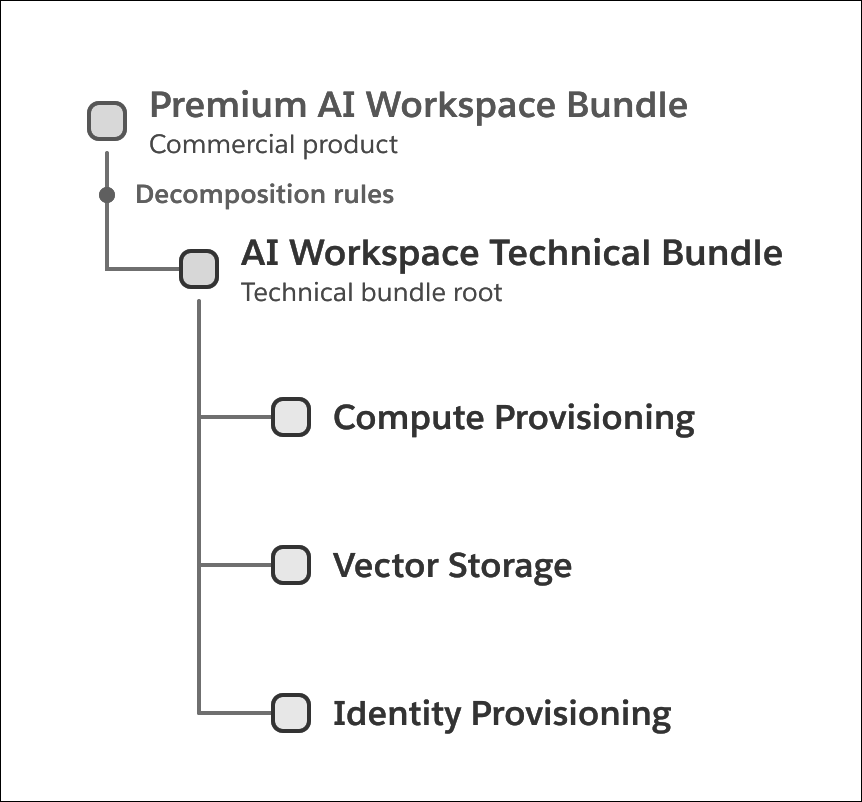
- Generate a fulfillment order line item (FOLI) for a technical bundle only when a decomposition rule is defined.
- Parent-child products under a technical bundle only if their lineage traces back to that parent. To establish this hierarchy, the system verifies catalog relationships. If it doesn't find an immediate match, the system searches the order hierarchy for the nearest valid ancestor.
- Qualify every decomposition rule in the parent-child chain to maintain the bundle structure. If a rule for a middle node doesn't qualify, the bundle hierarchy splits.
- Consolidate FOLI records when multiple products within a technical bundle share a decomposition rule.
- Assign bundled FOLI records to a single Fulfillment Order (FO) to make sure that technical dependencies remain unified for downstream systems.

Note Bubbling up the actions assigned to child components determines the parent FOLI actions:
- If a parent item has a cancel action but at least 1 child remains active, the parent action is updated to Amend.
- If a parent item has a No Change action but a child is assigned a cancel or Amend action, the parent action is updated to Amend to make sure that the parent reflects the changes to its components.