
Dynamic Revenue Orchestrator (DRO) breaks down a single commercial order into multiple, manageable fulfillment steps. You can execute a tailored fulfillment plan for each product or service.
Required Editions
| Available in: Enterprise, Unlimited, and Developer Editions |

Dynamic Revenue Orchestrator breaks down a customer's commercial order into the individual technical products, services, and tasks that are needed to fulfill it. The decomposition process bridges the gap between how a product is sold by sales reps and how it is actually delivered and managed by your order fulfillment team.
After order items are decomposed into fulfillment line items, an orchestration fulfillment plan tracks the stages and tasks required to fulfill the order to completion. A fulfillment plan can contain prioritization rules, SLAs, external callouts, automated tasks, manual tasks, and order fallout contingencies.
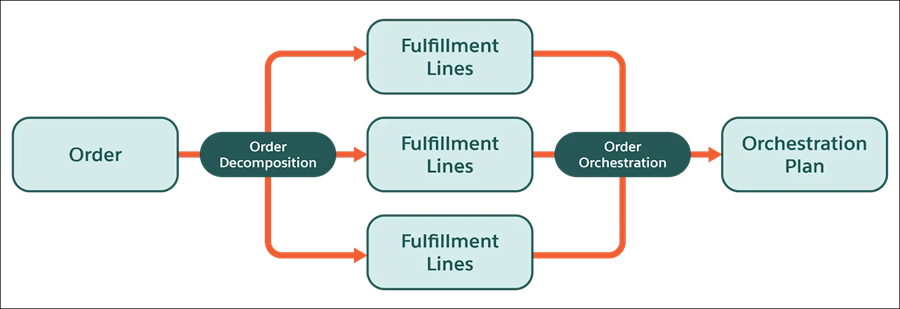
Here's a high-level summary of the steps required to build your DRO solution.
- Create your technical product catalog.
- Define how products decompose using decomposition rules, field mapping, and execution rules.
- Create fulfillment plans using a visual plan editor in the fulfillment workspace.
- Define fulfillment steps and product fulfillment scenarios for each of your fulfillment plans.
- Define rules for handling SLA jeopardy and order fallout.
- Monitor orchestration in real time using the fulfillment orchestration dashboard.
To migrate product fulfillment decomposition rules, fulfillment scenarios, fulfillment step definitions, and fulfillment task assignment rules between Salesforce orgs, use Data API. For high-volume data transfers, use Bulk API to move these records and their associated condition data.
Dynamic Revenue Orchestrator Integrations
You can use DRO to orchestrate Industries Configure, Price, Quote (CPQ) orders. Because DRO is preintegrated with Industries CPQ, you can use DRO without migrating commercial product data out of Enterprise Price Catalog (EPC). See Salesforce Release Note: Integrate DRO with Industries CPQ.
You can fulfill a single order in Salesforce Commerce Cloud across both DRO and Order Management in one coordinated process. Order Management typically fulfills physical goods, while DRO fulfills digital and service items. When an order contains items handled by both systems and Order Management is enabled, Order Management converts the order into an order summary and submits it to Dynamic Revenue Orchestrator through the Submit API. Dynamic Revenue Orchestrator now supports order summaries in both the Submit API and orchestration, so each item is routed to the right system and these actions stay coordinated across the order lifecycle:
- Validated cancellation: Cancel an item only when it's still allowed, based on the fulfillment progress of related items. For example, cancel the install only before the technician is dispatched.
- Mid-flight adjustments: Keep quantities aligned across systems when an order is updated in flight. If only 5 of 10 locks ship, the install count drops to 5.
- Global order termination: Cancel an entire order and stop all related fulfillment activity together, halting both the lock shipment and the scheduled install.
- Linked exchange: Coordinate replacements across systems without duplicate charges, such as a no-charge reinstall when a lock is defective.
See Dynamic Revenue Orchestration with Order Management