
Create and organize fulfillment steps, their dependencies, and fulfillment processes in fulfillment workspaces.
Required Editions
| Available in: Enterprise, Unlimited, and Developer Editions |
| User Permissions Needed | |
|---|---|
| To create and manage fulfillment workspaces: |
Fulfillment Designer OR DRO Admin User |
Manage your orchestration plans using fulfillment workspaces. The fulfillment workspace is a graphical representation of all the fulfillment tasks, organized into a timeline.
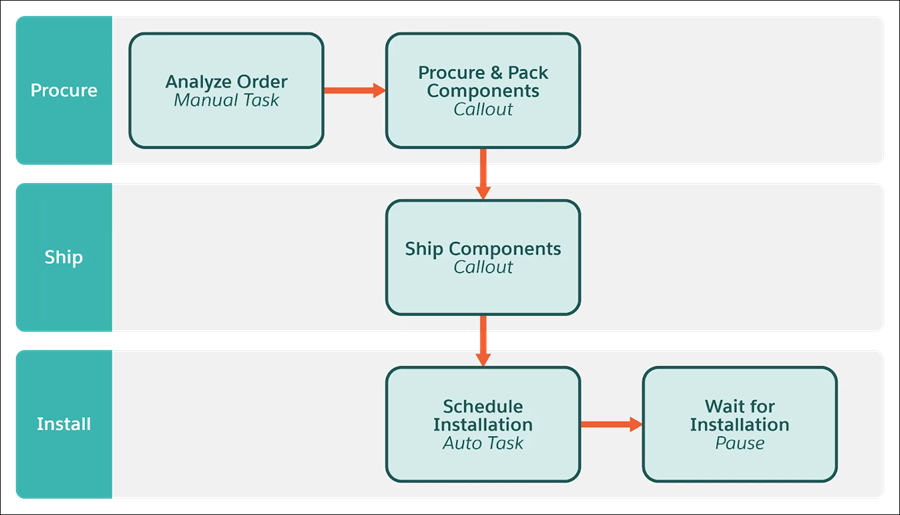
Within the workspace, organize your fulfillment workstreams using fulfillment step groups. Then, define each tasks, process, or milestone using fulfillment steps within the step groups.
Fulfillment step groups represent workstreams and fulfillment steps represent unique actions within those workstreams. Here's a diagram of showing how these elements are used in a workspace:
To get started with your orchestration plan, follow these instructions:
- Create a Fulfillment Workspace
To get started, create a fulfillment workspace. You can then add fulfillment groups and steps to the workspace. - Clone a Fulfillment Workspace
Copy a fulfillment workspace and its supported design-time records to create a starting point for a new orchestration design. Changes to the cloned workspace don’t affect the source workspace. - Create a Fulfillment Step Definition Group
Create logical, reusable groups of fulfillment step definitions directly from a fulfillment workspace. - Define a Fulfillment Step
After you create a fulfillment step definition group in the workspace, add a fulfillment step definition to it. When an order is submitted, Dynamic Revenue Orchestrator (DRO) creates a fulfillment step in the Orchestration Plan for the order based on this definition.