---
schema_version: "1"
id: 353fe670bd1cec2248329a35fe99fb8578f564a79bd8d39f9a456a5047611290
title: Clone a Fulfillment Workspace
collection: admin
version: current
locale: en-us
portal_url: https://docs.salesforce.com/admin/current/en-us/ind/264-0-0/dro_clone_a_fulfillment_workspace.md
canonical_url: https://help.salesforce.com/s/articleView?id=ind.dro_clone_a_fulfillment_workspace.htm&release=264.0.0&type=5
source_site: help.salesforce.com
content_type: documentation
content_hash: dbdfd35c125f83792d34df9543bccfdcd97a055e061f85d0c4421b075bde8aef
description: Copy a fulfillment workspace and its supported design-time records to create a starting point for a new orchestration design. Changes to the cloned workspace don’t affect the source workspace.
products:
- Revenue Cloud
release: "264"
---
# Clone a Fulfillment Workspace
Copy a fulfillment workspace and its supported design-time records to create a starting point for a new orchestration design. Changes to the cloned workspace don’t affect the source workspace.
### Required Editions
Available in: Enterprise, Unlimited, and Developer Editions
User Permissions
Needed
To clone a fulfillment workspace:
DRO Admin
When you deep clone a fulfillment workspace with the preconfigured context definition FulfillmentWorkspaceDeepCloneContext, it copies the fulfillment workspace, workspace items, step definition groups, step definitions, and step dependency definitions. To include supported custom fields or objects, configure a context definition that extends FulfillmentWorkspaceDeepCloneContext. Optionally, you can also configure an expression set to transform field values during cloning. See [Configure Deep Cloning for Fulfillment Workspaces](https://help.salesforce.com/s/articleView?id=ind.dro_configure_fulfillment_workspace_deep_cloning.htm&release=264.0.0&type=5 "Deep cloning uses the preconfigured context definition FulfillmentWorkspaceDeepCloneContext by default. Configure deep clone settings to include supported custom fields or objects, or to transform field values during cloning.").
Before you clone a fulfillment workspace, review these considerations.
- Records outside the workspace aren't cloned, such as flows, queues, users, integration definitions, OmniScripts, and expression sets. The cloned records continue to reference the external records.
- Execute On and Resume On rulesets aren't copied. They're not included in the cloned workspace.
- You can clone a maximum of 500 records, including records in the source workspace and records created in the cloned workspace.
1. From the App Launcher, find and select **Dynamic Revenue Orchestrator**.
2. From the app navigation menu, find and select **Fulfillment Workspaces**.
3. Open the fulfillment workspace that you want to clone.
4. From the action menu, select **Deep Clone**.
5. Enter a unique name for the cloned workspace, and then click **Deep Clone**.
The workspace name is prefilled with the source workspace name and a prefix.
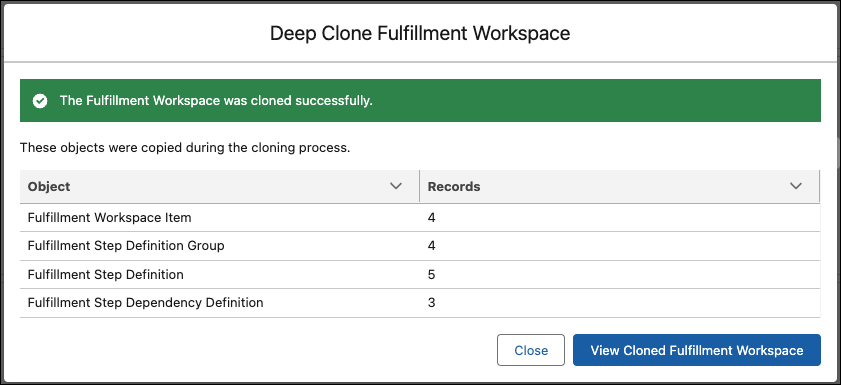
The Deep Clone Fulfillment Workspace window confirms that cloning succeeded and lists the copied object types and record counts.
6. To continue designing the cloned workspace, click **View Cloned Fulfillment Workspace**.