---
schema_version: "1"
id: bcd244fb6b0174b1e27723fdb5eeb2ad1910f0749e073112c0199b82a4b68fb2
title: View Reference Nodes
collection: admin
version: current
locale: en-us
portal_url: https://docs.salesforce.com/admin/current/en-us/ind/264-0-0/dpe_view_reference_nodes.md
canonical_url: https://help.salesforce.com/s/articleView?id=ind.dpe_view_reference_nodes.htm&release=264.0.0&type=5
source_site: help.salesforce.com
content_type: documentation
content_hash: eed72162f9caf3c355887419628135e5449fc2a7a2dc2b78c078fb72ee92d000
description: Select a node and view the details of other nodes that currently reference elements of it, such as node sources and mapped fields. These nodes that reference the selected node are known as reference nodes. If you make changes to a node, it’s helpful to know its reference nodes to anticipate any changes that need to be made to them, too.
products:
  - Cross Cloud
release: "264"
---
# View Reference Nodes

Select a node and view the details of other nodes that currently reference elements of it, such as node sources and mapped fields. These nodes that reference the selected node are known as reference nodes. If you make changes to a node, it’s helpful to know its reference nodes to anticipate any changes that need to be made to them, too.

### Required Editions

<table class="slds-table slds-table_bordered slds-max-medium-table_stacked slds-m-bottom_small edition"><colgroup><col></colgroup><tbody><tr class=""><td class="slds-cell-wrap" style="vertical-align:top;"><a href="https://help.salesforce.com/s/articleView?id=ind.dpe_editions.htm&amp;release=264.0.0&amp;type=5" title="Review the supported editions and availability for Data Processing Engine (DPE).">View supported editions</a>.</td></tr></tbody></table>

<table class="slds-table slds-table_bordered slds-max-medium-table_stacked slds-m-bottom_small permission">
        <colgroup>
          <col style="width:50%">
          <col style="width:50%">
        </colgroup>
        <thead class="slds-text-title_caps ">
          <tr class="">
            <th scope="colgroup" class="slds-cell-wrap" colspan="2" style="text-align:center;vertical-align:top;" id="d15058e60">User Permissions
              Needed</th>
          </tr>
        </thead>
        <tbody>
          <tr class="">
            <td data-label="User Permissions Needed" class="slds-cell-wrap" style="vertical-align:top;" headers="d15058e60 ">To view reference nodes:</td>

            <td class="slds-cell-wrap" style="vertical-align:top;" headers="d15058e60 "><span>
                <a href="https://help.salesforce.com/s/articleView?id=ind.dpe_setup.htm&amp;release=264.0.0&amp;type=5" title="Assign users system permissions, object access, and permission sets that they require to manage, run, and monitor Data Processing Engine (DPE) definitions. User permissions for Data Processing Engine vary based on the runtime platform your company uses to run definitions.">View permissions information.</a>
              </span></td>

          </tr>
        </tbody>
      </table>

1. In a definition, on the node canvas, click the node that you want to see the reference nodes of, then select **Configure**.
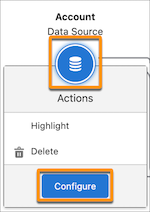
    
    ![A Data Source node is highlighted. The node menu is open with the Configure option highlighted.](https://sf-zdocs-cdn-prod.zoominsoftware.com/tdta-ind-data_processing_engine-264-0-0-production-enus/80e06924-e6c0-4b82-81cf-e99ccd77d857/data_processing_engine/images/node_menu_configure.png)
2. Click the **References** tab.
    
    All nodes that use the selected node as a source are shown in the References tab.
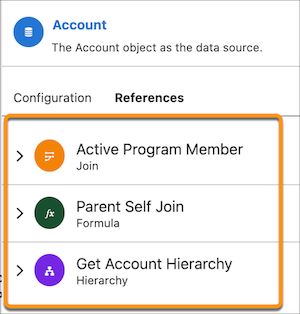
    
    ![A node's References tab shows three reference nodes that are highlighted.](https://sf-zdocs-cdn-prod.zoominsoftware.com/tdta-ind-data_processing_engine-264-0-0-production-enus/80e06924-e6c0-4b82-81cf-e99ccd77d857/data_processing_engine/images/references_tab_nodes.png)
3. To expand a reference node’s details, click the node icon or arrow.
    
    The reference node details open.
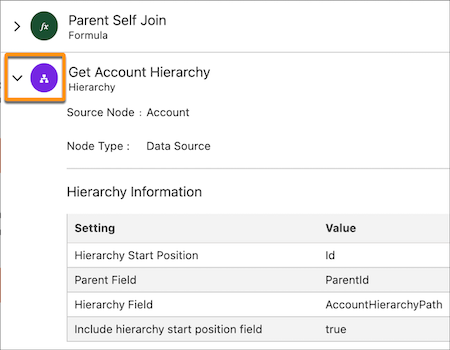
    
    ![A node icon is highlighted for a hierarchy node. Hierarchy information is shown in a table.](https://sf-zdocs-cdn-prod.zoominsoftware.com/tdta-ind-data_processing_engine-264-0-0-production-enus/80e06924-e6c0-4b82-81cf-e99ccd77d857/data_processing_engine/images/references_tab_expand.png)
    
    The details show information about how the node is referencing the selected node (for example, what fields the reference node is using from the selected node).

- **[Why Does a Node Indicate That Removed Fields Are Referenced in a Node after the References Are Removed?](https://help.salesforce.com/s/articleView?id=ind.dpe_removed_fields_faq.htm&release=264.0.0&type=5)**  
    When you remove fields from a node, ensure that the removed fields aren't referenced by any other node in the definition. The node in which you've already deleted references to the removed fields is used as a source by another node in which the removed fields are still referenced. To resolve this issue, go to the node in which you've deleted references to the removed fields. Next, find the nodes that use the current node as source and reference the removed field. Go to the nodes that still reference the removed fields, and then delete the references.