---
schema_version: "1"
id: 1e93373ebdc0729ecbc468c7d20d95143b4aa3082afd5fdeea55673606cfa54b
title: Track Your Data Processing Engine Usage
collection: admin
version: current
locale: en-us
portal_url: https://docs.salesforce.com/admin/current/en-us/ind/264-0-0/dpe_usage.md
canonical_url: https://help.salesforce.com/s/articleView?id=ind.dpe_usage.htm&release=264.0.0&type=5
source_site: help.salesforce.com
content_type: documentation
content_hash: 8527d64df98a01dbaf733edac576a62be1555366757726cbddf22215d3cbe7bd
description: Data Processing Engine definition runs can process and write back data up to a specific size. If your Salesforce org reaches a daily or monthly limit, the definitions stop running.
products:
  - Cross Cloud
release: "264"
---
# Track Your Data Processing Engine Usage

Data Processing Engine definition runs can process and write back data up to a specific size. If your Salesforce org reaches a daily or monthly limit, the definitions stop running.

### Required Editions

<table class="slds-table slds-table_bordered slds-max-medium-table_stacked slds-m-bottom_small edition"><colgroup><col></colgroup><tbody><tr class=""><td class="slds-cell-wrap" style="vertical-align:top;"><a href="https://help.salesforce.com/s/articleView?id=ind.dpe_editions.htm&amp;release=264.0.0&amp;type=5" title="Review the supported editions and availability for Data Processing Engine (DPE).">View supported editions</a>.</td></tr></tbody></table>

<table class="slds-table slds-table_bordered slds-max-medium-table_stacked slds-m-bottom_small permission">
        <colgroup>
          <col style="width:50%">
          <col style="width:50%">
        </colgroup>
        <thead class="slds-text-title_caps ">
          <tr class="">
            <th scope="colgroup" class="slds-cell-wrap" colspan="2" style="text-align:center;vertical-align:top;" id="d16014e61">User Permissions
              Needed</th>
          </tr>
        </thead>
        <tbody>
          <tr class="">
            <td data-label="User Permissions Needed" class="slds-cell-wrap" style="vertical-align:top;" headers="d16014e61 ">To view Data Pipelines usage:</td>

            <td class="slds-cell-wrap" style="vertical-align:top;" headers="d16014e61 ">
              <ul>
                <li>Customize Application</li>

                <li>Data Pipelines Base User</li>

              </ul>
            </td>

          </tr>
        </tbody>
      </table>

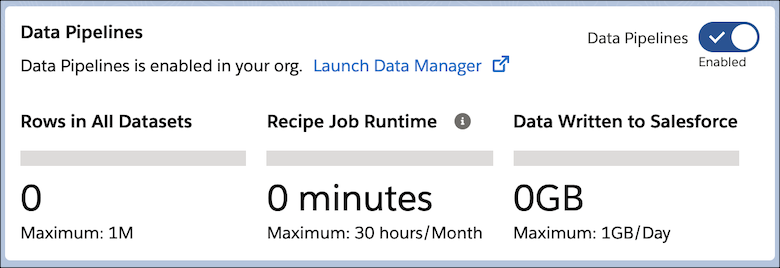
You can track:

- Number of rows added to all datasets
- Minutes spent processing data
- Size of the data written back to standard or custom objects

From Setup, in the Quick Find box, enter Data Pipelines, and then select **Get Started**.
![Sonic usage](https://sf-zdocs-cdn-prod.zoominsoftware.com/tdta-ind-data_processing_engine-264-0-0-production-enus/80e06924-e6c0-4b82-81cf-e99ccd77d857/data_processing_engine/images/data_processing_engine_usage.png)