---
schema_version: "1"
id: 0a4cfd6ecce4ad5d1e6130b37c3ca2f76329e17ce4bcfb35e1817a1987934891
title: Track CRM Analytics (CRMA) Data Sync Status of Definition Runs
collection: admin
version: current
locale: en-us
portal_url: https://docs.salesforce.com/admin/current/en-us/ind/264-0-0/dpe_monitor_data_manager.md
canonical_url: https://help.salesforce.com/s/articleView?id=ind.dpe_monitor_data_manager.htm&release=264.0.0&type=5
source_site: help.salesforce.com
content_type: documentation
content_hash: 4fc9101e74f031654f16e4aed9170c1e4222ea6fbe54bd584c0f36b76d7f3ee7
description: When you run a definition, the data sync jobs run to extract data from each Salesforce object that’s selected as a data source. For example, if the definition pulls data from the Opportunity and Account objects, a separate data sync appears for each object. After the data syncs are complete, the definition runs. To view the status of data syncs and Data Processing Engine definitions, use the Monitor tab on Data Manager.
products:
- Cross Cloud
release: "264"
---
# Track CRM Analytics (CRMA) Data Sync Status of Definition Runs
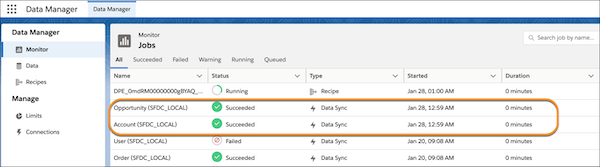
When you run a definition, the data sync jobs run to extract data from each Salesforce object that’s selected as a data source. For example, if the definition pulls data from the Opportunity and Account objects, a separate data sync appears for each object. After the data syncs are complete, the definition runs. To view the status of data syncs and Data Processing Engine definitions, use the Monitor tab on Data Manager.
### Required Editions

Note During a definition's run, Data Processing Engine replicates source Salesforce object data into temporary datasets in CRM Analytics so the recipe can process it. These replicated datasets count toward your org's total dataset row limit, even when the definition writes results back to a Salesforce object rather than to a dataset. The replicated datasets are listed as connected data assets named after the source object (for example, Account or Event) and are accessible from the Connections tab in Data Manager under SFDC\_LOCAL. The row storage limit applies only to input rows when source data is replicated into CRM Analytics. Output rows written back to a Salesforce object are governed by a separate output limit over a rolling 24-hour window.
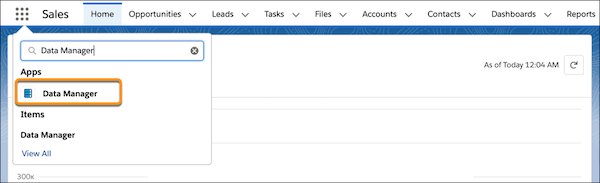
1. From the App Launcher, find and select **Data Manager**, and then click **Data Manager**.
2. Monitor the data sync jobs for each Salesforce object that’s selected as a data source.
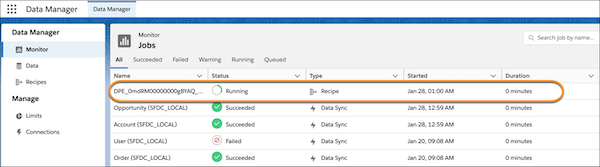
3. Monitor the status of the Data Processing Engine definition.
The Data Processing Engine definition runs after the data sync jobs complete. The Monitor tab shows the definition's run as a Recipe job type. When the run completes, the recipe is removed from the Monitor tab.
To track the status and details of a definition's run, go to Monitor Workflow Services.
#### See Also
- [Run Jobs to Create and Refresh Datasets](https://help.salesforce.com/s/articleView?id=xcloud.sdp_integrate_run_schedule_jobs.htm&type=5&language=en_US)