---
schema_version: "1"
id: e46bd2e58e049676bd7a9a24eb10afe3f385ed0edec3e5ab106e55c0fcc2ad71
title: Joins
collection: admin
version: current
locale: en-us
portal_url: https://docs.salesforce.com/admin/current/en-us/ind/264-0-0/dpe_join.md
canonical_url: https://help.salesforce.com/s/articleView?id=ind.dpe_join.htm&release=264.0.0&type=5
source_site: help.salesforce.com
content_type: documentation
content_hash: a63431cd4be093ef0e4483cd42bbea3b3e5853c4e3ed94859ed6323244a457b6
description: Join data from two nodes to create an output based on matching field values. Combining data into a single join node allows for further transformations, such as formulas or aggregations.
products:
- Cross Cloud
release: "264"
---
# Joins
Join data from two nodes to create an output based on matching field values. Combining data into a single join node allows for further transformations, such as formulas or aggregations.
### Required Editions
## Purpose of Joining Data
Joining nodes enriches a primary data source with related information from another source. Use joins to create a unified view of business data for analysis and reporting. For example, join a node with sales orders to a node with account details so each order includes customer information.
## Join Types and Configuration Options
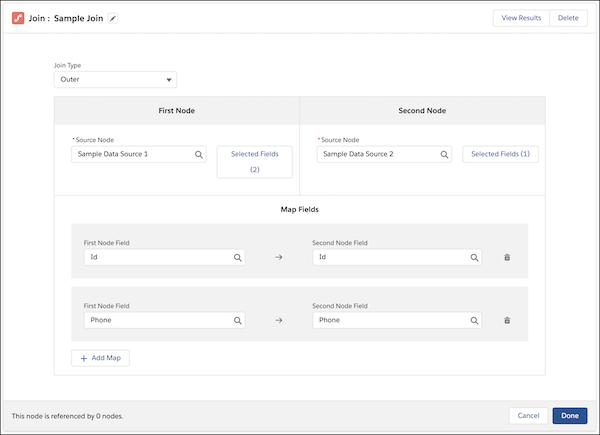
When you configure a Join node, select two source nodes and define the matching criteria (join keys). You can also define behavior for unmatched records and for cases with multiple matches.
The join type determines which records are included in the output when matching values are found or missing in either source.
| Join Type | Description |
| --- | --- |
| Left Outer | All records from the first source node and matching records from the second source node. Unlike a lookup, a left outer join includes all matched rows in the target when multiple rows match. |
| Right Outer | All records from the second source node and matching records from the first source node. |
| Outer | All records from both source nodes. |
| Inner | Only matching records from both source nodes. |
| Single-Value Lookup | All records from the left source node and only the first matching record values found in the right source node. Use this option when you expect one unique match. To make sure that the grain of the results doesn’t change, the lookup outputs one row for each row in the left source node. |
| Multi-Value Lookup | All records from the left source and values from all matching records from the right source. This option isn’t supported for Data 360 runtime definitions. |
## Considerations and Limitations
Keep these constraints in mind to help definitions run efficiently.
- Field Aliases: Review autopopulated aliases and rename them to ensure uniqueness across both source nodes. Downstream nodes use these aliases to reference fields.
- Field Mapping: Map one or more fields from each source node to define the output data. After you create a Join node, you can review these fields in the generated output.
- Join Keys: Define matching criteria by using up to five fields.
- Field Compatibility: Join keys must use identical data types. For example, you can't join a text field with a number field.
- Node Limit: A definition can include up to 20 join nodes.
- Cartesian Product Risk: Multi-value lookup on nodes with many matches can significantly increase row count and impact performance.
- Null Values: Joins don't match null values.
- Preview Limitations: The Preview tab shows only the first value in a multi-value column.
- Field Removal Dependencies: If an upstream source field is removed, manually remove dependent references in the Join node to resolve errors.

Example
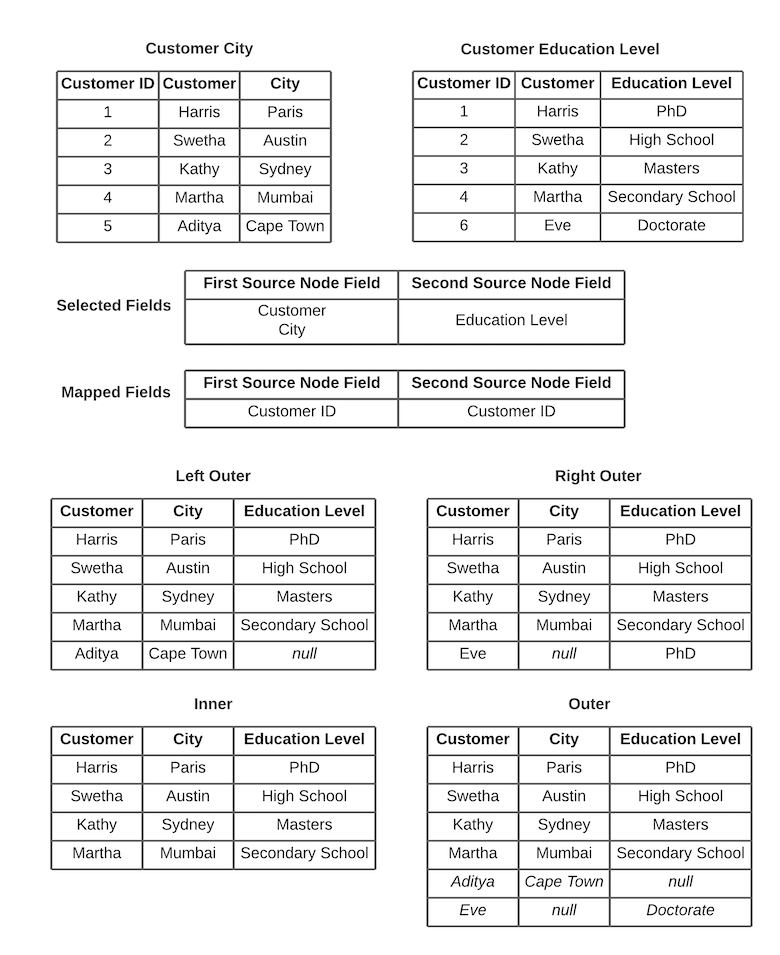
A marketing team wants to send targeted promotions based on the customer location and education. To gather the required data, the team joins records from two objects: Customer City and Customer Education Level. The outputs vary based on the join type.
Consolidate Contact Information with Multi-Value Lookups
Use a multi-value lookup to consolidate contact details for each account. In this example, the Accounts node is the left source and the Contacts node is the right source. The join key is Account ID.
The output includes one row per account from the left source and all matching contact values from the right source.
Account
| Account ID | Account Name |
| 001 | Acme Corp |
| 002 | Global Tech |
Contact
| Contact ID | Account ID | Contact Name |
| C1 | 001 | John Doe |
| C2 | 001 | Jane Smith |
| C3 | 002 | Bob Jones |
Multi-value Lookup
| Account ID | Account Name | Contact ID | Contact Name |
| 001 | Acme Corp | C1, C2 | John Doe, Jane Smith |
| 002 | Global Tech | C3 | Bob Jones |
Sample DPE JSON for Lookup Joins
```json
{
"FullName": "Test_DPE_Multi_Lookup_Join_CRMA_1",
"Metadata": {
"processType": "DataProcessingEngine",
"status": "Inactive",
"label": "Test_DPE_Multi_Lookup_Join_CRMA_1",
"isTemplate": false,
"executionPlatformType": "CRMA",
"executionPlatformObjectType": "None",
"dataSpaceApiName": "default",
"definitionRunMode": "Batch",
"datasources": [
{
"name": "Account",
"label": "Account",
"sourceName": "Account",
"type": "StandardObject",
"fields": [
{
"name": "Id",
"dataType": "Text",
"alias": "Id",
"displaySequence": 1
},
{
"name": "Name",
"dataType": "Text",
"alias": "Name",
"displaySequence": 1
},
{
"name": "BillingCity",
"dataType": "Text",
"alias": "BillingCity",
"displaySequence": 1
},
{
"name": "AnnualRevenue",
"dataType": "Numeric",
"alias": "AnnualRevenue",
"displaySequence": 1
}
]
},
{
"name": "Test_Object",
"label": "Test Object",
"sourceName": "Test_Object__c",
"type": "StandardObject",
"fields": [
{
"name": "Boolean_Field__c",
"dataType": "Text",
"alias": "Boolean_Field_c",
"displaySequence": 1
},
{
"name": "Number_Field__c",
"dataType": "Numeric",
"alias": "Number_Field_c",
"displaySequence": 1
},
{
"name": "Text_Field__c",
"dataType": "Text",
"alias": "Text_Field_c",
"displaySequence": 1
},
{
"name": "Name",
"dataType": "Text",
"alias": "Name",
"displaySequence": 1
}
]
}
],
"joins": [
{
"name": "Join",
"label": "Join",
"type": "Lookup",
"hasLookUpMultipleValues": true,
"primarySourceName": "Account",
"secondarySourceName": "Test_Object",
"joinKeys": [
{
"primarySourceFieldName": "BillingCity",
"secondarySourceFieldName": "Text_Field_c"
}
],
"fields": [
{
"sourceName": "Account",
"sourceFieldName": "AnnualRevenue",
"alias": "AnnualRevenue"
},
{
"sourceName": "Account",
"sourceFieldName": "BillingCity",
"alias": "BillingCity"
},
{
"sourceName": "Account",
"sourceFieldName": "Id",
"alias": "Id"
},
{
"sourceName": "Account",
"sourceFieldName": "Name",
"alias": "Name"
},
{
"sourceName": "Test_Object",
"sourceFieldName": "Boolean_Field_c",
"alias": "Boolean_Field_c"
},
{
"sourceName": "Test_Object",
"sourceFieldName": "Name",
"alias": "Name_TO"
},
{
"sourceName": "Test_Object",
"sourceFieldName": "Number_Field_c",
"alias": "Number_Field_c"
},
{
"sourceName": "Test_Object",
"sourceFieldName": "Text_Field_c",
"alias": "Text_Field_c"
}
]
}
],
"writebacks": [
{
"name": "Writeback",
"label": "Writeback",
"sourceName": "Formula",
"targetObjectName": "Test_Multi_Lookup_DS_1",
"storageType": "Analytics",
"fields": [
{
"sourceFieldName": "mValField",
"targetFieldName": "Name"
},
{
"sourceFieldName": "BillingCity",
"targetFieldName": "BillingCity"
},
{
"sourceFieldName": "Number_Field_c",
"targetFieldName": "Number_Field_c"
},
{
"sourceFieldName": "AnnualRevenue",
"targetFieldName": "AnnualRevenue"
},
{
"sourceFieldName": "Id",
"targetFieldName": "Id"
}
]
}
],
"transforms": [
{
"name": "Formula",
"label": "Formula",
"sourceName": "Join",
"expressionFields": [
{
"expression": "ARRAYJOIN({Name_TO} )",
"alias": "mValField",
"dataType": "Text",
"length": 80
}
],
"partitionBy": [
"Id"
],
"orderBy": [
{
"name": "Name",
"orderType": "Ascending"
}
],
"transformationType": "ComputeRelative"
}
]
}
}
```
#### See Also
- [Lookup](https://help.salesforce.com/s/articleView?id=analytics.bi_integrate_recipe_join_lookup_multivalue.htm&language=en_US)