
Perform multilevel rollups of measures for parent-child relationships. Aggregate values from leaf nodes upward through all levels of a hierarchy, such as Child Accounts to Accounts. Hierarchical aggregation is available only for CRMA and on-demand runtime definitions.
Required Editions
| View supported editions. |
Business Purpose and Use Cases
Hierarchical aggregation scales multilevel hierarchy roll ups without impacting job execution time. It combines flat and hierarchy aggregations, customizes field selection, ensures data accuracy by handling invalid hierarchies and reduces double-counting risks.
- Compute total assets under management (AUM), total liabilities, or revenue across household or relationship hierarchies.
- Monitor flows, sales, and engagement across distribution networks and intermediaries.
- Track premiums, claims, and commissions at the rep or agency level across regional hierarchies.
Field Mapping Requirements
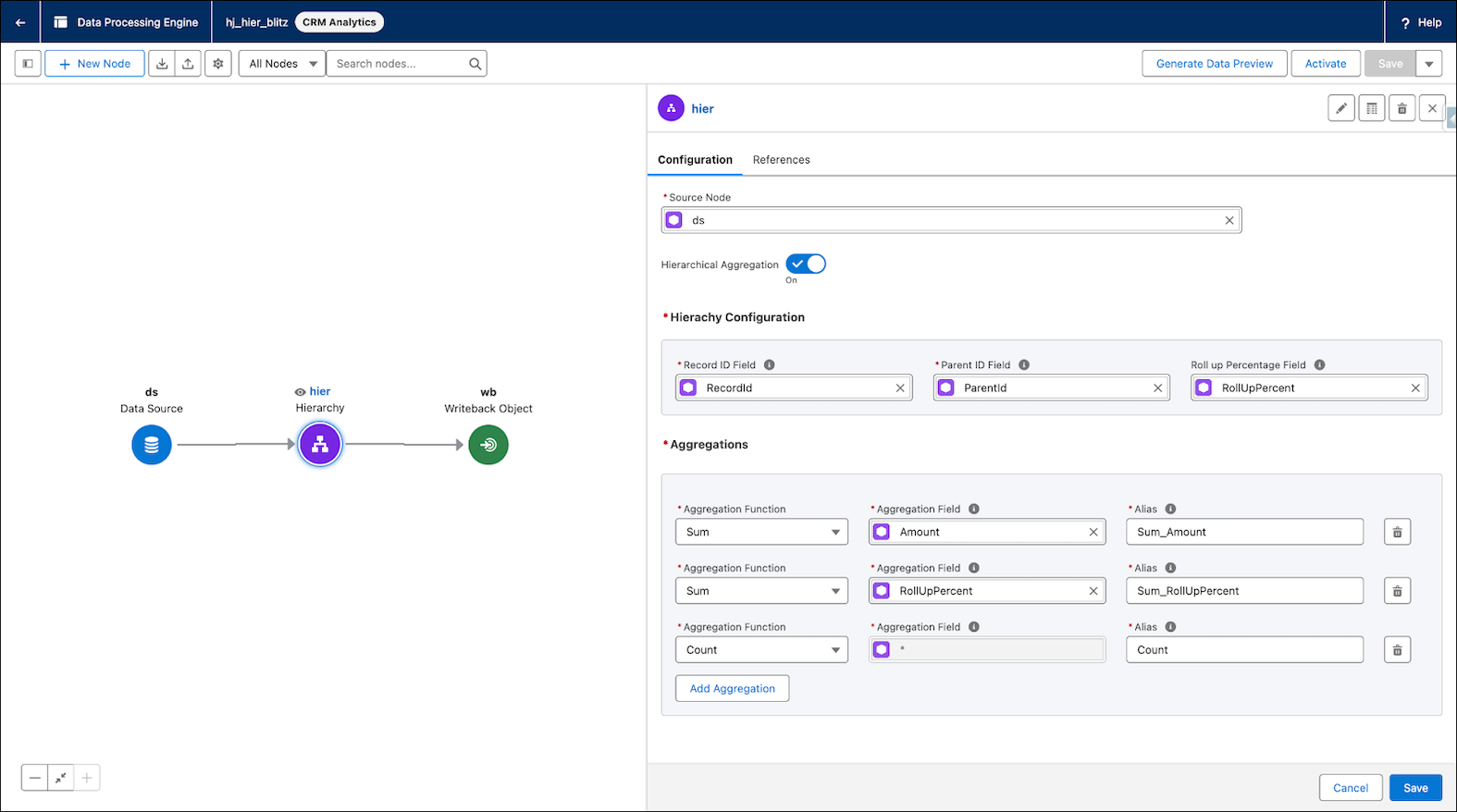
In a DPE definition, specify the record and parent relationship fields, then select an aggregation field to calculate consolidated summaries.
To define the hierarchy, map these fields:
- Record ID: Unique identifier for records in the hierarchy.
- Parent ID: Identifier for the parent record.
- Aggregation function:
- SUM: Calculates the total value of a field across the hierarchy.
- COUNT: Calculates the total number of records within the hierarchy.
Rollup Percentage (Optional): Percentage of a child record's contribution to a parent. If blank, the value defaults to 1.0 (100%). Use this field to distribute contributions proportionally when a child record has multiple parents.
Use Data Preview in DPE Builder to verify that values roll up correctly from leaf records to the root.
Aggregate Only the Lowest-Tier Records in a Hierarchy
For each aggregate field on a Hierarchy node, decide whether to include the parent record's value in its rolled-up total. By default,when Include only the lowest-level values is off, each record's total includes its own value plus the values that roll up from its child records.
Use Include only the lowest-tier values option to exclude parent record values and to combine only lowest-level values for an aggregate field. Lowest-level records can be at different hierarchy depths. A record counts as lowest-level whenever it has no child records, even if other branches of the hierarchy go deeper.
For example, in a region-district-store hierarchy where only stores hold sales amounts, a region's total equals the combined sales of all its stores, with no district or region values added in.

Considerations
- Aggregation functions: Only SUM and COUNT are supported.
- Single-Parent support: Single-parent hierarchies are supported.
- Field compatibility: Aggregations apply only to numeric fields.
- Circular references: Job execution stops with an error if a circular reference is detected.
- Rollup percentage: For each node, ensure rollup percentages total 1.0 (100%) for intended semantics. Totals more or less than 1.0 can produce inflated or deflated aggregate values.
- Runtime Availability: Hierarchical aggregation isn’t supported for definitions with Data 360 runtime.

Global Account Revenue Rollup
Nexus Corp is a global technology company that sells software licenses to a large international bank. To understand the total value of this relationship, an account manager needs to view combined revenue from all subsidiaries worldwide.
The Hierarchy Structure
- Root (Level 1): Global Headquarters (New York)
- Parent (Level 2): Regional Hubs (EMEA, APAC, AMER)
- Child (Level 3): Country Offices (London, Tokyo, San Francisco)
- Leaf (Level 4): Individual Sales Contracts (the actual revenue records)
How the Aggregation Works
The London office has three contracts worth $100,000, $200,000, and $50,000. DPE aggregates these into a total of $350,000 for the UK Country Office. The EMEA regional hub then aggregates country totals from the UK, France, and Germany. If France contributes $200,000 and Germany contributes $450,000, the EMEA hub shows a rolled-up total of $1 million.
Global Headquarters then aggregates the totals from EMEA ($1 million), APAC ($2 million), and AMER ($3 million) to show a total relationship value of $6 million.
The Result
Without manual calculations or complex external spreadsheets, the global account manager can open the global headquarters record and instantly see a total relationship value of $6 million.
With Rollup Percentage
If a subsidiary is a joint venture where Nexus Corp owns 50%, use the Rollup Percentage field. If that subsidiary generates $1 million, only $500,000 rolls up to the parent, which reflects ownership-adjusted value in aggregate reporting.