
Use the group and aggregate node to group records by field, and aggregate the data from one or more fields.
Required Editions
| View supported editions. |
You can group a dataset by multiple fields and aggregate multiple fields. You can only group a dataset by fields of the type Text, Date, and Date/Time.

Note The number of fields you can use for aggregation is calculated by adding the
fields in the source node and the fields used for aggregation.
Aggregate your data using the following functions:
| Function | Supported Data Types | Description |
|---|---|---|
| Unique |
|
Returns the count of unique values. |
| Count |
|
Returns the number of rows. |
| Sum | Number | Returns the sum of the field selected for aggregation. |
| Minimum | Number | Returns the minimum value of the field selected for aggregation. |
| Maximum | Number | Returns the maximum value of the field selected for aggregation. |
| Average | Number | Returns the arithmetic mean for the field selected for aggregation. |
| Standard Deviation | Number | Returns the sample standard deviation computed on the field selected for aggregation. |
| Standard Deviation Population | Number | Returns the population standard deviation computed on the field selected for aggregation. |
| Variance | Number | Returns the sample variance (unbiased variance) computed on the field selected for aggregation. |
| Variance Population | Number | Returns the population variance (biased variance) computed on the field selected for aggregation. |
After you create your group and aggregate node, you can view the fields that are created based on the node.
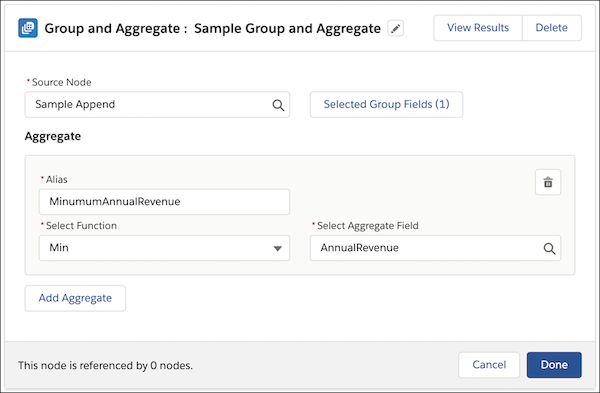

Example You can group opportunities by Campaign field and find the sum of the amount by
defining an aggregate.