---
schema_version: "1"
id: 2d92c7502dd2deb43d155609cc640401c22d757801e48ebf73f6d367c856b8fb
title: Run the Definition to Update Purchase Credit and Bonus
collection: admin
version: current
locale: en-us
portal_url: https://docs.salesforce.com/admin/current/en-us/ind/264-0-0/dpe_example_flow.md
canonical_url: https://help.salesforce.com/s/articleView?id=ind.dpe_example_flow.htm&release=264.0.0&type=5
source_site: help.salesforce.com
content_type: documentation
content_hash: ddd9adeda7fec4e77e0bf235ea9a63af2aa0280550cbdd44589ffe29f0186b5f
description: An admin creates a flow to run the activated Data Processing Engine definition. The admin wants to schedule the flow to write back the results to the target objects and fields automatically on December 1, every year.
products:
- Cross Cloud
release: "264"
---
# Run the Definition to Update Purchase Credit and Bonus
An admin creates a flow to run the activated Data Processing Engine definition. The admin wants to schedule the flow to write back the results to the target objects and fields automatically on December 1, every year.
### Required Editions
The admin enters the values of the input variables. The input variables ensure that the purchase credit and the bonus amount are calculated for orders that were effective and ended within a specific period. The period in this case is between January 1, 2021, and November 30, 2021.
1. From Setup, in the Quick Find box, enter Flow, and then select **Flow**.
2. Click **New**.
3. In the New Flow window, select **Schedule-Triggered Flow**.
4. From the Start element, click **Set Schedule**.
5. Complete these fields.
- Start Date: **December 1, 2021**
- Time: **12:00 AM**
- Frequency: **Once**
6. Click **Done**.
7. Drag the **Action** element onto the canvas.
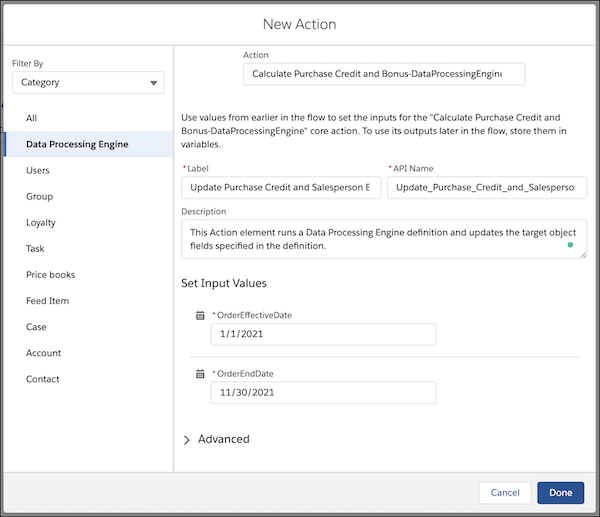
8. Complete these steps in the New Action window.
1. From Category, select **Data Processing Engine**.
2. Enter Calculate Purchase Credit and Bonus-DataProcessingEngine, and then select **Calculate Purchase Credit and Bonus-DataProcessingEngine**.
The name of each definition is appended with the name of the process type selected while creating a definition. DataProcessingEngine is the API name of the Standard process type.
3. Complete these fields.
- Name: Update Purchase Credit and Salesperson Bonus
- Input Values:
- OrderEffectiveDate: 1/1/2021
- OrderEndDate: 11/30/2021
The input variable values are used to filter Order records that were effective and closed during the current year. To run the definition again in 2022, the change the effective date and end date.
4. Click **Done**.
9. Save your work and name your flow.
10. Activate your flow.
The flow runs the Data Processing Engine definition on December 1 and updates the Purchase Credit Amount field in the Account records. New records are also created for the Salesperson Bonus object with the bonus amount, ID, and email of the salespeople awarded the bonuses.
#### See Also
- [Run a Data Processing Engine Definition in Flows](https://help.salesforce.com/s/articleView?id=ind.dpe_run.htm&release=264.0.0&type=5 "After you activate a Data Processing Engine definition, run it as part of a business flow or create a flow to run only a definition. You can also run a definition in a scheduled flow.")
- [Monitor Data Processing Engine Definition Runs](https://help.salesforce.com/s/articleView?id=ind.dpe_monitor.htm&release=264.0.0&type=5 "Monitor definition runs to review the status of your definition runs. On Monitor Workflow Services, you can analyze key details of definition runs such as count of records processed and written back, analysis of latest and previous runs, and reasons for the failure of the latest runs.")