
Define flexible data processing rules by using input variables to define default values, filter records, and create formulas. To dynamically control the data filters and formulas at run time, create variables without values and use them to configure Filter and Formula nodes. During a definition run, specify variable values based on your specific requirements. For example, to filter opportunities above a certain value for different fiscal years, set a default value for the input variable and then update it when you run the definition.
Required Editions
| View supported editions. |
| User Permissions Needed | |
|---|---|
| To create input variables: | View permissions information. |
You can add these types of input variables to a definition:
| Input Variable Type | Use |
|---|---|
| Text | Use text input variables to specify values or comma-separated list of values in Filter node conditions or in formulas. |
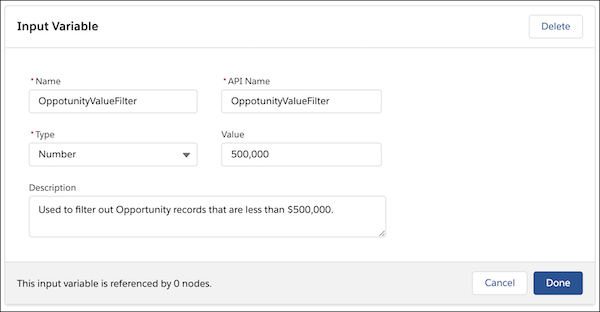
| Number | Use number input variables to specify numerical values in Filter node conditions or in formulas. |
| Filter |
Use filter input variables to set the Filter node criteria for filtering data in both CRM Analytics (CRMA) and Data 360 runtimes. The value of a filter input variable must be in a valid JSON format with specific key-value pairs. Here’s a sample JSON: The types of operators that you use in the conditions depend on the data type of the condition's source field. To learn about the supported operators for each field data type, see Supported Operators for Filter Input Variables. |
| Expression | Use expression input variables to define expressions by using variables, operators, or functions in both CRMA and Data 360 runtimes. The value of the expression input variable acts as a default placeholder and can be overridden at run time. |
| Date | Use date input variables to specify dates in Filter node conditions or in formulas. |
| Date/Time | Use date/time input variables to specify times in Filter node conditions or in formulas. |
| File Identifier |
Use file identifier input variables in the Data 360 runtime to provide the content document IDs to the Data Processing Engine definition. When a definition is run, the definition uses the content document ID to find that CSV file that it must use as the run's data source. If a definition consists of multiple data source nodes that use CSV files as data source, create input variables for each data source node that uses CSV files as data source. While defining the input variables, don't specify a value for the variables. When running the definition, you can specify the IDs of the content documents that contain the data source CSV files of that specific run. |
-
Click the
 left panel icon and select the Input Variables tab.
- Click New.
-
Enter a name.
The API name automatically populates from the name. For example, if the variable name is Test Variable, the API name autopopulates as Test_Variable.
- Select the variable type.
- Optionally, enter a default value for the variable.
- Click Done.

- Supported Operators for Filter Input Variables
A filter input variable is defined as a JSON and the JSON represents a filter criteria with conditions and a condition logic. The conditions are based on fields and the data type of each field decides the operators that can be used in the condition. These are the list of operators that are supported for each field data type in filter input variables.