---
schema_version: "1"
id: 2c6766919d0f6289c4a2bbfb9f1c048ad4c5f77737e56e12db6f9de775ade599
title: Learn About Issues in Your Data Processing Engine Definition by Using CRM Analytics (CRMA) Recipe
collection: admin
version: current
locale: en-us
portal_url: https://docs.salesforce.com/admin/current/en-us/ind/264-0-0/dpe_check_definition_issues_recipe.md
canonical_url: https://help.salesforce.com/s/articleView?id=ind.dpe_check_definition_issues_recipe.htm&release=264.0.0&type=5
source_site: help.salesforce.com
content_type: documentation
content_hash: 04cc3ee024386f9987ae2ae5bf9f16642c222feea096f3748bfe1237ec037393
description: Use the Data Manager to determine why a definition isn’t writing back results.The definition's design or the data available in the org can cause the issues.
products:
- Cross Cloud
release: "264"
---
# Learn About Issues in Your Data Processing Engine Definition by Using CRM Analytics (CRMA) Recipe
Use the Data Manager to determine why a definition isn’t writing back results.The definition's design or the data available in the org can cause the issues.
### Required Editions
After the data is synced from your definition's source objects, a recipe is created to process the records.

Tip Any changes that you make to the recipe don’t affect the definition or the run in progress. The recipe is automatically deleted after the run starts writing back results. To save the recipe and triage the issues after the run completes, run the definition in the [Save Recipe and its Output Records](https://help.salesforce.com/s/articleView?id=ind.dpe_run_builder_debug_modes.htm&language=en_US) debug mode.
1. From the App Launcher, find and select **Data Manager**.
2. Switch to the **Recipes** tab.
The recipes for Data Processing Engine definition runs are named by using this convention: DPE\_{ID of the batch job used to run the definition}.
3. Open the recipe of the definition that you want to investigate.
4. On the confirmation window, click **Yes, Fix It**.
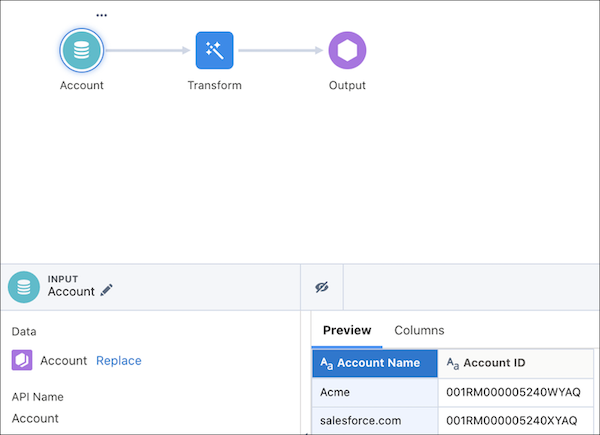
5. Review the records that each node processed. This review can help you determine whether the issue is due to your definition’s design or the org’s data.

Example
The oldest Account record in an org was created on March 17, 2020. A filter node in the definition is trying to filter all Account records created before 2019. When the definition is run, no Account records are filtered because none of them match the filter criteria. So, the user looks at the filter node in the recipe. The user recognizes that results aren’t written back because the filter node doesn’t make any Account record available for processing in subsequent nodes.
#### See Also
- [Clean, Transform, and Load Data with Data Prep](https://help.salesforce.com/s/articleView?id=analytics.bi_integrate_data_prep_overview.htm&type=5&language=en_US)