Data Processing Engine Builder

The Data Processing Engine builder is a visual interface where you can create, manage, and run Data Processing Engine definitions.

Required Editions

View supported editions.

Use the builder to define and manage the various nodes and input variables that you want to use in your data transformation process.
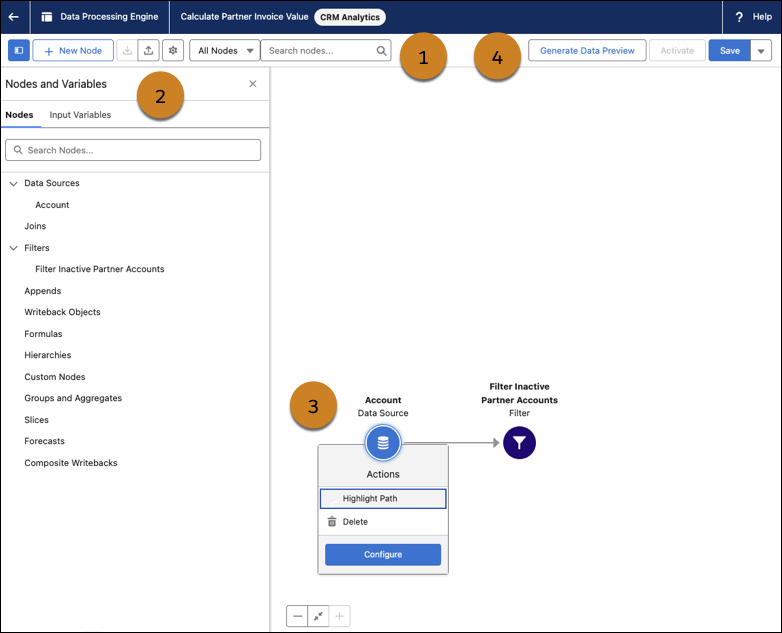
Data Processing Engine builder visual interface

Number Use
1

Use the quick actions to:

  • Select a node and recenter the node canvas on the selected node
  • Update the name, description, and process type of the definition
  • Upload and download the definition as a JSON file
  • Add a node to the canvas
  • Open the Nodes and Variables panel
2

Use the Nodes and Variables panel to:

  • Review the nodes and input variables that are available in the definition
  • Select a node on the canvas
  • Add and edit input variables
3

Use the canvas to:

  • Configure nodes
  • Review the sequence of nodes in the definition
4

Use the quick actions to:

  • Open the data preview mode and generate a data preview of the definition
  • Save the definition
  • Clone the definition
  • Activate the definition

    You can run active definitions but you can't edit active definitions. To edit an active definition, deactivate it. You can't deactivate a definition while one of its runs is in progress.