---
schema_version: "1"
id: 09fc31e7e91a28d6b059633d4dd01d8c03978f43349c4bca54889b7b6f0484de
title: Add a Custom Node
collection: admin
version: current
locale: en-us
portal_url: https://docs.salesforce.com/admin/current/en-us/ind/264-0-0/dpe_add_custom_node.md
canonical_url: https://help.salesforce.com/s/articleView?id=ind.dpe_add_custom_node.htm&release=264.0.0&type=5
source_site: help.salesforce.com
content_type: documentation
content_hash: 66b173e05c9ea201e12ae20878681cbac3ba8e475dbc020e58d03b749f707eb0
description: Add a custom node to a Data Processing Engine definition to run domain-specific logic tied to the definition's process type.
products:
  - Cross Cloud
release: "264"
---
# Add a Custom Node

Add a custom node to a Data Processing Engine definition to run domain-specific logic tied to the definition's process type.

### Required Editions

<table class="slds-table slds-table_bordered slds-max-medium-table_stacked slds-m-bottom_small edition"><colgroup><col></colgroup><tbody><tr class=""><td class="slds-cell-wrap" style="vertical-align:top;"><a href="https://help.salesforce.com/s/articleView?id=ind.dpe_editions.htm&amp;release=264.0.0&amp;type=5" title="Review the supported editions and availability for Data Processing Engine (DPE).">View supported editions</a>.</td></tr></tbody></table>

<table class="slds-table slds-table_bordered slds-max-medium-table_stacked slds-m-bottom_small permission">
        <colgroup>
          <col style="width:50%">
          <col style="width:50%">
        </colgroup>
        <thead class="slds-text-title_caps ">
          <tr class="">
            <th scope="colgroup" class="slds-cell-wrap" colspan="2" style="text-align:center;vertical-align:top;" id="d14882e58">User Permissions
              Needed</th>
          </tr>
        </thead>
        <tbody>
          <tr class="">
            <td data-label="User Permissions Needed" class="slds-cell-wrap" style="vertical-align:top;" headers="d14882e58 ">To add a custom node:</td>

            <td class="slds-cell-wrap" style="vertical-align:top;" headers="d14882e58 "><span>
                <a href="https://help.salesforce.com/s/articleView?id=ind.dpe_setup.htm&amp;release=264.0.0&amp;type=5" title="Assign users system permissions, object access, and permission sets that they require to manage, run, and monitor Data Processing Engine (DPE) definitions. User permissions for Data Processing Engine vary based on the runtime platform your company uses to run definitions.">View permissions information.</a>
              </span></td>

          </tr>
        </tbody>
      </table>

You can add a custom node to a Data Processing Engine definition only when:

- A custom node is shipped with your consuming cloud for a specific process type.
- The definition is created with the associated process type.

1. On the Nodes tab of the definition builder, select **Custom Nodes**, and then select the custom node.
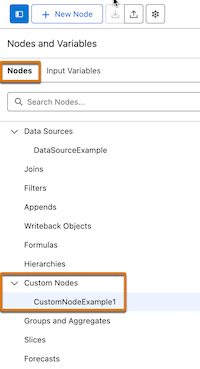
    
    ![Custom Nodes option in the Nodes tab.](https://sf-zdocs-cdn-prod.zoominsoftware.com/tdta-ind-data_processing_engine-264-0-0-production-enus/80e06924-e6c0-4b82-81cf-e99ccd77d857/data_processing_engine/images/custom_node_option.png)
2. Select **Custom** as the node type and enter the required details.
3. Select a custom node, and then select the source node to pass the data to the node.
    
    The parameters for a custom node are automatically filled.
4. If necessary, select an input type, and then select or enter the input values for the required parameters.
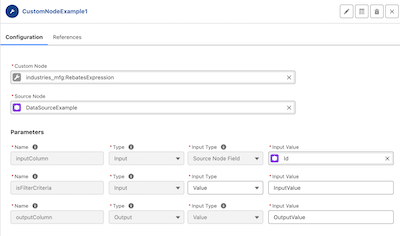
    
    ![Example of a configured custom node.](https://sf-zdocs-cdn-prod.zoominsoftware.com/tdta-ind-data_processing_engine-264-0-0-production-enus/80e06924-e6c0-4b82-81cf-e99ccd77d857/data_processing_engine/images/custom_node_example.png)