---
schema_version: "1"
id: 08b6c96637d88a14837003223afe72bf28bb260d18d9a6c313fc4cd6e7540256
title: Save and Resume Draft Assessments in Discovery Framework
collection: admin
version: current
locale: en-us
portal_url: https://docs.salesforce.com/admin/current/en-us/ind/264-0-0/discovery_framework_save_for_later.md
canonical_url: https://help.salesforce.com/s/articleView?id=ind.discovery_framework_save_for_later.htm&release=264.0.0&type=5
source_site: help.salesforce.com
content_type: documentation
content_hash: 86e436b0015ef799fab7be82e9761ed0190ddb1c7ac5bf3dd446a13061780945
description: Your users can save drafts of Discovery Framework-based assessments that they’re not ready to complete. Easily find the draft assessments that are in progress and complete them at their convenience.
products:
  - Industry Solutions
  - Cross Cloud
release: "264"
---
# Save and Resume Draft Assessments in Discovery Framework

Your users can save drafts of Discovery Framework-based assessments that they’re not ready to complete. Easily find the draft assessments that are in progress and complete them at their convenience.

### Required Editions

<table class="slds-table slds-table_bordered slds-max-medium-table_stacked slds-m-bottom_small edition"><colgroup><col></colgroup><tbody><tr class=""><td class="slds-cell-wrap" style="vertical-align:top;"><a href="https://help.salesforce.com/s/articleView?id=ind.discovery_framework_editions_permissions.htm&amp;release=264.0.0&amp;type=5" title="Review the supported products and editions for Discovery Framework and Assessments. Then learn about how your product handles permissions and how to assign them.">View supported product editions</a>.</td></tr></tbody></table>

<table class="slds-table slds-table_bordered slds-max-medium-table_stacked slds-m-bottom_small permission">
        <colgroup>
          <col style="width:50%">
          <col style="width:50%">
        </colgroup>
        <thead class="slds-text-title_caps ">
          <tr class="">
            <th scope="colgroup" class="slds-cell-wrap" colspan="2" style="text-align:center;vertical-align:top;" id="d2261e63">User Permissions
              Needed</th>
          </tr>
        </thead>
        <tbody>
          <tr class="">
            <td data-label="User Permissions Needed" class="slds-cell-wrap" style="vertical-align:top;" headers="d2261e63 ">To save Discovery Framework assessments as draft:</td>

            <td class="slds-cell-wrap" style="vertical-align:top;" headers="d2261e63 "><a href="https://help.salesforce.com/s/articleView?id=ind.discovery_framework_editions_permissions.htm&amp;release=264.0.0&amp;type=5" title="Review the supported products and editions for Discovery Framework and Assessments. Then learn about how your product handles permissions and how to assign them.">View
                permissions information</a>.</td>

          </tr>
        </tbody>
      </table>

![Note](https://sf-zdocs-cdn-prod.zoominsoftware.com/tdta-ind-discovery_framework-264-0-0-production-enus/e279ff15-cce5-49ed-87b7-c676317e3119/images/icon_note.png)

Note Saving Assessments As Draft isn't supported for Experience Cloud users.

1. From Setup, in the Quick Find box, enter Discovery Framework, and then select **General Settings**.
2. Turn on **Save Assessment As Draft**.

If the end users aren't ready to complete an assessment, they can click **Save For Later**, to save the assessment as draft. To resume the assessment, users can either email themselves the link to the assessment or use the link provided after saving the assessment as draft.
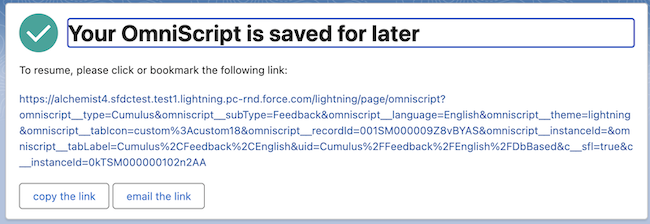
![Resume assessment screen displaying options to copy the link and email the link](https://sf-zdocs-cdn-prod.zoominsoftware.com/tdta-ind-discovery_framework-264-0-0-production-enus/e279ff15-cce5-49ed-87b7-c676317e3119/discovery_framework/images/df_save_for_later.png)

The CRM users such as support reps can complete the draft assessment for the end-user by using the Assessment Library in the Assessment Lightning web component.