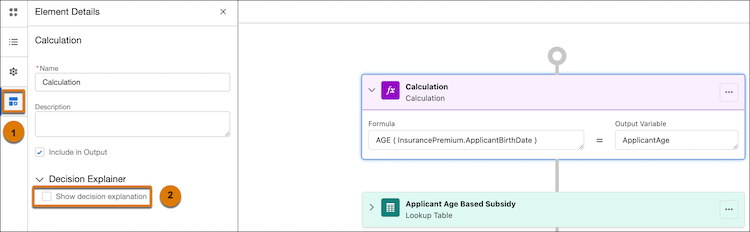
To remove the explainability message templates assigned to an expression set version
step, open the version in Expression Set Builder and deselect Show decision explanation for the
step. You can disable decision explanations for expression set version steps only if the version
is inactive.
Required Editions
| Available in: Lightning Experience |
| Available in: Enterprise, Unlimited, and Developer Editions for
Industries clouds that have Business Rules Engine and Decision Explainer enabled |
| User Permissions Needed |
| To prevent showing decision explanations to external users for specific expression set
version steps: |
Rule Engine Designer |
-
Open the expression set version for which you want to disable showing decision explanations
for specific steps.
-
Select the step on the Expression Set Builder canvas.
-
To open the Element Details panel for the step, click
 .
.
-
Deselect Show decision explanation.
-
Save your changes.