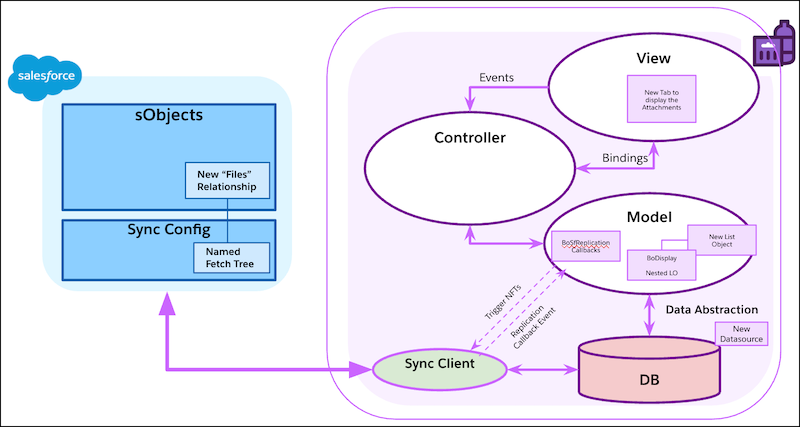
Add a tab to show a list of display attachments in the master-detail Displays page. In
Visual Studio Code based Modeler, create a list object to load the attachments and to bind to a
MediaList UI control in a new tab.
Required Editions
|
Available in: Lightning Experience
Available in: Enterprise and
Unlimited Editions where Consumer Goods Cloud is enabled
|
Some backend processes are triggered when the attachments tab is created in the display
record details page.
Sync
This process triggers the syncing of named fetch tree in the replication callback
event.
Data
The model adds a datasource contract for attachments.
Model
The model creates a list object and adds it to the Display object as a nested list
object.
View
The UI flow creates a new tab in the detail page of the display record. It also adds a MediaList
UI control to show the attachments of the selected display record.