---
schema_version: "1"
id: 205cf23f342cfe3413eab1dcb39ca5342c250d9cb7e1723e1d944f8aea8a51fd
title: Distribute Display Records Based on Account
collection: admin
version: current
locale: en-us
portal_url: https://docs.salesforce.com/admin/current/en-us/ind/264-0-0/custom_sync_add_account_lookup_field_to_display.md
canonical_url: https://help.salesforce.com/s/articleView?id=ind.custom_sync_add_account_lookup_field_to_display.htm&release=264.0.0&type=5
source_site: help.salesforce.com
content_type: documentation
content_hash: edcb91e552e7d97bb7e3b0eb973315c6ee2e4b57f92b139ebddb9d473676b530
description: To sync display data by using named queries, add an account lookup field to the Display object in Consumer Goods Cloud. Then, to sync the Display account data to the offline mobile app, add the account field to the mobility relevant field sets.
products:
- Consumer Goods
release: "264"
---
# Distribute Display Records Based on Account
To sync display data by using named queries, add an account lookup field to the Display object in Consumer Goods Cloud. Then, to sync the Display account data to the offline mobile app, add the account field to the mobility relevant field sets.
### Required Editions
Available in: Lightning Experience
Available in: Enterprise and
Unlimited Editions where Consumer Goods Cloud is enabled
User
Permissions Needed
To add account lookup field
CGCloud Business Admin
1. From the object management settings for Display, go to **Fields & Relationships** and then click **New**.
2. Select **Lookup Relationship** and then click **New**.
3. In Related To, select **Account** and click **Next**.
4. In Field Label and Field Name, enter Account.
5. Save your changes.
6. To add the lookup field to the mobility relevant field set, open the Mobility Relevant field set of the Display object.
To define fields for the mobile app, see [Mobile relevant field set](https://help.salesforce.com/s/articleView?id=ind.cg_admin_define_mobile_relevant_fields.htm&language=en_US).
7. Drag and drop the **Account** field to the In the Field Set box.
8. Save your changes.

Example
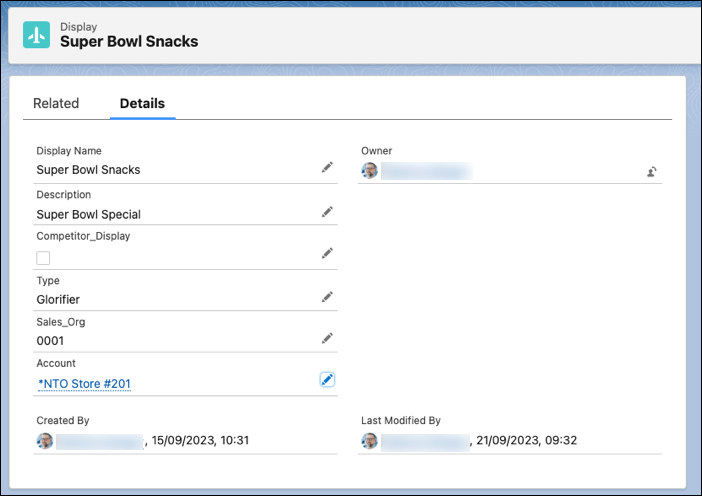
To add an account to the display records, from the App Launcher, find and select **Displays**. In the Accounts tab, click **New** and complete the workflow to add the desired account.