---
schema_version: "1"
id: 6622dc252fc218a6701c05640ad47f7c7ec41338368e0794a820e57d3b5b3c68
title: Apex Classes for a Context Definition
collection: admin
version: current
locale: en-us
portal_url: https://docs.salesforce.com/admin/current/en-us/ind/264-0-0/ctx_apex_classes_for_context_definitions.md
canonical_url: https://help.salesforce.com/s/articleView?id=ind.ctx_apex_classes_for_context_definitions.htm&release=264.0.0&type=5
source_site: help.salesforce.com
content_type: documentation
content_hash: de3198d84cf4de820a4cfbbbc8885a14e8d508f237fdaa19c22ae50de3222b98
description: Apex classes provide the framework for the structure and data of a context definition. You can use these classes to create and manage the context data in your Salesforce org.
products:
- Industry Solutions
- Cross Cloud
release: "264"
---
# Apex Classes for a Context Definition
Apex classes provide the framework for the structure and data of a context definition. You can use these classes to create and manage the context data in your Salesforce org.
### Required Editions
Available in: Lightning Experience
Available in: Developer, Enterprise, Professional, and Unlimited editions for Industries clouds where Context Service is enabled
You can’t create an Apex class from a context definition that has any of the following:
- Attributes with the data type set to SelfReference.
- Nodes that indirectly reference themselves or child nodes that are shared across multiple parent nodes.
- Node with the name DefRoot.
- Attributes with name of meta attributes: id, dmlStatus, dataPath, businessObjectType
## Considerations for generating an Apex class
- The generated Apex classes will not contain dynamic attributes which are part of the context dictionary (such as DYN\_COLOR)
- The generated Apex class names will not contain the underscore character, even if the context definition has an underscore. The Apex class names skip the underscore character.
- If a context definition includes an attribute with name ‘type’, the generated Apex automatically converts the name to ‘z0type’ to make it Apex compliant. See [Apex Reserved Keywords](https://help.salesforce.com/s/articleView?id=platform.external_services_schema_def_apex_reserved_keywords.htm&language=en_US) for more information.
- If a context definition includes attributes of DateTime or Date data type, they are treated as strings having data type as Text in the generated Apex and it will appear in the local date format in the Flow. For example, a Last Modified Date value of 2026-01-21T18:33:26.000Z in the generated Apex appears as 22 January 2026, 00:03 in the flow. Map these values directly to text fields in your flow, or use formula fields to convert the strings to Date or DateTime fields.
- The generated Apex classes of extended custom definitions must be manually refreshed after the extended custom definition is synced. Apex classes of standard definitions are automatically updated.
- The generated Apex classes will not contain tag names. Reading query tag data, refer to the related Apex node and attribute names.
- All system limits of External Service OpenAPI apply to generating Apex classes. See [System Limits](https://help.salesforce.com/s/articleView?id=platform.external_services_schema_def_limits.htm&type=5&language=en_US).
- For each context definition, one Definition Root class with the name \_DefRoot is created, and one Apex class is created for each node in the definition.
## Structure of the Apex Class
The structure of the generated Apex classes follows the structure of the context definition. Each node in the context definition is represented as a separate class, and the attributes within a node are represented as fields in that class.
For example, consider a context definition named **SalesContextDef** with the following structure:
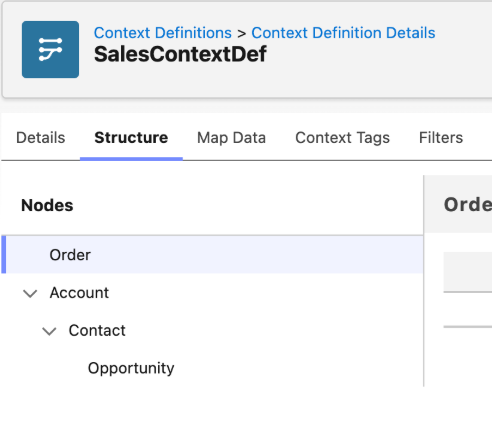
When you generate the Apex classes, one main definition root class with the name \_DefRoot is created. Four more apex classes are created, one for each node.
In this example, Definition root class: SalesContextDef\_DefRoot.apex.
Node classes:
- SalesContextDef\_Order.apex
- SalesContextDef\_Account.apex
- SalesContextDef\_Contact.apex
- SalesContextDef\_Opportunity.apex
The **SalesContextDef\_DefRoot** class is the entry point for the context definition. It contains fields for each top-level node in the context definition. Each node class contains fields for its attributes and any nested nodes.
Here is an example of the **SalesContextDef\_DefRoot** class:
```
global class SalesContextDef_DefRoot {
// [PROPERTY] Order
@AuraEnabled
global List Order {get; set{ this.Order = value; this.Order_set = true; }}
global Boolean Order_set {get; set;}
// [PROPERTY] Account
@AuraEnabled
global List Account {get; set{ this.Account = value; this.Account_set = true; }}
global Boolean Account_set {get; set;}
// [PROPERTY] Opportunity
@AuraEnabled
global List Opportunity {get; set{ this.Opportunity = value; this.Opportunity_set = true; }}
global Boolean Opportunity_set {get; set;}
// [PROPERTY] Contact
@AuraEnabled
global List Contact {get; set{ this.Contact = value; this.Contact_set = true; }}
global Boolean Contact_set {get; set;}
}
```
Each attribute in a node is represented as a field in the node class with the field name as the attribute's name and the field type as the attribute's data type. Each node Apex class contains its attributes and these fixed meta attributes : id, dmlStatus, dataPath, businessObjectType.
The Account node has two attributes: BillingCity and Name. The Apex class for the Account node also contains one variable for its child node Contact. This variable is used while reading or assigning contact records that come under Account.
```
global class SalesContextDef_Account {
// [PROPERTY] BillingCity
@AuraEnabled
global String BillingCity {get; set{ this.BillingCity = value; this.BillingCity_set = true; }}
global Boolean BillingCity_set {get; set;}
// [PROPERTY] businessObjectType
@AuraEnabled
global String businessObjectType {get; set{ this.businessObjectType = value; this.businessObjectType_set = true; }}
global Boolean businessObjectType_set {get; set;}
// [PROPERTY] dmlStatus
@AuraEnabled
global String dmlStatus {get; set{ this.dmlStatus = value; this.dmlStatus_set = true; }}
global Boolean dmlStatus_set {get; set;}
// [PROPERTY] id
@AuraEnabled
global String id {get; set{ this.id = value; this.id_set = true; }}
global Boolean id_set {get; set;}
// [PROPERTY] Name
@AuraEnabled
global String Name {get; set{ this.Name = value; this.Name_set = true; }}
global Boolean Name_set {get; set;}
// [PROPERTY] dataPath
@AuraEnabled
global String dataPath {get; set{ this.dataPath = value; this.dataPath_set = true; }
global Boolean dataPath_set {get; set;}
// [PROPERTY] Contact
@AuraEnabled
global List Contact {get; set{ this.Contact = value; this.Contact_set = true; }}
global Boolean Contact_set {get; set;}
}
```
## Package Generated Apex Classes in Second-Generation Packages
When you include a context definition with generated Apex classes in a second-generation managed package (2GP), you must also include the associated ExternalServiceRegistration component in your package. Generated Apex classes for context definitions are created through the External Services API, and the registration record is required for the classes to deploy correctly in the org.
To include the ExternalServiceRegistration component in your package, first add the ExternalServiceRegistration metadata component to your package manifest (package.xml or sfdx-project.json) in your package directory. Then, select the registration record whose name corresponds to your associated context definition.
Without this component, the generated Apex classes aren't available in the org after package installation, and the associated dynamic invocable actions don't appear in Flow Builder.
- **[Generate an Apex Class for a Context Definition](https://help.salesforce.com/s/articleView?id=ind.ctx_generate_apex_class.htm&release=264.0.0&type=5)**
View definition-specific invocable actions in Salesforce Flow by generating Apex classes from your context definitions. The Apex classes mirror the metadata and hierarchy of your context definition, which can be used directly in Salesforce Flow without any coding required.
- **[Dynamic Context Service Invocable Actions](https://help.salesforce.com/s/articleView?id=ind.ctx_dynamic_invocable_actions.htm&release=264.0.0&type=5)**
Manage your business application data efficiently by combining the capabilities of Salesforce Flow and Context Service dynamic invocable actions. With dynamic actions, you can work with typed Apex-defined variables that mirror your context definition structure.
- **[Call Dynamic Context Service Invocable Actions from Flows](https://help.salesforce.com/s/articleView?id=ind.ctx_call_dynamic_invocable_actions.htm&release=264.0.0&type=5)**
Call invocable actions for context definitions that have Apex classes generated.
#### See Also
- [Apex-Defined Data Type](https://help.salesforce.com/s/articleView?id=platform.flow_concepts_apex_type.htm&language=en_US)
- [Considerations for the Apex-Defined Data Type](https://help.salesforce.com/s/articleView?id=platform.flow_considerations_apex_data_type.htm&language=en_US)
- [Second-Generation Managed Packages](https://developer.salesforce.com/docs/atlas.en-us.pkg2_dev.meta/pkg2_dev/sfdx_dev_dev2gp.htm)
- [ExternalServiceRegistration Metadata Type](https://developer.salesforce.com/docs/atlas.en-us.api_meta.meta/api_meta/meta_externalserviceregistration.htm)