
Explainability message templates store explanation messages, and can be referenced in an expression set version step to explain the step’s result. You can use expression set message tokens in your message templates as placeholders for expression set version resources. Rule designers can then map the tokens to the resources from the expression set version where the template is used. When the expression set runs, the explanations dynamically show the values of the mapped resources.
Required Editions
| Available in: Lightning Experience |
| Available in: Enterprise, Unlimited, and Developer Editions for Industries clouds that have Business Rules Engine and Decision Explainer enabled |
| User Permissions Needed | |
|---|---|
| To create and modify explainability message templates: | Decision Explainer Service Access |
| To use explainability message templates in expression set steps: | Rule Engine Designer |
| To run expression sets that have Decision Explainer enabled: | Rule Engine Runtime |
- From Setup, in the Quick Find box, enter Explainability Message Template, and then select Explainability Message Template.
- Click New Explainability Message Template.
-
Enter a name for the template.
Enter a unique name that begins with a letter and doesn’t contain spaces, special characters, or consecutive underscores.
- Enter a label for the template.
-
In the Message field, enter a message for a combination of the expression set step type and
the result type.
To create a token-based message, enter a token name within {} as a placeholder for an expression set version resource.
 Note A message can include up to five unique tokens.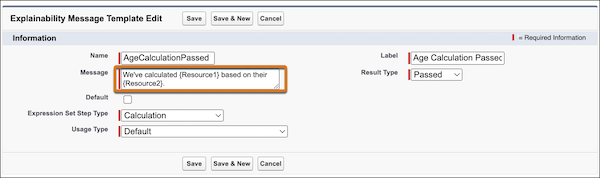
Here, Resource1 and Resource2 are tokens. When the template is attached to a Calculation step with the Passed result type in an expression set version, rule designers can map the tokens to resources from the version.
- Select the result type.
-
Select the expression set step type.
The No Result result type applies only to the Decision Table Lookup and Decision Matrix Lookup step types.
-
Select the usage type.
Note When rule designers search for the explainability message templates to be added to an expression set version step, they see only the templates that share the expression set’s usage type and the templates that don’t have a usage type.
-
To set the message as default for the expression set step type and result type, select
Default.
If a default template is available for an expression set version’s step type and result type, the template is automatically selected for the step.
Note One Salesforce instance can have only one default message for a combination of expression set step type and result type. - Save your explainability message template.