---
schema_version: "1"
id: 995f4152eeafd1f154878170cf5a92abe4fedc02c2a6581fd324a7c6acd3da43
title: Create a UI Plugin to Show Charts
collection: admin
version: current
locale: en-us
portal_url: https://docs.salesforce.com/admin/current/en-us/ind/264-0-0/create_a_ui_plugin_to_show_charts.md
canonical_url: https://help.salesforce.com/s/articleView?id=ind.create_a_ui_plugin_to_show_charts.htm&release=264.0.0&type=5
source_site: help.salesforce.com
content_type: documentation
content_hash: 30578e91566db0da31bad394c2d7bf5898048800a3d355cadcc58b9c3100f009
description: Create a Competitor Rate custom report on the CG offline mobile app to show the competitor rate of the available displays in a store. Configure the JavaScript implementation of the UIPluginV2 contract to define the properties, labels, libraries, HTML, and CSS.
products:
- Consumer Goods
release: "264"
---
# Create a UI Plugin to Show Charts
Create a Competitor Rate custom report on the CG offline mobile app to show the competitor rate of the available displays in a store. Configure the JavaScript implementation of the UIPluginV2 contract to define the properties, labels, libraries, HTML, and CSS.
### Required Editions
Available in: Professional, Enterprise, and Unlimited Editions that have Consumer Goods Cloud enabled
User Permissions
Needed
To create a UI plugin to show charts:
CG Cloud Developer, Admin
In a retail store, different competing brands display their products in the same category. Sales reps review the percentage of products from each brand to understand trends such as the share-of-shelf of a product. The Competitor Rate report shows this info with an easy-to-understand chart.
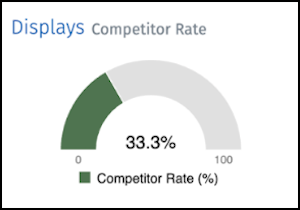
Here, a 33.3% competitor rate on the chart means that competitor products make up 33.3% of the displayed products in a retail store. The remaining 66.7% of the displayed products are from the manufacturer.
1. To create a UIPluginV2 contract, in the UI Plugins folder in your Modeler workspace, clone the template file $workspace/contractSnippets/UI\_Plugins/#Name#UiPluginV2.uipluginv2.xml.
2. Name the cloned contract as MyCardDisplayReportUiPluginV2.uipluginv2.xml and save the contract at $workspace/src/UI Plugins.
3. Set the name attribute to MyCardDisplayReportUiPluginV2 in MyCardDisplayReportUiPluginV2.uipluginv2.xml.
4. Save your changes.
5. To check for validation errors, build your contracts. Run `sf mdl build`.
6. In Interface, add the `CompetitorRate` property.
```
```
7. In Labels, add the `CardReportingCompetitorRate_Title` label.
```
```
8. In Libraries, add the C3JS and D3JS libraries.
```
```
9. In the UI Component HTML, define the HTML structure of UIPluginV2.
```
]]>
```
10. In UI Component CSS, define the CSS classes.
```
```
11. Set up the JavaScript implementation.
```
// Declarations
let config = {
measures: [60, 90, 100],
measureColors: [],
};
let chartReference;
const selectors = {
chart: "#Chart",
};
// React specific Callbacks
function connectCallback() {
renderChart();
}
function disconnectCallback() {
if (PluginManager.helpers.isDefined(chartReference)) {
chartReference.destroy();
}
}
function renderCallback() {
inputChanged();
}
function setStyles() {
config.measureColors = [
PluginManager.pluginConfiguration.Color15,
PluginManager.pluginConfiguration.Color16,
PluginManager.pluginConfiguration.Color14
];
}
function inputChanged() {
if (PluginManager.helpers.isDefined(chartReference)) {
chartReference.load({
columns: [[PluginManager.locale.labels.CardReportingCompetitorRate_Title, PluginManager.competitorRate]],
});
}
}
function renderChart() {
if (PluginManager.helpers.isDefined(PluginManager.competitorRate)) {
//destroy chart object before setting new reference
if (PluginManager.helpers.isDefined(chartReference)) {
chartReference.destroy();
}
//set styles and colors
if (PluginManager.helpers.isDefined(PluginManager.pluginConfiguration)) {
setStyles();
}
//create chart
chartReference = c3.generate({
bindto: selectors.chart,
data: {
columns: [
[PluginManager.locale.labels.CardReportingCompetitorRate_Title, PluginManager.competitorRate],
],
type: "gauge",
},
gauge: {},
color: {
pattern: config.measureColors, // the three color levels for the percentage values.
threshold: {
values: config.measures,
},
},
size: {
height: 140,
},
tooltip: {
show: false
}
});
}
}
```
12. Save your changes.
13. To check for validation errors, build your contracts. Run `sf mdl build`.
- **[Add a Global Label for the UIPluginV2 contract in Modeler](https://help.salesforce.com/s/articleView?id=ind.add_a_global_label_for_uipluginv2.htm&release=264.0.0&type=5)**
Add a global label for the UIPluginV2 contract in Visual Studio Code-based Modeler to localize the contract in different languages.
- **[Prepare the Report Data](https://help.salesforce.com/s/articleView?id=ind.prepare_the_report_data.htm&release=264.0.0&type=5)**
Create business logic methods in Visual Studio Code-based Modeler to define the data that business reports and charts show.