A Salesforce org that has Business Rules Engine comes with a Rule Engine Designer
permission set. If you want to create custom permission sets, clone and then modify the Rule
Engine Designer permission set. For example, you can create a read-only permission set for users
to only view and run but not create, edit, or delete expression sets.
Required Editions
| Available in: Lightning Experience |
| Available in: Enterprise, Unlimited, and Developer Editions
for clouds that have Business Rules Engine enabled |
| User Permissions Needed |
| To clone Rules Engine Designer permission set: |
Manage Profiles and Permission Sets and Rule Engine Designer |
| To assign permission sets to users: |
Assign Permission Sets |
-
From Setup, in the Quick Find box, enter Permission Sets, and then
select Permission Sets.
-
In the list of permission sets, click Clone next to the Rules Engine
Designer permission set.
-
Enter a label, such as Engine Business User, for the cloned
permissions set.
The API name autopopulates.
-
Save your work.
-
Select the new permission set.
-
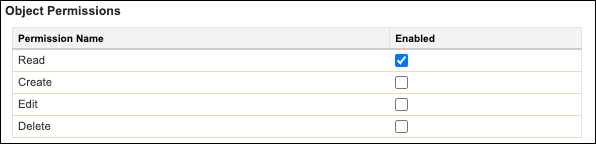
Change the permissions for these objects so that the objects are read only:
- Expression Set
- Expression Set Version
- Decision Matrix
- Decision Matrix Version
- Decision Matrix Row
- Decision Matrix Column
- Decision Matrix Column Range
-
Under Apps, click Object Settings.
-
Select an object whose permissions you want to modify.
-
Click Edit.
-
Deselect the permissions, except the read permission.
-
Save your changes.
The selected permissions are applied for the object.
After you create the permission set, assign the set to relevant users.