---
schema_version: "1"
id: f4c962c2b3242325b7c550f7d497a58269aa283e9e1467e4574e6dc51c67b223
title: Review Alerts in the Contact Center
collection: admin
version: current
locale: en-us
portal_url: https://docs.salesforce.com/admin/current/en-us/ind/264-0-0/contact_center_review_alerts_to_take_appropriate_action.md
canonical_url: https://help.salesforce.com/s/articleView?id=ind.contact_center_review_alerts_to_take_appropriate_action.htm&release=264.0.0&type=5
source_site: help.salesforce.com
content_type: documentation
content_hash: cf3c6ba4ab748f45664e2afe49dbe775dbde78224fe8dce170a85e0d162974e7
description: Record Alerts provide notifications about record changes that require your immediate attention. For example, an alert for checking in with a member during their upcoming benefit enrollment window.
products:
- Health
release: "264"
---
# Review Alerts in the Contact Center
Record Alerts provide notifications about record changes that require your immediate attention. For example, an alert for checking in with a member during their upcoming benefit enrollment window.
### Required Editions
Available in: Lightning Experience
Available in: Enterprise and Unlimited Editions with Health
Cloud
User Permissions Needed
To use the Contact Center for Health Cloud
Manage Contact Center for Health Cloud
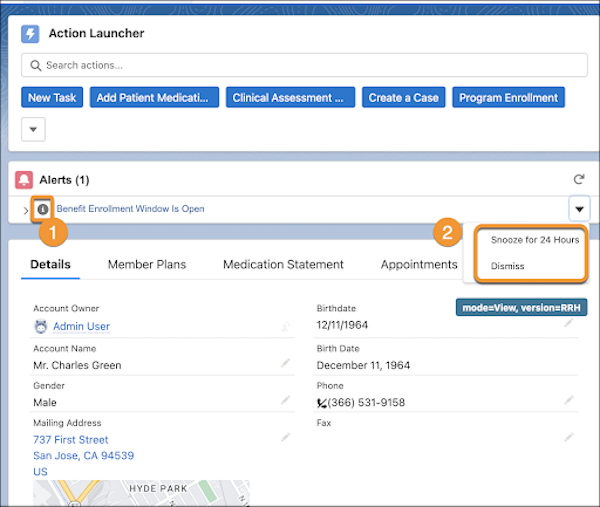
Record alerts appear as warnings, errors, or info, to denote the nature of the alerts (1). Click an alert in the Contact Center to open it and make changes or snooze the alert (2). You can also snooze and dismiss an alert directly from the app.
1. In the App Launcher, find and select Contact Center.
2. Go to Alerts and review the notifications.
3. Click the Action button.
4. Snooze the alert for 24 hours or dismiss it.
#### See Also
- [_Salesforce Help_: Record Alerts in the Contact Center](https://help.salesforce.com/s/articleView?id=ind.admin_contact_center_record_alerts.htm&type=5&language=en_US)