
Here’s an example with value type Price and %.
Required Editions
|
Available in: Lightning Experience Available in: Enterprise and Unlimited Editions where Consumer Goods Cloud is enabled |

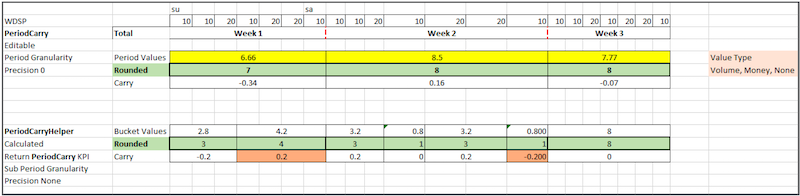
Period values in editable PeriodCarry KPI are distributed to calculate sub period values of PeriodCarryHelper KPI using the week day share profile. The value type considered is Price and %. The table shows the additional configurations that are considered:
| Configuration | PeriodCarry KPI | PeriodCarryHelper KPI |
|---|---|---|
| Rounding Type | With carry | Without carry |
| Rounding Order | Default | Default |
| Rounding Precision | 0 | 0 |
| Time Granularity | Period | Subperiod |
Here’s the sequence of execution.
| Step No. | Calculation step | Description |
|---|---|---|
| 1 | Rounded values | The manual inputs of period values are rounded to the nearest value, by considering carry. Week (W) 1 = Round (6.66) = 7 and similarly, for W2 and W3. |
| 2 | Period Carry | The carry values are determined based on the global carry used. The system obtains a global carry based on the logic: (Value of the period before rounding) - (value of the period after rounding). W1 = 6.66 - 7 = -0.34 and similarly, for W2 and W3. |
| 3 | Sub period values |
The sub period values are same as the rounded period values. That is, the period values are copied into each sub period. For W1, W2, and W3, the values are 7, 8, and 8 respectively. The rounded sub period values are same as the sub period values. So, for W1, W2, and W3, the values are 7, 8, and 8 respectively. |
| 4 | Sub period Carry | No carry is generated as the values before and after rounding are the same. |