
You can reference the total value of a KPI with a different granularity to calculate the values of a KPI.
Required Editions
|
Available in: Lightning Experience Available in: Enterprise and Unlimited Editions where Consumer Goods Cloud is enabled |

Example Here are two KPIs:
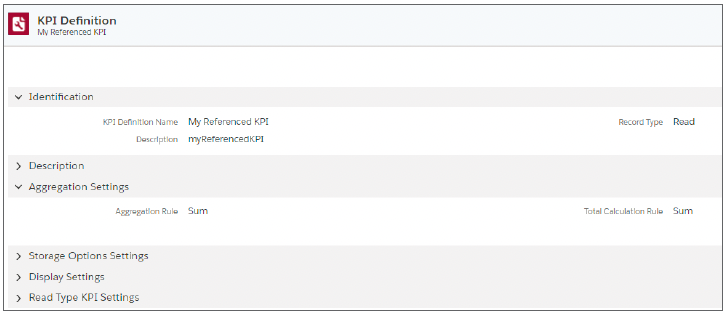
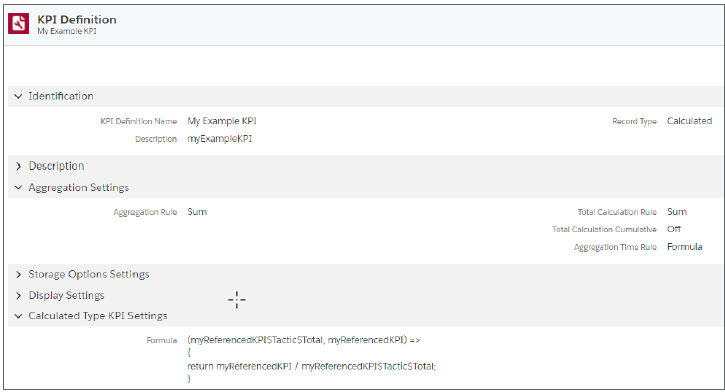
Here’s how the product-level values of My Referenced KPI are aggregated to the tactic level.
| KPI | Aggregation Level | Total | Week 1 | Week 2 | Week 3 |
|---|---|---|---|---|---|
| My Referenced | Promotion | 930 | 130 | 140 | 660 |
| My Referenced | Tactic 1 | 750 | 100 | 50 | 600 |
| My Referenced | Product 1 | 500 | 100 | 0 | 400 |
| My Referenced | Product 2 | 250 | NULL | 50 | 200 |
| My Referenced | Tactic 2 | 330 | 90 | 120 | 120 |
| My Referenced | Product 1 | 180 | 30 | 90 | 60 |
| My Referenced | Product 3 | 150 | 60 | 30 | 60 |
Here’s how My Example KPI is calculated based on the tactic-level values of My Referenced KPI.
| KPI | Aggregation Level | Total | Week 1 | Week 2 | Week 3 |
|---|---|---|---|---|---|
| My Example | Promotion | 1.9887 | 0.4060 | 0.4302 | 1.1635 |
| My Example | Tactic 1 | 0.9888 | 0.1333 | 0.0666 | 0.7999 |
| My Example | Product 1 | 0.6666 | (100/750) × 100 = 0.1333 | 0.0000 | (450/750) × 100 = 0.5333 |
| My Example | Product 2 | 0.3222 | 0.0000 | (50/750) × 100 = 0.0666 | (200/750) × 100 = 0.2666 |
| My Example | Tactic 2 | 0.9999 | 0.2727 | 0.3636 | 0.3636 |
| My Example | Product 1 | 0.5454 | (30/330) × 100 = 0.0909 | (90/330) × 100 = 0.2727 | (60/330) × 100 = 0.1818 |
| My Example | Product 3 | 0.4545 | (60/330) × 100 = 0.1818 | (30/330) × 100 = 0.0909 | (60/330) × 100 = 0.1818 |