
You can specify other KPIs as an input parameter in a formula.
Required Editions
|
Available in: Lightning Experience Available in: Enterprise and Unlimited Editions where Consumer Goods Cloud is enabled |

Here are two KPIs:
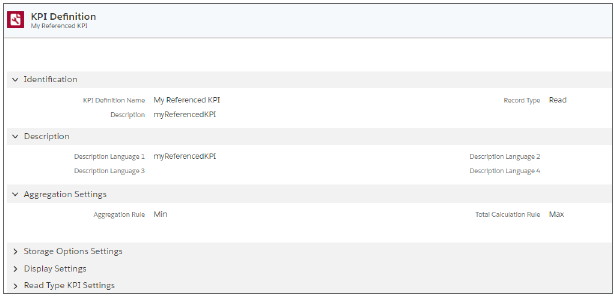
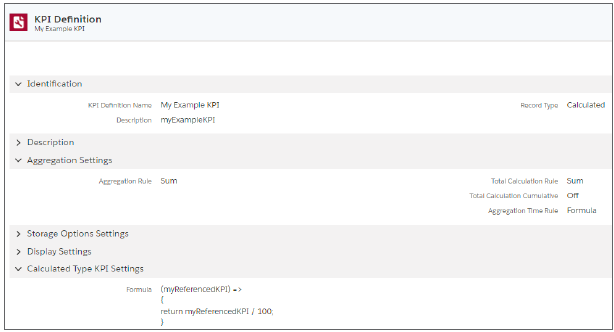
My Referenced KPI is a read KPI with a min aggregation rule and a max total calculation rule. The My Example KPI is the main KPI and is calculated by dividing My Referenced KPI by 100, as defined in the formula field. The table shows sample data for My Example KPI and the expected calculation results for My Referenced KPI.
| KPI | Aggregation Level | Total | Week 1 | Week 2 | Week 3 |
|---|---|---|---|---|---|
| My Referenced | Promotion | 200 | 100 | 0 | 200 |
| My Referenced | Product 1 | 400 | 100 | 0 | 400 |
| My Referenced | Product 2 | 200 | Null | 50 | 200 |
| My Example | Promotion | 7.5 | 1 | 0.5 | 6 |
| My Example | Product 1 | 5 | 1 | 0 | 4 |
| My Example | Product 2 | 2.5 | 0 | 0.5 | 2 |
The calculation occurs in this order.
- Read the values of My Referenced KPI at the lowest level of granularity. For this example, it’s the Product 1 and Product 2 level.
- For calculating the value of My Example KPI, execute the formula at the lowest granularity for each period.
- Calculate total values of My Example KPI based of these rules:
- Product total based on the Total Calculation rule
- Period total based on the Aggregation rule
- Promotion total based on the Total Calculation rule
In this example, the input KPI’s Aggregation and Total Calculation rules don’t influence the calculation result of the second KPI. The calculation result of the second KPI is influenced by its own Aggregation and Total Calculation rules.
To use the shipment profile for distributing promotion volume, calculate the value for each subperiod to ensure that the volume is correctly distributed among the subperiods, and then correctly shown per week.
| KPI or Product Dimension | Total | Week 1 | Week 2 |
|---|---|---|---|
| Planned Base Volume | 5429 | 2715 | 2714 |
| Promotion Volume | 20000 | 10000 | 10000 |
| Shipment Profile | 100.00 | 70.00 | 30.00 |
| Incremental Volume | 14571 | 10200 | 4371 |
| Lump Sum Amount | 15000 | 7500 | 7500 |
This formula distributes the incremental volume.
(PromotionVolume, PromotionVolume$Product$Total, PlanBaseVolume,
PlanBaseVolume$Product$Total, ShipmentProfile, Promotion, Period,
Subperiod) => {
if (PromotionVolume !== 0 && PromotionVolume !== undefined) {
const msPerDay = 86400000;
let firstDayOfWeek = Period.datefrom > Promotion.datefrom ? Period.
datefrom : Promotion.datefrom;
let lastDayOfWeek = Period.datethru < Promotion.datethru ? Period.
datethru : Promotion.datethru;
let lengthOfWeek = (lastDayOfWeek - firstDayOfWeek) / msPerDay + 1;
let lengthOfSubperiod = (Subperiod.datethru - Subperiod.datefrom) / msPer-
Day + 1;
return (PromotionVolume$Product$Total - PlanBaseVolume$Product$Total) *
(ShipmentProfile / 100) * (lengthOfSubperiod / lengthOfWeek);
}
return undefined;
}