
The system reads a promotion or tactic's actual KPI values from source tables and shifts data outside the KPI's time frame into the first or last week for accurate totals.
Required Editions
|
Available in: Lightning Experience Available in: Enterprise and Unlimited Editions where Consumer Goods Cloud is enabled |
A promotion or tactic’s actual values (daily or weekly) are available within or outside the promotion or tactic’s time frame. These values are obtained from the relevant data source tables in which each record is a reference to a promotion or tactic.
The value for the KPI is read from the tables selected in the respective KPI.
The system reads the data from the selected source tables, determines the relevant time frame for the KPI, and then adjusts the data under the relevant time frame.
Data is read from these tables:
- Promotion Tactic Daily Measure Real
- Promotion Tactic Weekly Measure Real
The relevant time frame is based on the KPI’s object scope and time scope. For example, if the object scope is Promotion, and the time scope is Shipment, the relevant time frame is Promotion Shipment.
Here’s how the data is adjusted in the relevant time frame.
- If the data belongs to a week or day and is at least partially within the relevant time frame, the value is shown in the week to which it belongs.
- If the data belongs to a week or day and is before the promotion or tactic time frame, it’s placed in the first week of the relevant time frame.
- If the data belongs to a week or day that is after the promotion or tactic time frame, it’s placed in the last week of the relevant time frame.
If the KPI value belongs to a product that isn’t a part of the promotion, the KPI value is considered for calculation. The value is shown under the appropriate weeks or custom periods of the relevant time frame in the Promotion P&L.
When a custom calendar is activated, the values are calculated and shown for custom periods instead of weeks.
Actual values can also be shown in the account plan, but if the time scope is Complete, no adjustments are made, and the values are read relevant to the time frame.

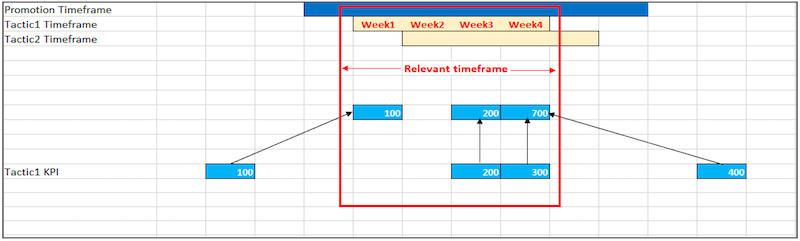
The value 100 is moved into Week 1 because it occurs before the Tactic 1 time frame. The values 200 and 300 are within the Tactic 1 time frame, so they’re shown within the week that they belong to. The value 400 is moved to Week 4 because it occurs after the Tactic 1 time frame. The final value is the sum of all the values present in the Tactic 1 time frame (100 + 200 + 300 + 400), and the system reads 1,000 as the total value of this tactic time frame.