
With Rounding within Period, ensure that a period’s manually entered KPI value doesn’t change when you manually adjust the KPI value for another period. You can use this option for value types Volume, Money, and None.
Required Editions
|
Available in: Lightning Experience Available in: Enterprise and Unlimited Editions where Consumer Goods Cloud is enabled |
With Rounding with Carry Over, a KPI value is adjusted across periods to retain the total value of the KPI. To ensure that the value you enter is always retained, use the Rounding within Period rounding type. When you use this rounding type, the KPI values are adjusted within the period that the value is manually adjusted in. So, the values that aren’t related to the period remain unchanged.

You entered 10,000 for a product category for week 2.
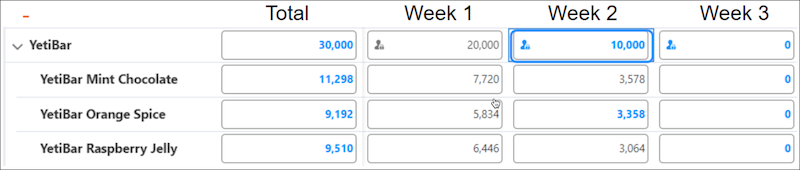
Then, for week 3, you enter another 10,000 for the same product category.
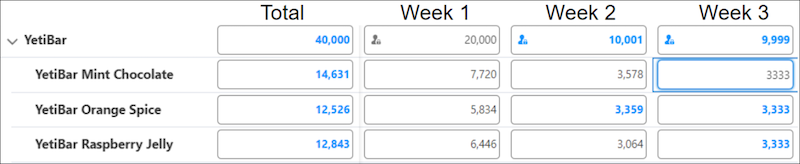
The manual input is then distributed equally among the three products of the category. With Rounding Precision as 0, the number of each of the products is 3333. That means the total value for week 3 becomes 9999, and that’s 1 unit less than the entered amount. If Rounding with Carry Over is the rounding type of the KPI, then rounding is done across weeks to ensure that the total value of the product category doesn’t change. So, the extra unit is adjusted in the previous week. So, the manual input for week 2 is changed to 10,001.
To ensure that the value you entered remains unchanged, use the rounding type Rounding within Period. When you use this rounding type, the manual input remains the same, and the values that aren’t related to the manual input remain the same.
For this example, with Rounding within Period, the units of products for week 3 are distributed as 3334, 3333, and 3333. This distribution keeps the total value for week 3 as 10,000, while the total value for week 2 remains unchanged.
These examples explain how KPI values are calculated when the rounding type of the KPI is Rounding within Period.
KPIs are distributed based on weekday share profile. When you manually increase the KPI for one product by 3, here’s how the KPI is distributed for each week.

If the rounding precision for the KPI is 0, here’s how the KPI is distributed for each week with carry over.

When you manually adjust the weekly KPI for a product category by 5, here’s how the KPI is distributed.

If the rounding precision is 0, here’s how the KPI is distributed.

The KPI is distributed within the week, and KPI values for other weeks remain unchanged.