The time frame of a KPI is determined based on the object scope and time scope of the KPI.
Required Editions
|
Available in: Lightning Experience Available in: Enterprise and Unlimited Editions where Consumer Goods Cloud is enabled |
Object scope defines the purpose of a KPI. Here are the possible object scopes.
- Promotion
- Promotion Tactic
- Claim Tactic
- Funding
- Account
Time scope defines the timeframe relevant for a KPI calculation. Here are the possible time scopes.
- Complete
- Shipment
- In-store
- Order
- Custom 1
- Custom 2
Here’s how KPI timeframe is determined based on object and time scope:
| Object Scope | Time Scope | Date From | Date Thru |
|---|---|---|---|
| Promotion | Shipment | Shipment Date From of Promotion | Shipment Date Thru of Promotion |
| In-store | Instore Date From of Promotion | Instore Date Thru of Promotion | |
| Order | Order Date From of Promotion | Order Date Thru of Promotion | |
| Complete | Date From of Promotion | Date Thru of Promotion | |
| Custom 1 | Custom 1 Date From of Promotion | Custom 1 Date Thru of Promotion | |
| Custom 2 | Custom 2 Date From of Promotion | Custom 2 Date Thru of Promotion | |
| Promotion Tactic | Shipment | Shipment Date From of Tactic | Shipment Date Thru of Tactic |
| In-store | Instore Date From of Tactic | Instore Date Thru of Tactic | |
| Complete | Date From of Tactic | Date Thru of Tactic | |
| Custom 1 | Custom 1 Date From of Tactic | Custom 1 Date Thru of Tactic | |
| Custom 2 | Custom 2 Date From of Tactic | Custom 2 Date Thru of Tactic | |
| Account | Complete | Date From of Account Plan | Date Thru of Account Plan |
| Claim Tactic | Complete | Date From of Claim Tactic | Date Thru of Claim Tactic |
| Funding | Complete | Date From of Fund | Date Thru of Fund |
A week or month is considered if at least one day of the week or month falls within the timeframe. The values of the KPIs can be edited, calculated, and distributed only for the determined timeframe and the cells that fall outside the timeframe are grayed out.
The calculation results for a KPI are dependent on the configuration of the time scope consideration settings for a sales org. By default, time scope consideration is enabled. But, you can disable it using Custom Settings.
When time scope consideration is enabled, the system considers the object and time scopes defined in the KPI definitions during promotion calculations. But, when it’s disabled, the system internally sets the promotion and tactic time ranges, which isn’t the time scope, to the complete time range of the corresponding promotion.

Here’s a configuration for a Calculated KPI.
- Merge Rule: Sum
- Aggregation Rule: Sum
- Total Calculation Rule: Sum
- Object Scope: Promotion
- Time Scope: Instore
- Measure: ()=>{return 30;}
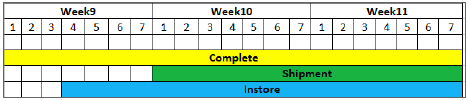
Here’s the timeframe for a promotion.
Here’s how the KPI value is calculated.
- The weekly value at the product level is calculated by applying the formula ()=>{return 30;}.
- The total value at the product level is calculated by applying the total calculation rule of the KPI to the weekly values.
- The total values at the higher levels of hierarchy are calculated by applying aggregation rule of the KPI to the total values at lower levels.

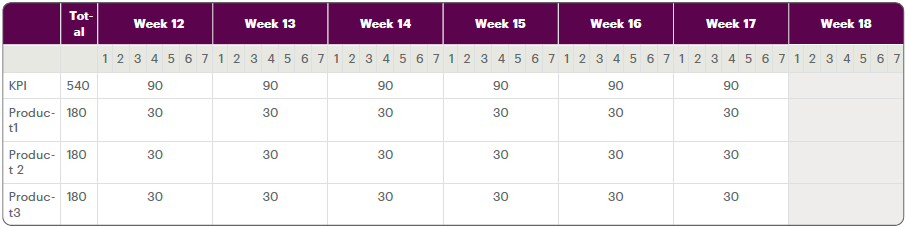
Across time hierarchy, the system distributes the changed total values across only those weeks that have at least one day of the week as part of the time scope of the KPI definition. As the time scope of the selected KPI definition doesn’t have a single day in Week 18, values of this week can’t be calculated. (as shown as the grayed out column in the image).
The image shows the values after calculation:
Here’s a configuration for an Editable KPI.
- Distribution Order: Time -> Planning Hierarchy
- Distribution Type (Time): Equal
- Distribution Type (Planning Hierarchy): Copy
- Edit Mode: Total
- Aggregation Rule: Sum
- Total Calculation Rule: Sum
- Object Scope: Promotion Tactic
- Time Scope: Shipment
Here’s the timeframe for a promotion.
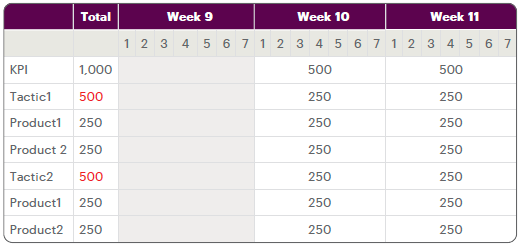
The manual input for Tactic 1 and Tactic 2 total is 500. Here’s how the values are distributed.
- To ensure equal distribution across weeks, a factor is calculated by dividing the manual
input with the total number of days in the shipment timeframe. This factor is then
multiplied with the number of days in the week to calculate the weekly values of a
tactic.Note Across time hierarchy, the system distributes the changed total values across only those weeks that have at least one day of the week as part of the time scope of the KPI definition. So, as the time scope of the selected KPI definition doesn’t have a single day in Week 9, values of this week can’t be distributed (as shown as the grayed out column in the image).
- As the distribution across planning hierarchy is Copy, the distributed weekly values at the tactic level are copied to the corresponding weeks for each product included in the tactic.
- The total value at the product level is calculated by applying the total calculation rule of the KPI to the weekly values.
- The total values at the higher levels of hierarchy (Tactic) are calculated by applying aggregation rule of the KPI to the total values at lower levels.
The image shows the values after distribution.