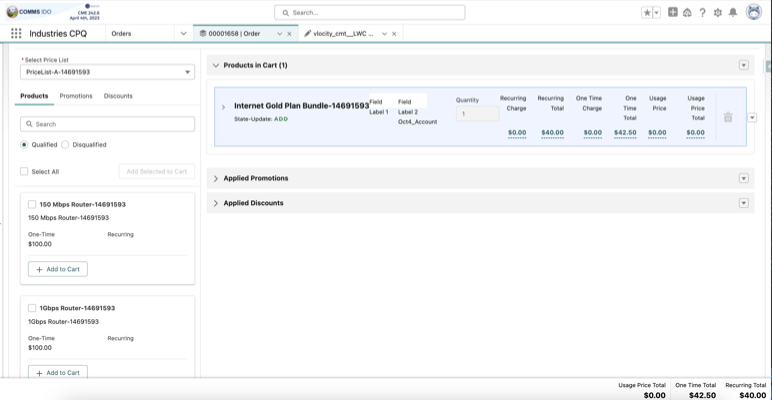
The Additional Line Item Fields customization in Industries CPQ (Configure, Price, Quote) adds fields to the Products in Cart section, providing sales representatives with detailed product information for a more informative cart view.
In Industries CPQ, the Products in Cart section typically displays core information such as
product name, quantity, and price. Using the additionalCustomJson parameter,
you can configure additional fields to meet specific business needs, such as lifecycle status
or billing account name. These fields provide valuable context for sales representatives
during the configuration process.

Salesforce recommends a maximum of seven columns in the cart, including pricing-related columns, for optimal usability.
We now support the optional fields type and formatter to provide greater control over data display. The type field can be defined as date, datetime, number, or text, while the formatter field accepts either percent or currency. Additionally, the percent formatter is applicable only when the type is set to a number.
JSON Structure for Adding Custom Fields
"lineItemCustomFields": [
  {
   "label": "Effective One Time Total",
   "field": "vlocity_cpq9__EffectiveOneTimeTotal__c.value",
   "type": "number",
   "formatter": "currency"
  },
  {
   "label": "Recurring Manual Discount",
   "field": "vlocity_cpq9__RecurringManualDiscount__c.value",
   "type": "number",
   "formatter": "percent"
  },
  {
   "label": "Reference Time",
   "field": "vlocity_cpq9__CatalogItemReferenceDateTime__c.value",
   "type": "datetime"
  }
 ]
Use the above JSON structure to define additional fields. Each entry in the
lineItemCustomFields array represents a single field.
Key Components of the JSON Structure
- lineItemCustomFields: An array containing definitions for each additional field.
- label: The display name of the field, visible as the column header in the cart.
- field: The API path to the data field in the line item JSON structure.

JSON Fields
First Field
{
 "label": "Field Label 1",
 "field": "Product2.vlocity_cmt__LifecycleStatus__c"
}- label: Field Label 1 could be replaced with a user-friendly name like Lifecycle Status.
- field:
"Product2.vlocity_cmt__LifecycleStatus__c"retrieves the Lifecycle Status for each product.
Second Field
{
 "label": "Field Label 2",
 "field": "vlocity_cmt__BillingAccountId__r.Name"
}