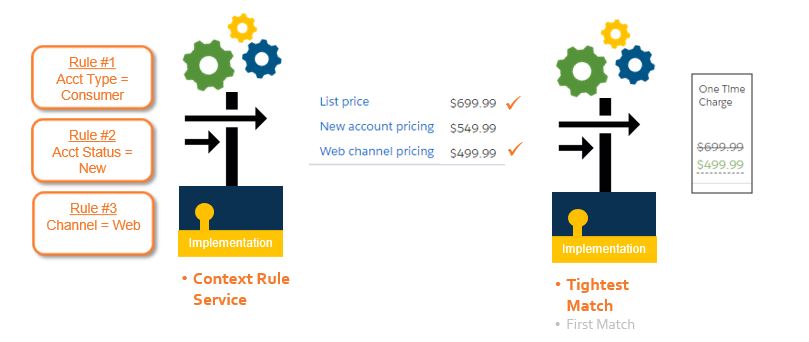
Products can have multiple price list entries across child price lists or in a single price list. You can use context rules to determine which price list entry to apply when the product is added to the cart.
For example, you might want rules like this:
-
Orders placed over the web receive certain prices
-
New customers receive certain prices
-
Geographic regions receive certain prices
In a world of multiple prices, what if the customer is eligible for multiple prices? In the end, a single price must be set. That’s when the TightestMatchInterface comes into play.
TightestMatchInterface
TightestMatchInterface is an interface that is provided as part of the managed package. It is called by the PricingInterface when using either PricingElementServiceImplementation or PricingPlanService implementations. It is not called when using PricingRulesImplementation.
TightestMatchInterface includes two interface implementations: FirstMatchImplementation and TightestMatchServiceImplementation.
-
FirstMatchImplementation ignores any condition weights and selects the first price list entry that it finds.
-
TightestMatchServiceImplementation uses condition weights to determine the “tightest match” price. For more information on condition weights, see Using Condition Weights.

To use condition weights and the tightest match algorithm set the TightestMatchServiceImplementation as the active implementation for the TightestMatchInterface.
Using the TighestMatchInterface and Context Rules to Set the "Tightest Match" Price
Tightest Match User Experience
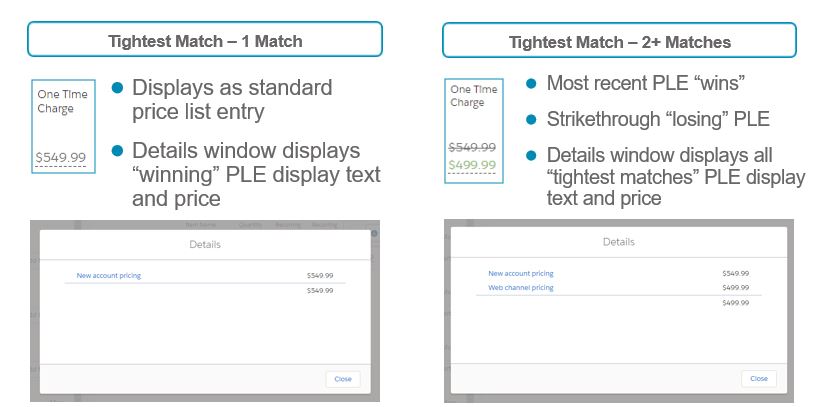
When there is only one “winning” tightest match, the user experience is the same as a standard price list entry.
However, when there are multiple “winning” tightest matches, the most recent price list entry is selected, and the price list entries not selected are displayed in the price Details window.