
The Product Console provides a unified user experience to manage EPC elements in a single, contextual interface. The Product Console is a web-based application for managing the Enterprise Product Catalog.
It gives both business and IT users access to all the product management capabilities they need.
-
Improves usability for product definition, pricing, and structure.
-
Increases productivity for product marketing and admin users.
-
Provides a cohesive view of shared catalog elements across Configure Price Quote, Contract Life Cycle Management, and Order Management.
-
Provides omni-channel capabilities directly within the catalog.
-
Decreases time to market for new promotions and products.
The Product Console provides seamless integration between the shared product catalog and the ability to configure, price, and quote the products in the catalog. The dashboard contains workspaces for product management, pricing, rules, and more. Here, you can access many elements of Industries CPQ that are co-located on the Product Console.
Product managers use the Product Console for the following tasks:
-
Define and maintain product entities.
-
Manage product structure, pricing, rules, and offers.
-
Build foundational constructs, including attributes and picklists.
-
Build metadata constructs, such as product object types.
System administrators use the Product Console for these tasks:
-
Work with predefined objects, for example, to create reusable object types that define properties, such as attributes and fields.
-
Define common layouts for product entities, such as offers or product specifications, that are instantiated from the object types.
-
Perform initial setup tasks at the start of EPC implementation.
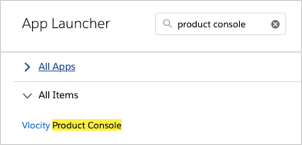
To access the Product Console, in the Lightning interface, click the App Launcher and type Vlocity Product Console in the quick find box.
Click the Vlocity Product Console item.
The Product Console has the following sections:
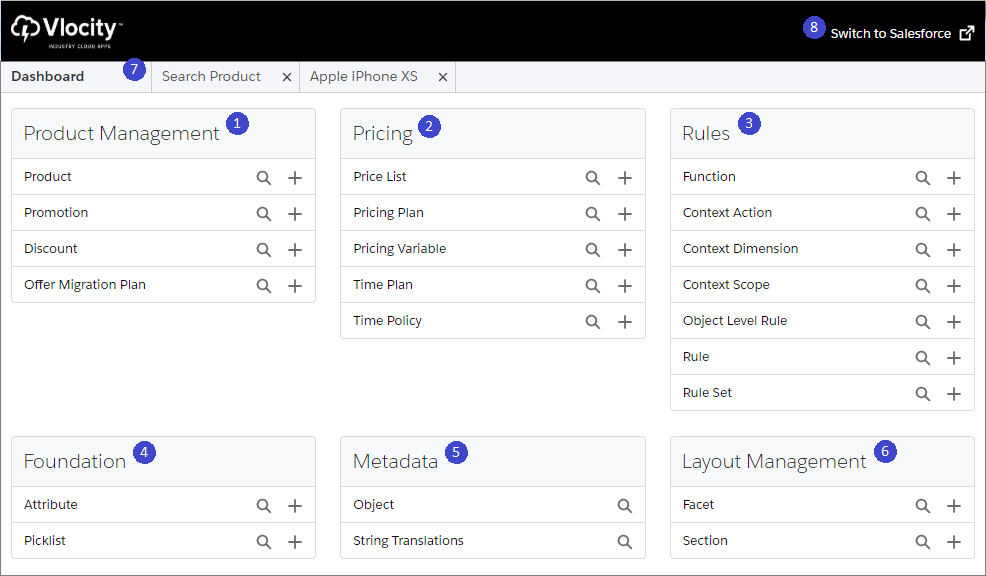
- Product Management: Product Console enables you to perform product management by defining and maintaining product entities. You can create products, promotions, discounts, and offer migration plans.
-
Pricing: Salesforce Industries Communications, Media, and Energy (CME) enables you to price products and promotions according to your business
requirements. CME's pricing solution includes the following benefits.
-
Reusability
-
Categories of pricing such as penalties, charges, and adjustments to existing charges.
-
Settings that determine the frequency of the charge.
-
Updates from previous prices.
-
-
Rules: In Salesforce Industries Communications, Media, and Energy (CME), you can use rules to change standard product and pricing behaviors
in Industries Cart. Vlocity Rules are essential to creating the perfect order. You
control all the products and services you offer to your customer and offer them
at the right prices.
There are two rules frameworks that work in tandem: Context rules and advanced rules.
-
Context rules help you determine which products, promotions, and prices appear in Industries Cart. You can specify when to apply a penalty for cancellations and what the penalty will be.
-
Advanced rules help you design product compatibility rules based on conditions in order line items and related objects. You can also create advanced pricing, availability and eligibility rules.
-
-
Foundations contain attributes and
picklists:
-
An attribute is a property or characteristic. In CME apps, attributes describe profiles and products. An attribute is a property or characteristic. In CME apps, attributes describe profiles and products. Product attributes must be grouped under Categories. For more information, see Product Attributes and Profile Attributes.
-
A picklist is a list of values from which a user can choose. Used in product attributes and in context dimensions for context rules. CME picklists are similar to Salesforce picklists, but are defined in a CME-specific custom object.
-
-
Metatdata contains objects and string
translations:
-
Metadata is the overall definition of the type of information you are storing. For example, the Case object enables you to store information regarding customer inquiries. For each object, your org will have multiple records that store the information about specific instances of that type of data. You might have a case record to store the information about someone’s training inquiry and another case record to store the information about someone’s configuration issue.
-
If your org has multiple languages enabled, string translations let you translate labels in your org to another language.
-
- Layout Management: You can use the Product Console to create a layout for a new product object. You create the base product object-type, assign attributes and field, and define a layout, which consists of creating a new facet and adding sections. You can then create object subtypes instantiated on the base product object-type.
- Move between pages using breadcrumb tabs, while staying within the context of the same object.
- Open the Salesforce interface in a new tab by clicking the Back to Salesforce link.
- Facets for Items in the Product Console
When you find or add a new item, such as a product, attribute, or rule, the page for that item appears, and various facets, such as General Properties, Pricing, or Context Rules, are displayed on the left side as shown in the following example.