
As a fulfillment designer, you can create a technical product to share by all products of the same class, and therefore define a single decomposition relationship once for the class instead for each commercial product.
To share decomposition configurations across multiple products:
-
Create a product with a record type “Class” and define the decomposition against this product.
-
Create new offers that reference this new class, by populating the Parent Class field with the product that you created in step one.
 Note
NoteIf there is no Parent Class field, you can add one. See "Define a Layout with Fields and Attributes."
This type of configuration works with v15.x releases and later of OM.
Starting with the Summer 17 Release, EPC has introduced the concept of ObjectType. Catalog designers can use ObjectType to model products that share the same traits. Use of ObjectType affords inheritance among products declared of the same ObjectType. It also enables inheritance for ObjectTypes themselves. The inheritance means that an attribute defined (bound) to an object type is automatically bound to all products of that specific ObjectType. This is a very powerful concept for product designers.
The following diagram shows how attributes are inherited across a hierarchy of ObjectTypes. For more information, see Create an Object Type
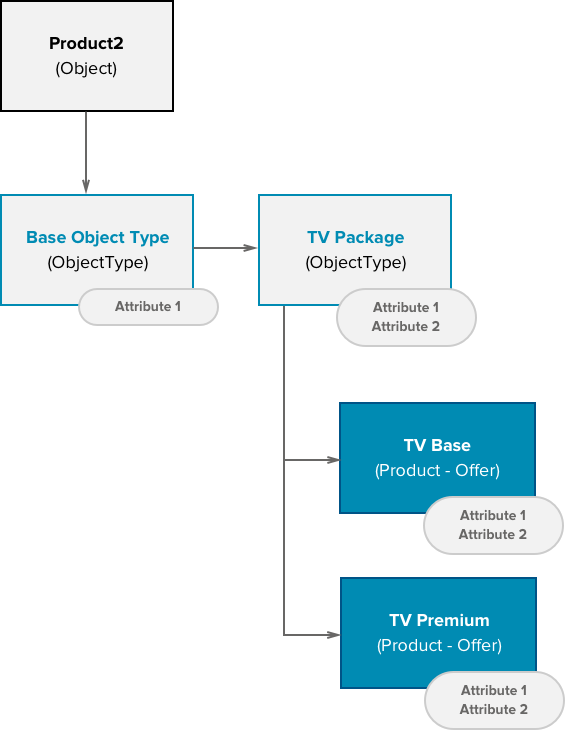
However, Order Management does not currently use ObjectTypes but does use the parent class concept. Catalog designers can take advantage of both concepts at the same time to optimize the way decomposition works.
You can use ObjectType with both commercial and technical products for more effective modeling. As previously mentioned, to enable class-based decomposition, the fulfillment designer creates a class and defines the decomposition rules against the class, then updates the offers to set the Parent Class field to point to the class.
Since the decomposition function maps attributes and fields to technical products, the class must include the same attributes and fields in its configuration. In the Summer 17 Release and later, you can use the ObjectType in the Class definition and thus inherit fields and attributes. This can greatly reduce the amount of work and provides better control of attribute definitions.
The following diagram shows a sample configuration using both ObjectType and Class.
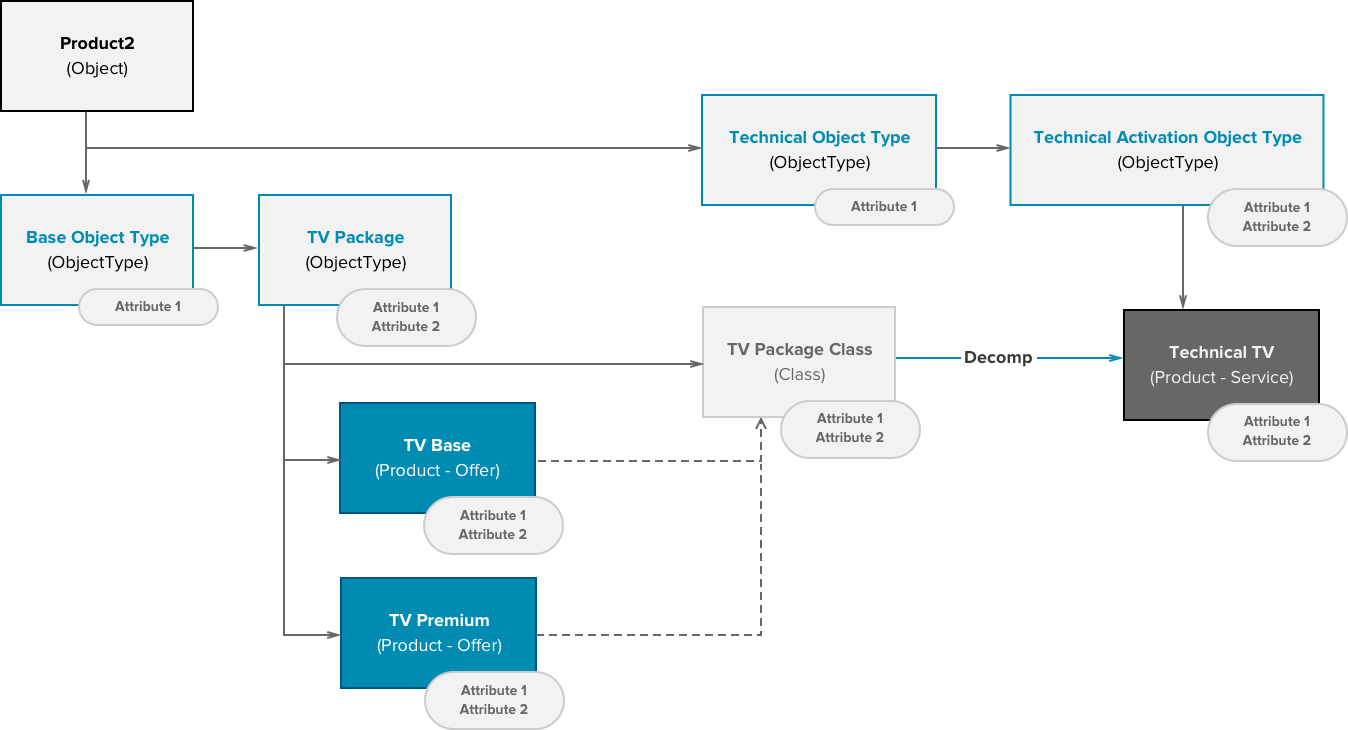
The product configuration is mostly performed through the Product Console. However, there are exceptions. The Product Console does not allow definitions of Classes, which means you must create the class in the Aloha interface.