
Use the agent console to view and manage subscriber requests.
 This feature is part of the Communications Cloud managed package.
The Service Console
Agents' interactions with subscribers are initiated from the Service Console. Agents access the Service Console from the App Launcher.
You can customize the set of tabs displayed by adding, removing, or changing the sequence of tabs.
Customer Interactions
Vlocity Interaction Launcher is minimized on the bottom left of the screen and is available on all pages in the Service Console. Agents click the Vlocity Interaction Launcher tab to bring up the interaction launcher at the start of a customer interaction.
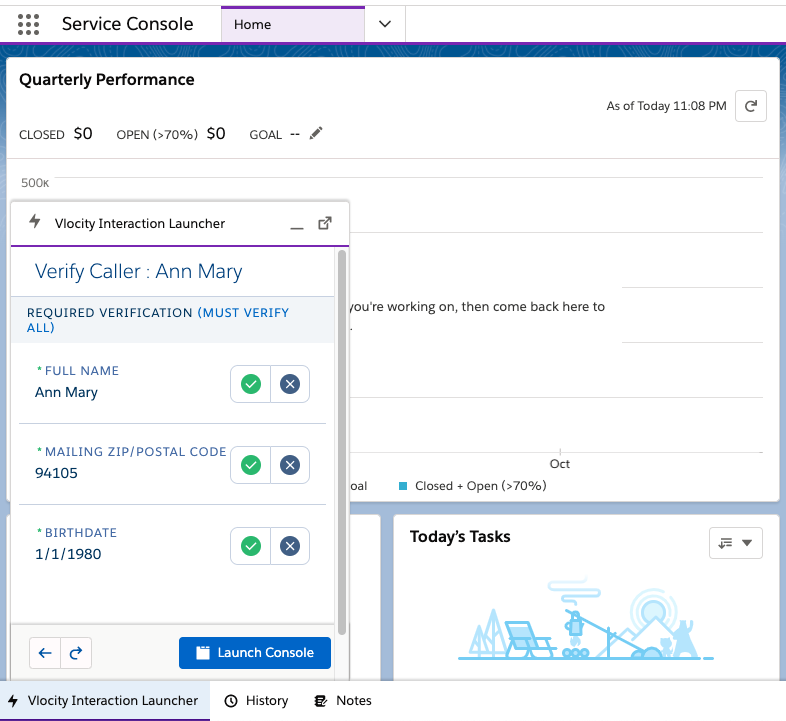
Agents can perform actions such as:
-
Add new subscribers by using the Shop workflow.
-
Verify subscribers by using Vlocity Interaction Launcher.
-
View subscriber information and perform various workflows for subscribers.
Explore Agent Console Workflows
- Add New Subscribers Using Guided Selling in Multiplay Subscription Management (Managed Package)
Your agents can guide new subscribers through the journey of selecting and purchasing an offer. - Update Subscriber Details in Multiplay Subscription Management (Managed Package)
If a subscriber's information need to change, such as a change in address or an alternate phone number, or if some subscriber information is incorrect, agents can update the information at the subscriber's request. - Buy Additional Offers Using Guided Selling in Multiplay Subscription Management (Managed Package)
Your agents can guide subscribers through the journey of selecting and purchasing additional offers. When an agent launches a guided selling workflow for a subscriber, the agent first checks or skips serviceability. The agent then browses and configures products for the subscriber and proceeds to checkout. - Top Up Cash Balance (Managed Package)
This workflow enables agents to increase the cash balance available to a subscriber. A subscriber can top up the balance for their own subscription or for another subscription. A top-up amount of USD 10 or USD 20 is available by default. - Buy Add-On in Multiplay Subscription Management (Managed Package)
This workflow enables agents to purchase add-ons on behalf of a subscriber. Add-ons allow subscribers to associate additional voice, data, or text message usage with their subscription. - Manage Features as an Agent in Multiplay Subscription Management (Managed Package)
Agents can activate or deactivate various mobile subscriptions on behalf of a subscriber. - Unlock a SIM Card (Managed Package)
If a subscriber's SIM card gets locked, for example by entering an incorrect PIN, the subscriber can request a SIM unlock code to unlock their SIM card and reset their PIN. This workflow enables agents to verify the subscriber's ICCID and then provide the SIM unlock code as requested by the subscriber. - Replace a SIM Card (Managed Package)
If a subscriber's SIM card is damaged or if a subscriber buys a new device and their current SIM card doesn't work with the new device, a subscriber might request that their SIM card be replaced. This workflow enables agents to accept a request to replace a SIM card. - Manage Lost or Stolen Device or SIM (Managed Package)
If a subscriber's SIM or device is lost or stolen, the subscriber can request to suspend the SIM card or block the device. Alternatively, the subscriber can request to resume the SIM card or unblock the device. This workflow enables agents to manage SIM cards and associated devices for subscribers. - Change Number for a Subscriber in Multiplay Subscription Management (Managed Package)
This workflow enables agents to change the number assigned to a subscriber based on the subscriber's request.