The pricing variable calculation hook allows you to add custom pricing variable calculations, or to override the out-of-the-box calculations.

Example of adding custom pricing variables
You could add a custom pricing variable called One Time Tax Percent with a code of OT_TAX_PCT and apply that to the One Time Total of each line item in the cart. The resulting taxed amount can then be saved in another custom pricing variable called One Time Total With Tax with a code of OT_WITH_TAX.
You could then calculate the taxed value in the hook as something similar to the following calculation, which you would save in the variable map: OT_WITH_TAX = OT_STD_PRC_TOTAL + (OT_STD_PRC_TOTAL * OT_TAX_PCT/100)
The default calculation formulas for the pricing variables are implemented by the following class: DefaultPricingVariableCalcImplementation. You can use a hook to this class to override the calculations or to add calculations for custom pricing variables.
In this example, we will define the hook class to be PricingVariableMapHookImplementation. An instance of this class will be called both before and after the DefaultPricingVariableCalcImplementation calculate method is called, and the hook logic will append both .PreInvoke and .PostInvoke to the methods of the class being intercepted.
-
PricingVariableMapHookImplementation.invokeMethod('calculate.PreInvoke', input, output) -
DefaultPricingVariableCalcImplementation.invokeMethod('calculate', input, output) -
PricingVariableMapHookImplementation.invokeMethod('calculate.PostInvoke', input, output)
Note that there are two separate instances of PricingVariableMapHookImplementation created by the InvokeService, but the input and output maps passed into their methods are the same instance. In fact, these maps are the same maps shared by all three invokeMethods.
Input Map
The input map has the following information. This is default sample code and does not have usage pricing enabled.
{
  "paymentMode": null,
  "itemId": "80246000003urCpAAI",
  "isRoot": true,
  "parentItemEffectiveQuantity": null,
  "pricingLogDataMap": {

  },
  "pricingVariableMap": {
    "ROLLUP_OT_STD_PRC_TOTAL": 0.00,
    "ROLLUP_REC_MNTH_STD_PRC_TOTAL": 55.00,
    "OT_STD_PRC_CALC": 0.00,
    "OT_STD_PRC": 0.00,
    "REC_MNTH_STD_PRC_DISC_PCT_MAN": 0.00,
    "OT_STD_PRC_DISC_PCT_MAN": 0.00,
    "LINE_QUANTITY": 1.00,
    "REC_MNTH_STD_PRC_TOTAL": 0.00,
    "REC_MNTH_STD_PRC_CALC": 0.00,
    "REC_MNTH_STD_PRC": 0.00,
    "OT_STD_PRC_TOTAL": 0.00
  }
}|
Field |
Description |
|---|---|
|
paymentMode |
This field's value is set to either Currency or Loyalty when LoyaltyMode is turned on in the system. This field's value comes from the |
|
itemId |
This field's value is the ID of the line item object (OpportunityLineItem, QuoteLineItem, or OrderItem) whose variable map is currently being calculated. |
|
isRoot |
This field indicates whether this line item is the root of the line item hierarchy. It's either true or false. |
|
parentItemEffectiveQuantity |
This field indicates the effectiveQuantity of the parent of the line item. The value is null when isRoot = true since the root line item does not have a parent. parentItemEffectiveQuantity is calculated by recursively multiplying the ancestor quantities from the root down to the current item's parent level. |
|
pricingLogDataMap |
This map contains any message strings coming from the calculate method. This map is empty in the input but is filled in the output. It is keyed by the pricing variable code and contains a format string and the data to fill the string information. This information is shown in the price Details popup for this pricing variable. |
|
pricingVariableMap |
This map contains the current values of the pricing variables for the line item before they are calculated by the |
Output Map
The output map has the following information:
{
  "pricingLogDataMap": {
    "OT_LTY_TOTAL": {
      "data": [
        "OT_LTY_TOTAL",
        "0.00",
        "ROLLUP_OT_LTY_TOTAL",
        "0.00",
        "LINE_QUANTITY",
        "1.00"
      ],
      "format": "[{0} ({1}) + Rollup {2} ({3})] x {4} ({5})"
    },
    "REC_MNTH_STD_PRC_TOTAL": {
      "data": [
        "REC_MNTH_STD_PRC_CALC",
        "0.00",
        "REC_MNTH_STD_PRC_TOTAL",
        "55.00",
        "LINE_QUANTITY",
        "1.00"
      ],
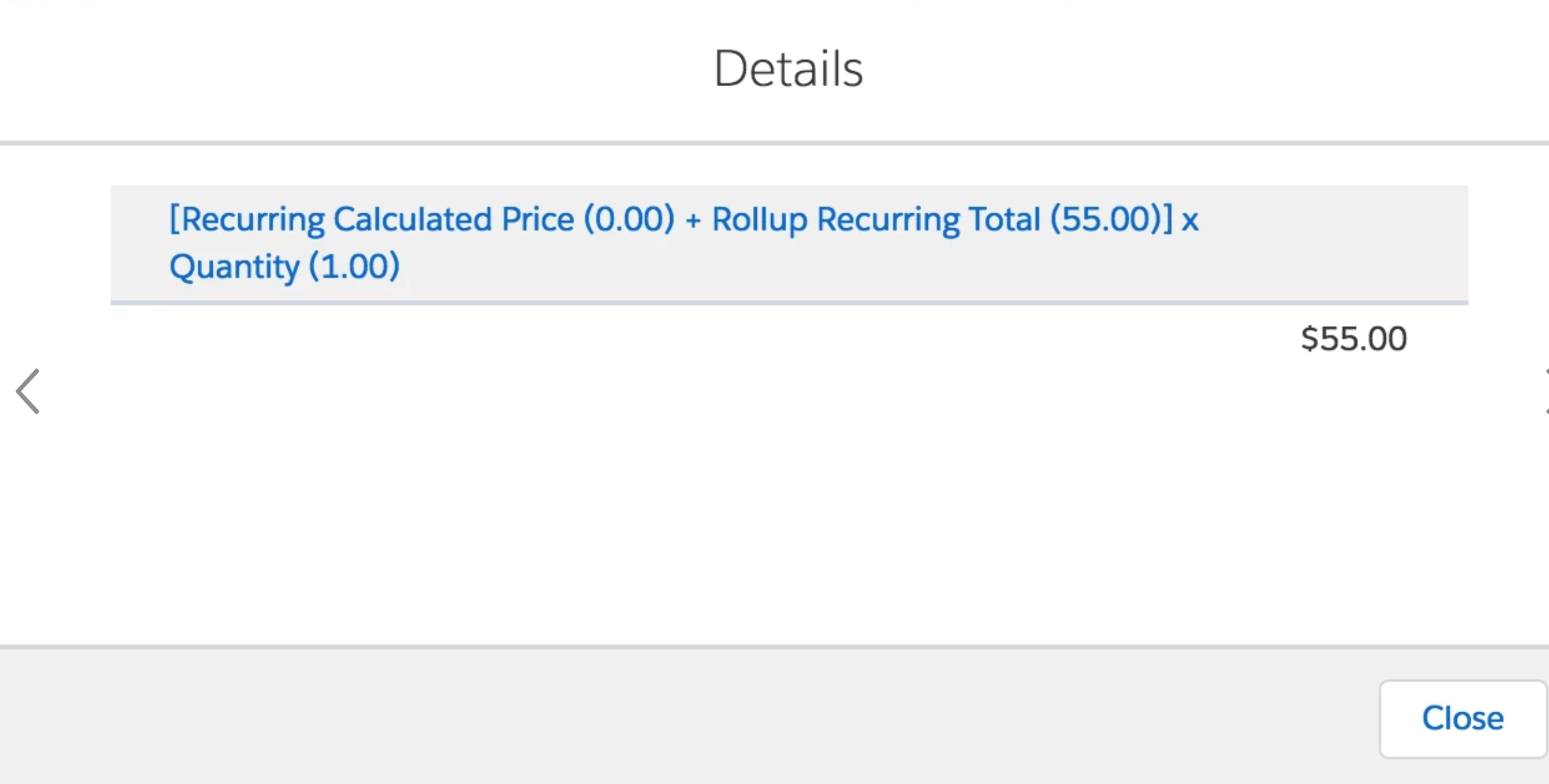
      "format": "[{0} ({1}) + Rollup {2} ({3})] x {4} ({5})"
    },
    "REC_MNTH_STD_PRC_CALC": {
      "data": [
        "REC_MNTH_STD_PRC",
        "0.00",
        "REC_MNTH_STD_PRC_DISC_PCT_MAN",
        "0.00"
      ],
      "format": "{0} ({1}) - {2} ({3}%)"
    },
    "OT_STD_PRC_TOTAL": {
      "chargeTiming": "One-Time",
      "data": [
        "OT_STD_PRC_CALC",
        "0.00",
        "OT_STD_PRC_TOTAL",
        "0.00",
        "LINE_QUANTITY",
        "1.00"
      ],
      "format": "[{0} ({1}) + Rollup {2} ({3})] x {4} ({5})"
    },
    "OT_STD_PRC_CALC": {
      "data": [
        "OT_STD_PRC",
        "0.00",
        "OT_STD_PRC_DISC_PCT_MAN",
        "0.00"
      ],
      "format": "{0} ({1}) - {2} ({3}%)"
    }
  },
  "pricingVariableMap": {
    "DISP_OT_LTY": 0.00,
    "EFF_OT_LTY_TOTAL": 0.00,
    "ROLLUP_OT_LTY_TOTAL": 0.00,
    "OT_LTY_TOTAL": 0.00,
    "OT_LTY": 0.00,
    "EFFECTIVE_QUANTITY": 1.00,
    "DISP_OT_STD_PRC": 0.00,
    "EFF_REC_MNTH_STD_PRC_TOTAL": 55.00,
    "EFF_OT_STD_PRC_TOTAL": 0.00,
    "ROLLUP_OT_STD_PRC_TOTAL": 0.00,
    "ROLLUP_REC_MNTH_STD_PRC_TOTAL": 55.00,
    "OT_STD_PRC_CALC": 0.00,
    "OT_STD_PRC": 0.00,
    "REC_MNTH_STD_PRC_DISC_PCT_MAN": 0.00,
    "OT_STD_PRC_DISC_PCT_MAN": 0.00,
    "LINE_QUANTITY": 1.00,
    "REC_MNTH_STD_PRC_TOTAL": 55.00,
    "REC_MNTH_STD_PRC_CALC": 0.00,
    "REC_MNTH_STD_PRC": 0.00,
    "OT_STD_PRC_TOTAL": 0.00
  },
  "errorCode": "INVOKE-200",
  "error": "OK"
}|
Field |
Description |
|---|---|
|
pricingLogDataMap |
This map contains any message strings coming from the calculate method. It is keyed by the pricing variable code and contains a format string and the data to fill the string information. This information is shown in the price Details popup for this pricing variable. The messages are for pricing variables whose values are calculated inside the calculate method. The format property is a string format with indexed placeholders to be filled in by the values in the data property. Any pricing variable code in the data is replaced by its bound field label, if any. See the example after this table. A simple message can be passed in for a pricing variable, as in the following example:
|
|
pricingVariableMap |
This map contains the calculated values of the pricing variables after it has gone through the DefaultPricingVariableCalcImplementation calculate method. |
|
errorCode |
An error code is returned by the InvokeService if there was any exception thrown.
|
|
error |
OK if no exception. Otherwise the exception message is returned in this property. |
Example Hook Class
In this example hook, we will change how REC_MNTH_STD_PRC_TOTAL is calculated.
It is currently calculated by DefaultPricingVariableCalcImplementation as:
REC_MNTH_STD_PRC_TOTAL = (REC_MNTH_STD_PRC_CALC + ROLLUP_REC_MNTH_STD_PRC_TOTAL) * LINE_QUANTITY;
We will change it to the following expression:
REC_MNTH_STD_PRC_TOTAL = (REC_MNTH_STD_PRC_CALC * LINE_QUANTITY) + ROLLUP_REC_MNTH_STD_PRC_TOTAL;
We will do a similar thing for OT_STD_PRC_TOTAL.
It is currently calculated as:
OT_STD_PRC_TOTAL = (OT_STD_PRC_CALC + ROLLUP_OT_STD_PRC_TOTAL) * LINE_QUANTITY
We will change it to the following expression:
OT_STD_PRC_TOTAL = (OT_STD_PRC_CALC * LINE_QUANTITY) + ROLLUP_OT_STD_PRC_TOTAL
We make our changes in calculate.PostInvoke since we want to override the default calculation.
Note that the calculate method is called first for all the leaf nodes of the line item hierarchy, and then for their parent level all the way up to the root. That is, each child line item has to be calculated first before their parents.
This is true because the REC_MNTH_STD_PRC_TOTAL and OT_STD_PRC_TOTAL of each child is rolled up to the ROLLUP_REC_MNTH_STD_PRC_TOTAL and ROLLUP_OT_STD_PRC_TOTAL of their parent line item.
This rollup logic is automatically done outside of the calculate method and is based on the rollup pricing variables' definitions where they are defined as having Scope = Rollup and Applies To Variable, which is the pricing variable on the child to rollup.
global with sharing class PricingVariableMapHookImplementation implements vlocity_cmt.VlocityOpenInterface{

    global Boolean invokeMethod(String methodName, Map<String, Object> input, Map<String, Object> output, Map<String, Object> options)
    {
        try
        {
            System.debug('____ PricingVariableMapHookImplementation ' + methodName);

            if (methodName.equalsIgnoreCase('calculate.PreInvoke'))
            {
                // dump the input
                System.debug('--- calculate.PreInvoke input: ' + JSON.serialize(input));
            }
            else if (methodName.equalsIgnoreCase('calculate.PostInvoke'))
            {
                // log the output
                System.debug('--- calculate.PostInvoke output: ' + JSON.serialize(output));

                // Retrieve the pricing variable map from the output
                Map<String, Object> pricingVariableCodeToValueMap = (Map<String, Object>)output.get('pricingVariableMap');

                // Retrieve the pricing log data map from the output
                Map<String, Object> pricingLogDataMap = (Map<String, Object>)output.get('pricingLogDataMap');

                // Retrieve the isRoot flag from the input
                Boolean isRoot = (Boolean)input.get('isRoot');

                // Get the Line quantity value
                Decimal LINE_QUANTITY = (Decimal)pricingVariableCodeToValueMap.get('LINE_QUANTITY');

                // Get the REC_MNTH_STD_PRC_CALC pricing variable value
                Decimal REC_MNTH_STD_PRC_CALC = (Decimal)pricingVariableCodeToValueMap.get('REC_MNTH_STD_PRC_CALC');

                // Get the ROLLUP_REC_MNTH_STD_PRC_TOTAL pricing variable value
                Decimal ROLLUP_REC_MNTH_STD_PRC_TOTAL = (Decimal)pricingVariableCodeToValueMap.get('ROLLUP_REC_MNTH_STD_PRC_TOTAL');

                // Override the default calculation formula. The formula being overridden is:
                // REC_MNTH_STD_PRC_TOTAL = (REC_MNTH_STD_PRC_CALC + ROLLUP_REC_MNTH_STD_PRC_TOTAL) * LINE_QUANTITY;
                Decimal REC_MNTH_STD_PRC_TOTAL = (REC_MNTH_STD_PRC_CALC * LINE_QUANTITY) + ROLLUP_REC_MNTH_STD_PRC_TOTAL;

                // Save the new REC_MNTH_STD_PRC_TOTAL rounded to 2 decimals in the pricing variable map of the line item
                pricingVariableCodeToValueMap.put('REC_MNTH_STD_PRC_TOTAL', REC_MNTH_STD_PRC_TOTAL.setScale(2, RoundingMode.HALF_UP));

                // Set the new pricing details information for the REC_MNTH_STD_PRC_TOTAL
                pricingLogDataMap.put('REC_MNTH_STD_PRC_TOTAL',
                    new Map<String, Object>{
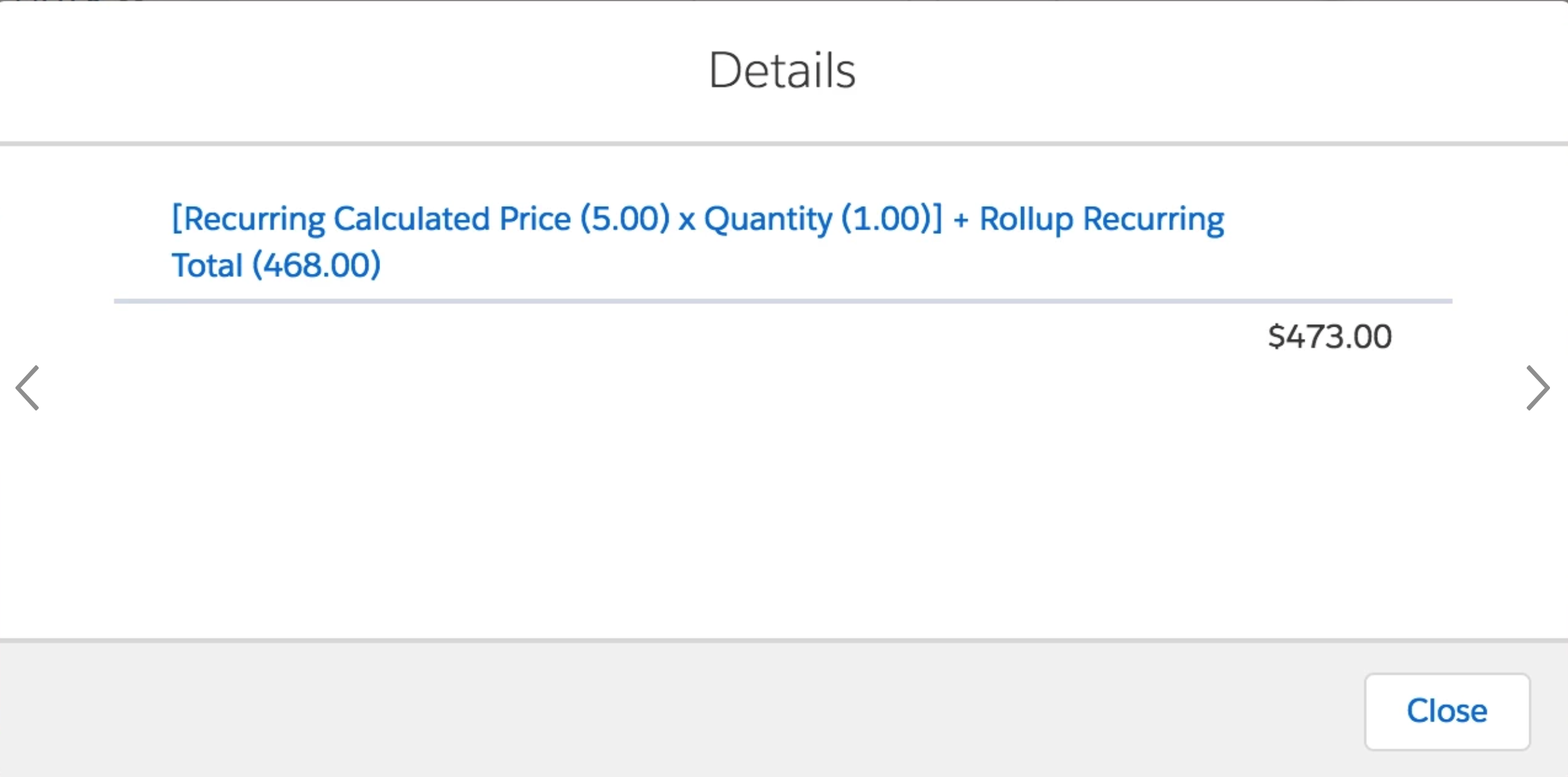
                        'format'=>'[{0} ({1}) x {2} ({3})] + Rollup {4} ({5})',
                        'data'=>new List<String>{'REC_MNTH_STD_PRC_CALC',                      // replaces {0}
                                                  String.valueOf(REC_MNTH_STD_PRC_CALC),       // replaces {1}
                                                 'LINE_QUANTITY',                              // replaces {2}
                                                 String.valueOf(LINE_QUANTITY),                // replaces {3}
                                                 'REC_MNTH_STD_PRC_TOTAL',                     // replaces {4}
                                                 String.valueOf(ROLLUP_REC_MNTH_STD_PRC_TOTAL) // replaces {5}
                                             }});

                // If this is the root, then set the EFF_REC_MNTH_STD_PRC_TOTAL of the line item to be the same as
                // REC_MNTH_STD_PRC_TOTAL value. EFF_REC_MNTH_STD_PRC_TOTAL participates in a rollup summary field in the parent header
                if (isRoot)
                {
                    Decimal EFF_REC_MNTH_STD_PRC_TOTAL = REC_MNTH_STD_PRC_TOTAL;
                    pricingVariableCodeToValueMap.put('EFF_REC_MNTH_STD_PRC_TOTAL', EFF_REC_MNTH_STD_PRC_TOTAL.setScale(2, RoundingMode.HALF_UP));
                }

                // Do the same for OT_STD_PRC_TOTAL

                // Get the OT_STD_PRC_CALC pricing variable value
                Decimal OT_STD_PRC_CALC = (Decimal)pricingVariableCodeToValueMap.get('OT_STD_PRC_CALC');

                // Get the ROLLUP_REC_MNTH_STD_PRC_TOTAL pricing variable value
                Decimal ROLLUP_OT_STD_PRC_TOTAL = (Decimal)pricingVariableCodeToValueMap.get('ROLLUP_OT_STD_PRC_TOTAL');

                // Override the default calculation formula. The formula being overridden is:
                // OT_STD_PRC_TOTAL = (OT_STD_PRC_CALC + ROLLUP_OT_STD_PRC_TOTAL) * LINE_QUANTITY;
                Decimal OT_STD_PRC_TOTAL = (OT_STD_PRC_CALC * LINE_QUANTITY) + ROLLUP_OT_STD_PRC_TOTAL;

                // Save the new OT_STD_PRC_TOTAL rounded to 2 decimals in the pricing variable map of the line item
                pricingVariableCodeToValueMap.put('OT_STD_PRC_TOTAL', OT_STD_PRC_TOTAL.setScale(2, RoundingMode.HALF_UP));

                // Set the new pricing details information for the OT_STD_PRC_TOTAL
                pricingLogDataMap.put('OT_STD_PRC_TOTAL',
                    new Map<String, Object>{
                        'format'=>'[{0} ({1}) x {2} ({3})] + Rollup {4} ({5})',
                        'data'=>new List<String>{'OT_STD_PRC_CALC',                      // replaces {0}
                                                  String.valueOf(OT_STD_PRC_CALC),       // replaces {1}
                                                 'LINE_QUANTITY',                        // replaces {2}
                                                 String.valueOf(LINE_QUANTITY),          // replaces {3}
                                                 'OT_STD_PRC_TOTAL',                     // replaces {4}
                                                 String.valueOf(ROLLUP_OT_STD_PRC_TOTAL) // replaces {5}
                                             }});

                // If this is the root, then set the EFF_OT_STD_PRC_TOTAL of the line item to be the same as
                // OT_STD_PRC_TOTAL value. EFF_OT_STD_PRC_TOTAL participates in a rollup summary field in the parent header
                if (isRoot)
                {
                    Decimal EFF_OT_STD_PRC_TOTAL = OT_STD_PRC_TOTAL;
                    pricingVariableCodeToValueMap.put('EFF_OT_STD_PRC_TOTAL', EFF_OT_STD_PRC_TOTAL.setScale(2, RoundingMode.HALF_UP));
                }
            }
            return true;
        }
        catch (Exception ex)
        {
            System.debug('--- Exception: ' + ex.getMessage());
            System.debug('--- Stack Trace: ' + ex.getStackTraceString());
            throw ex;
        }
    }
}
Setting Up the Hook
Create an Interface called DefaultPricingVariableCalcImplementaInterface and set PricingVariableMapHookImplementation as the implementation.
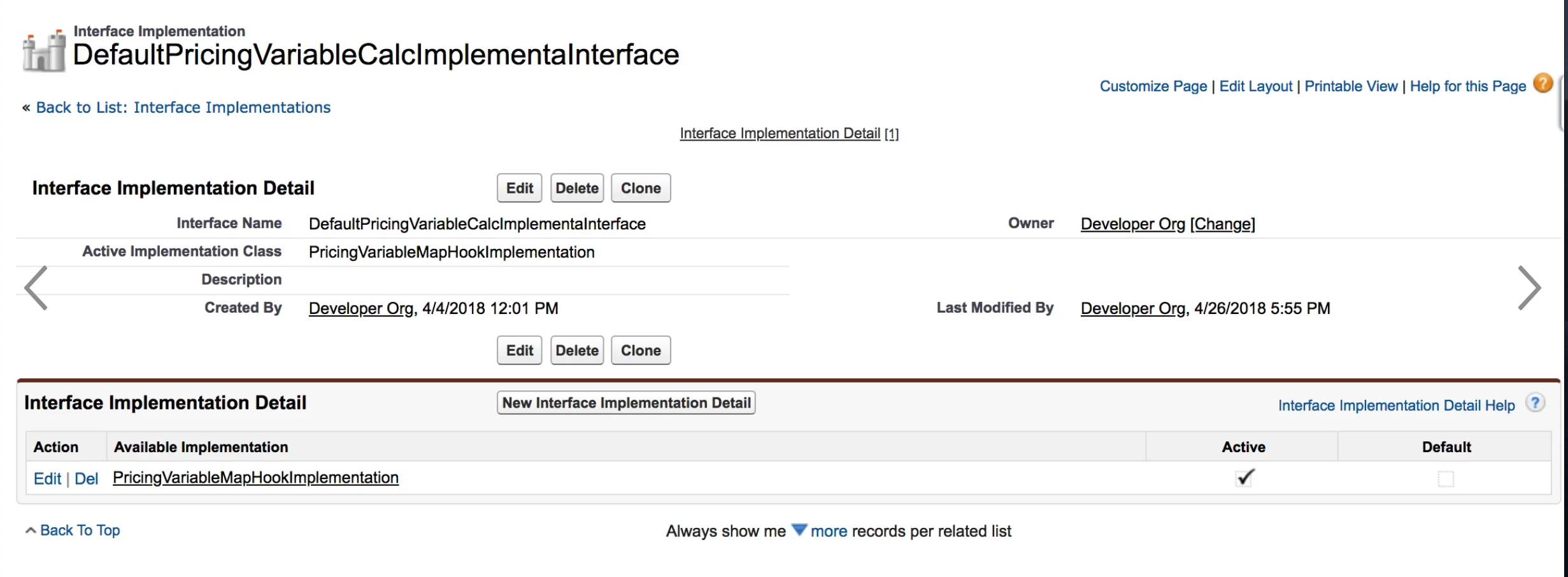
In our hook example, we set DefaultPricingVariableCalcImplementaInterface active implementation to be PricingVariableMapHookImplementation and PricingInterface active implementation to be PricingPlanService.
Now we test the hook and modified calculation by adding a product to the cart or forcing a pricing event by changing the quantity of a line item or changing attribute values. The new calculation formula is reflected in the Recurring Totals and One Time Totals in the CPQ interface. As well, the new detail message from the hook class appears in the totals details, as in the example below:
To revert to the out of the box behavior, de-activate the PricingVariableMapHookImplementationor delete the DefaultPricingVariableCalcImplementaInterface in the Interface Implementation view.
Names of Elements
Note the name of the DefaultPricingVariableCalcImplementaInterface interface. The last part of the name is "ImplementaInterface" instead of "ImplementationInterface".
Here's why:
The name of the class we are intercepting is DefaultPricingVariableCalcImplementation. The InvokeService appends Hook to this class name, making the new name: DefaultPricingVariableCalcImplementationHook.
However, this class name is too long and is truncated to 36 characters, making it: DefaultPricingVariableCalcImplementa (the last few letters are missing). Then the InvokeService appends Interface to that new name, arriving at the final name (DefaultPricingVariableCalcImplementaInterface), which is then used to look for the corresponding Active Implementation Name.
Whenever a new Interface Implementation and active Interface Implementation detail record is created or updated, the interface name (minus the Interface string) and the name of its active implementation class are cached in the Custom Class Implementation custom setting through the triggers of these objects. Doing so reduces SOQL queries to look for the implementation class names during runtime. Instead, they are retrieved from the Custom Class Implementation custom setting.
For example
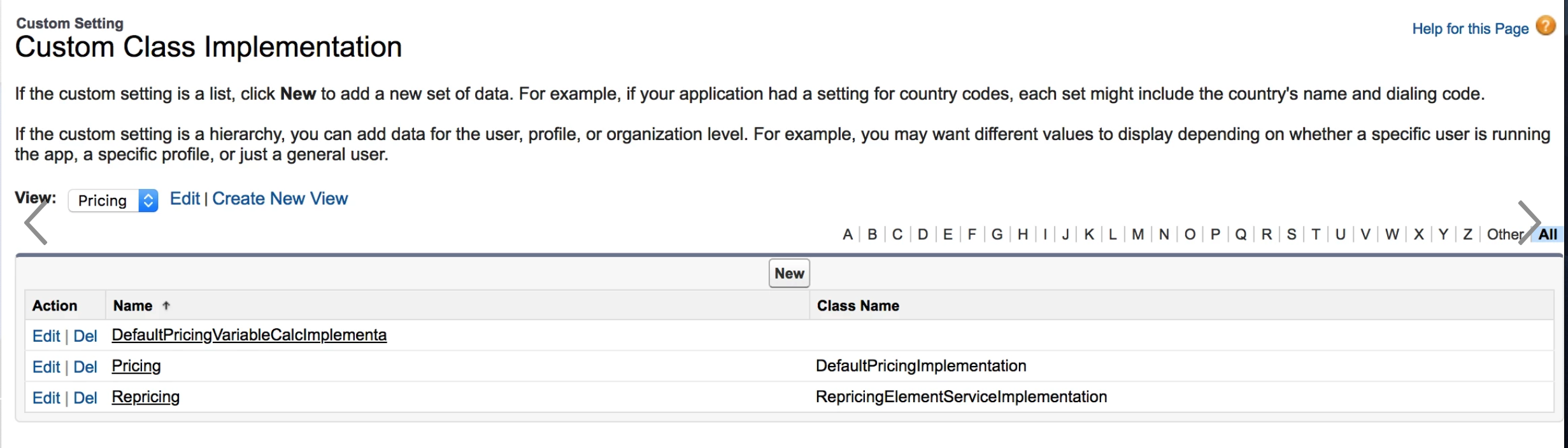
If the Interface Implementation is PricingInterface, and the Active Implementation Detail is PricingPlanService, then under Setup : Custom Settings : Custom Class Implementation : Manage, there will be an entry for Name = Pricing (the Interface string is stripped off) and another entry for Class Name = PricingPlanService.
When we set up our hook interface, there is a corresponding custom setting created where Name is DefaultPricingVariableCalcImplementa (the Interface string is stripped off) and Class Name is PricingVariableMapHookImplementation.
The name of the interface has to fit within the maximum 40 character limit of the Custom Class Implementation custom setting name field. This is why the InvokeService truncates to 36 characters.
When you de-activate an active implementation, the custom setting class name value for the interface will be null. When you activate another implementation, the custom setting class name value for the interface is updated to the active implementation class name. The screenshot here shows the state of the Custom Class Implementation custom setting if the PricingInterface active implementation is DefaultPricingImplementation and DefaultPricingVariableCalcImplementaInterface active implementation is deactivated.