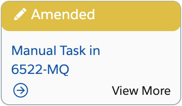
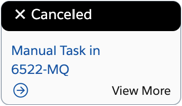
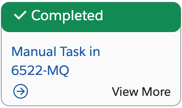
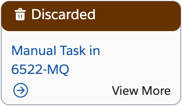
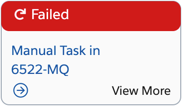
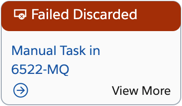
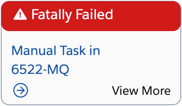
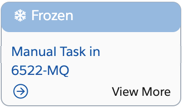
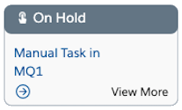
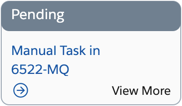
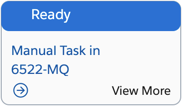
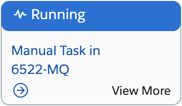
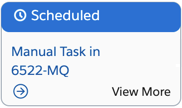
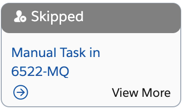
Each orchestration item in an orchestration plan is given a color that indicates its state. You can glance at the orchestration plan to get an idea of the states of the items in that plan.
This table describes each state with a description of what that state means in the orchestration process.

|
Image and name of State |
Description |
|---|---|
|
Amended: This item has been amended by a supplemental order. This item isn't executed. Depending on whether an amend orchestration plan requires it, a new supplemental order item might be created to represent the new, amended, order requirements. |
|
|
Canceled: This item has been canceled. |
|
|
Completed: This item has been completed. |
|
|
Discarded: This item hadn't been executed when a supplemental order required that it be canceled. This item isn't executed. |
|
|
Failed: This item has failed and will be retried. Note: This state and "Fatally Failed" appear in the same color. |
|
|
Failed Discarded: This item has failed and a supplemental order specifies that it's not needed. |
|
|
Fatally Failed: This item has failed and retries have failed as well, so the item will not be executed. Note: This state and "Failed" appear in the same color. |
|
|
Frozen: This item is temporarily frozen because a fulfillment operator has begun the process to amend or cancel an order. |
|
|
On Hold: This item is waiting for input before it can move to the next state. For example, callouts are moved to this state if they're ready to run, but their associated system interface is in Offline mode. Note: On Hold is the same color as Pending, but with an icon next to the state name. |
|
|
Pending: This item is waiting for prerequisites to finish before moving to the next state. Note: Pending is the same color as On Hold, but without an icon next to the state name. |
|
|
Ready: This item is ready to run, but hasn't started running yet. For example, it might be a manual task that no one has started working on yet. Note: Ready is the same color as Running, but without an icon next to the state name. |
|
|
Running: This item is running. Note: Running is the same color as Ready, but with an icon next to the state name. |
|
|
Scheduled: This item has been scheduled to be processed at a later date. It will not be processed until that date, even if all of its prerequisite tasks have completed. |
|
|
Skipped: This item has been skipped because of conditions that were set up in the orchestration plan definition. That is, the orchestration plan definition required that this item be skipped under certain circumstances, and those circumstances have come to pass. |