
Jeopardy dates and time intervals for Orders are:
-
Requested Completion Date: Requires user input at the order entry stage.
-
Due Date: Calculated expected or real completion date of the order, and is equal to the latest Due Date of tasks in the Orchestration Plan
-
Jeopardy Safety Interval and unit: User input at the Order Entry stage. Set the interval to a number, and then set the Unit to a value (like seconds, or calendar days).
These settings count back from the requested completion date. For example, if you set the requested completion date to the 4th of March, and the jeopardy safety interval and unit to three days, then the order goes yellow if it's not complete by the 1st of March (that is, three days before the requested completion date).
For Order Management Plus only, jeopardy dates for Orchestration Plans are:
-
Plan Scheduling Due Date: Datetime for recalculating the plan schedule to run the daily batch job. Set as the earliest Due Date for orchestration items in Ready/Running/Fatally Failed states. If left blank, then the plan is not scheduled. This field is set blank when the plan is completed
For Order Management Plus only, jeopardy scheduling controls on the Orchestration Plan Definition are:
-
Is Scheduling Enabled: Enable or disable jeopardy parameters recalculation for all tasks related to the plan definition. This setting is unchecked (disabled) by default. Calculation of jeopardy parameters for Order and Order Items are enabled if at least one plan definition for the related orchestration plan has scheduling enabled.
-
Scheduling expiration interval: Defines a duration in seconds to monitor overdue tasks, starting from task creation date. Once the scheduling expiration interval is reached, jeopardy statuses for tasks and Order due date calculation no longer occur, meaning scheduling has expired. This setting enables you to switch off Orchestration Plan re-scheduling after a period of time. Orders and Order Items with expired scheduling are not updated through Order Management Plus to Salesforce synchronization.
Jeopardy dates for Orchestration Items are:
-
Requested Start Date: Requires user input.
-
Requested Completion Date: Requires user input.
-
Start Date: Calculated expected start date of the task, and is equal to the Requested Start Date, current date, or maximum Due Date of the previous tasks, whichever is latest.
-
Due Date: Calculated expected completion date of the task or expected end date, and is equal to the Start Date of the task plus Item Length. Set to the current time of a running task if the task is overdue.
Jeopardy time intervals for Orchestration Item Definition are:
-
Jeopardy Safety Interval and unit: User input at the Order Entry stage. Set the interval to a number, and then set the Unit to a value (like seconds, or calendar days).
These settings count back from the requested completion date. For example, if you set the requested completion date to the 4th of March, and the jeopardy safety interval and unit to three days, then the order goes yellow if it's not complete by the 1st of March (that is, three days before the requested completion date).
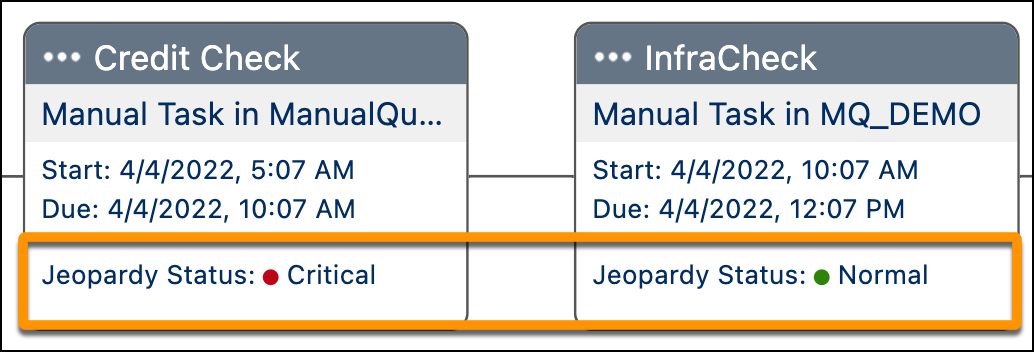
When the plan starts, the first manual task goes to ready state. The second manual task depends on the first task and is in pending state. The due date updates and moves along with the current time after the due date elapses on Ready state items. Expected Completion Date re-calculates regularly, so if the Order Due Date is passed, then the plan expected completion date is moved until the plan is finished.
Start and Due Date, as well as jeopardy status, appear on Tasks in the Plan View.
In the Decomposition view, if an order is in jeopardy, then the order is highlighted in red.