
After you submit an order, you can cancel or modify it. But it must have a status of in-progress, and it can't be past the point of no return (PONR). If Order Management (OM) has fulfilled the order, you can amend the order by creating a follow-on order and submit the changes to be queued until OM fulfills the original order.
When you create and submit an order, the order status changes to in-progress, and Industries Order Management (OM) processes it and fulfills the order. An in-flight order is an order (an original or supplemental order) that is submitted and is not fulfilled. In Winter '20 and later, the In-Flight Amendments feature enables you to amend or cancel your order by using supplemental or follow-on orders. See In-Flight Amendments and In-Flight Amendments. Your organization defines the PONR, as explained in Configuring the Point of No Return.
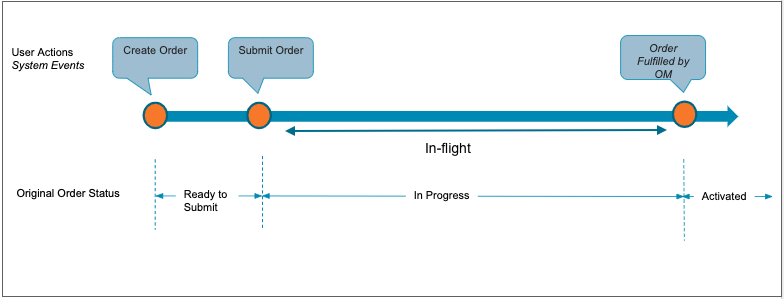
Supplemental Orders
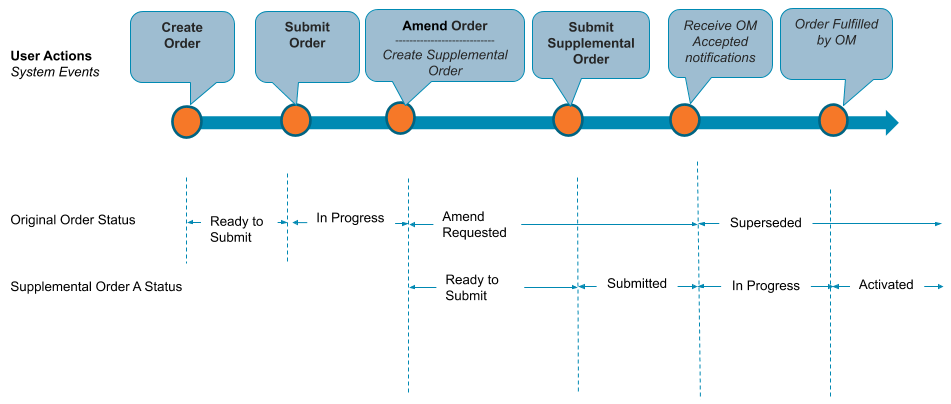
A supplemental order is an order that Industries CPQ creates when you amend or cancel an in-flight order that has not passed PONR. For example, when you submit an order in the Industries CPQ Cart, the order status changes to in-progress for OM to process it further. However, if you want to make changes to the order you submitted, such as change the color of the iPhone you selected or add a product, Industries CPQ creates a supplemental order. You can amend, discard, or cancel a supplemental order. A supplemental order replaces the original in-flight order, and Industries CPQ stops processing the original order after the supplemental order is submitted. For the Lightning Web Components interface, see Amend In-Flight Orders in LWC. For the Angular JS interface, see Amend In-Flight Orders.
Industries CPQ creates a supplemental order only if an in-flight order has not passed PONR. When an order passes PONR, you can neither modify nor cancel the order. See In-Flight Amendments.
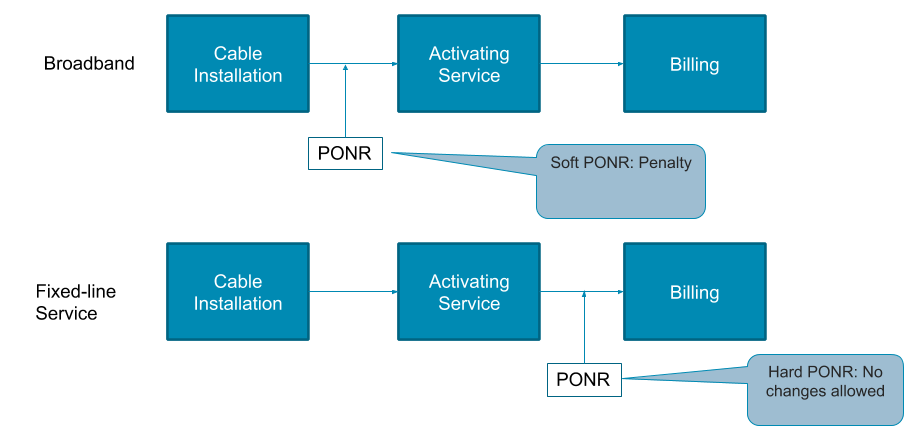
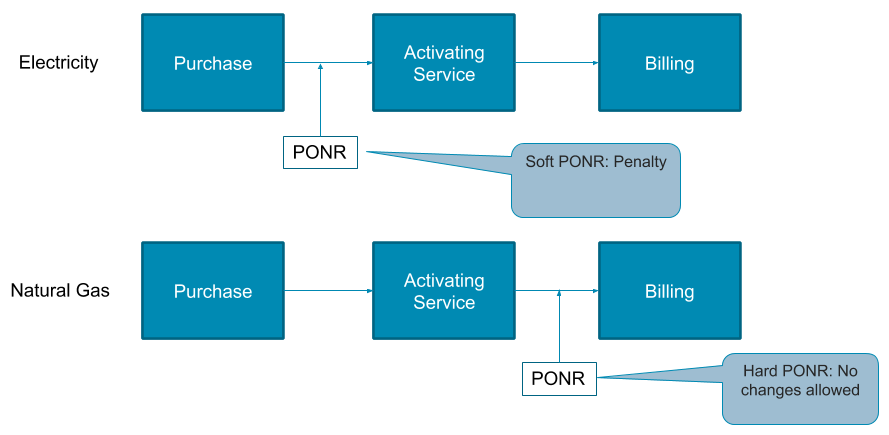
The In-Flight Order Amendment feature allows you to amend an in-flight supplemental order. A supplemental order is said to be in-flight when you submit the supplemental order to OM but want to amend the order before the order is fulfilled.
You can use supplemental orders in the following scenarios:
-
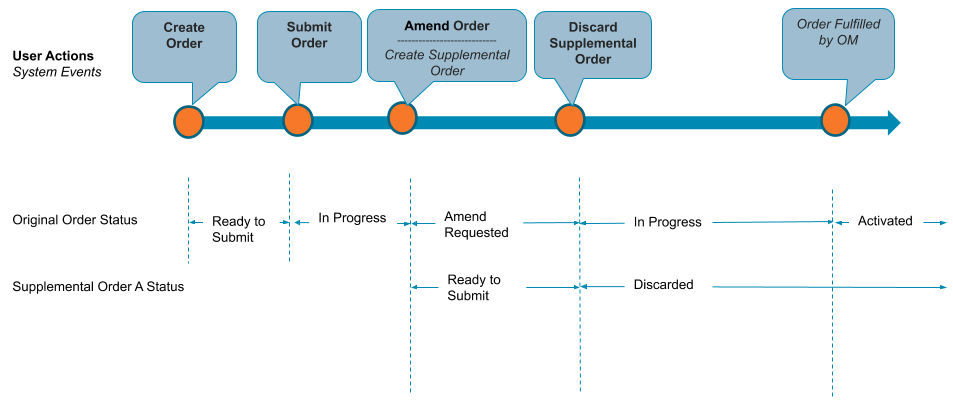
You want to revise a submitted order. When you amend the order, Industries CPQ creates a supplemental order and its status is set to Ready-to-submit. When you submit the order after making changes, the original in-flight order is superseded, and the supplemental order is activated in Industries Order Management.
-
You want to revise a submitted order but later decided not to do so. When you amend the order, Industries CPQ creates a supplemental order and its status is set to Ready-to-submit. After you submit it, you can discard the supplemental order if needed. After you discard a supplemental order, the original order status changes back to In-Progress.
-
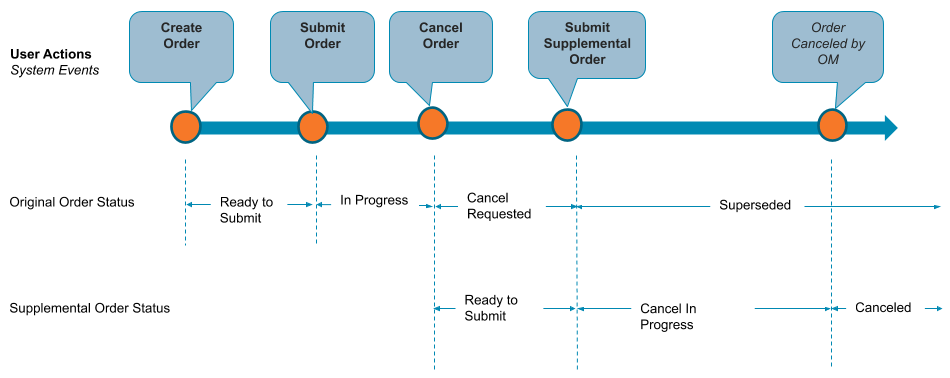
You created an order but want to cancel that order after you submitted it. When you cancel the order, Industries CPQ creates a supplemental order with a cancel-request in progress. When you confirm thec cancellation, the original in-flight order is superseded and the original order is canceled. For the Lightning Web Components interface, see Cancel an In-Flight Order in LWC. For the Angular JS interface, see Cancel an In-Flight Order.
Follow-On Orders
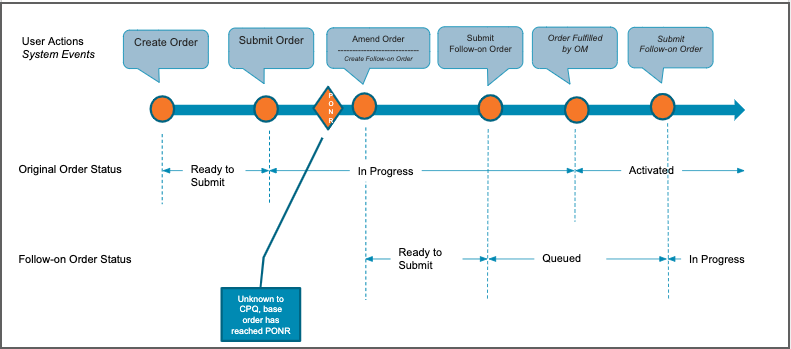
When an in-flight order or order items have passed PONR, you can no longer modify the order or order items. After an order line item passes PONR, it is grayed out, and you cannot change that order line item. In such a scenario, Industries CPQ creates a follow-on order. A follow-on order captures the changes that you want to submit after the original order is fulfilled. When you submit a follow-on order, it is queued in CPQ until the original order is fulfilled and is then processed by Order Management. For the Lightning Web Components interface, see . For the Angular JS interface, see .
- Amend In-Flight Orders in LWC
Any order that is in the process of fulfillment is referred to as an In-flight order. Using the Amending In-Flight Orders feature, you can modify your order after you've submitted it. It helps you fine-tune your order before order management completes its fulfillment. - Amend In-Flight Orders
Any order that's in the process of fulfillment is referred to as an In-flight order. Using the Amending In-Flight Orders feature, you can modify your order after you’ve submitted it. It helps you fine-tune your order before order management completes its fulfillment. - Cancel an In-Flight Order in LWC
You can cancel a submitted order if it hasn't passed the point of no return (PONR). - Cancel an In-Flight Order
You can cancel a submitted order if it has not passed the point of no return (PONR). - Order Statuses in CPQ
In Industries CPQ, an order changes status several times before order management processes and fulfills the order. The following table lists the available order statuses in Industries CPQ. - View Amendment History for In-Flight Orders in LWC
You can view the supplemental and follow-on orders associated with an order. - View Amendment History for In-Flight Orders
You can view the supplemental and follow-on orders associated with an order. - View Status Notifications for In-Flight Orders
After submitting or amending an order, you can check its status. - Create Follow-on Order API
The createFollowOnOrder API is invoked when customers want to capture a change to an inflight order after the inflight order has reached the Point of No Return (PONR).