
This workflow enables agents to purchase add-ons on behalf of a subscriber. Add-ons allow subscribers to associate additional voice, data, or text message usage with their subscription.
 This feature is part of the Communications Cloud managed package.
The following diagram shows the sequence of actions in the Buy Add-On process.
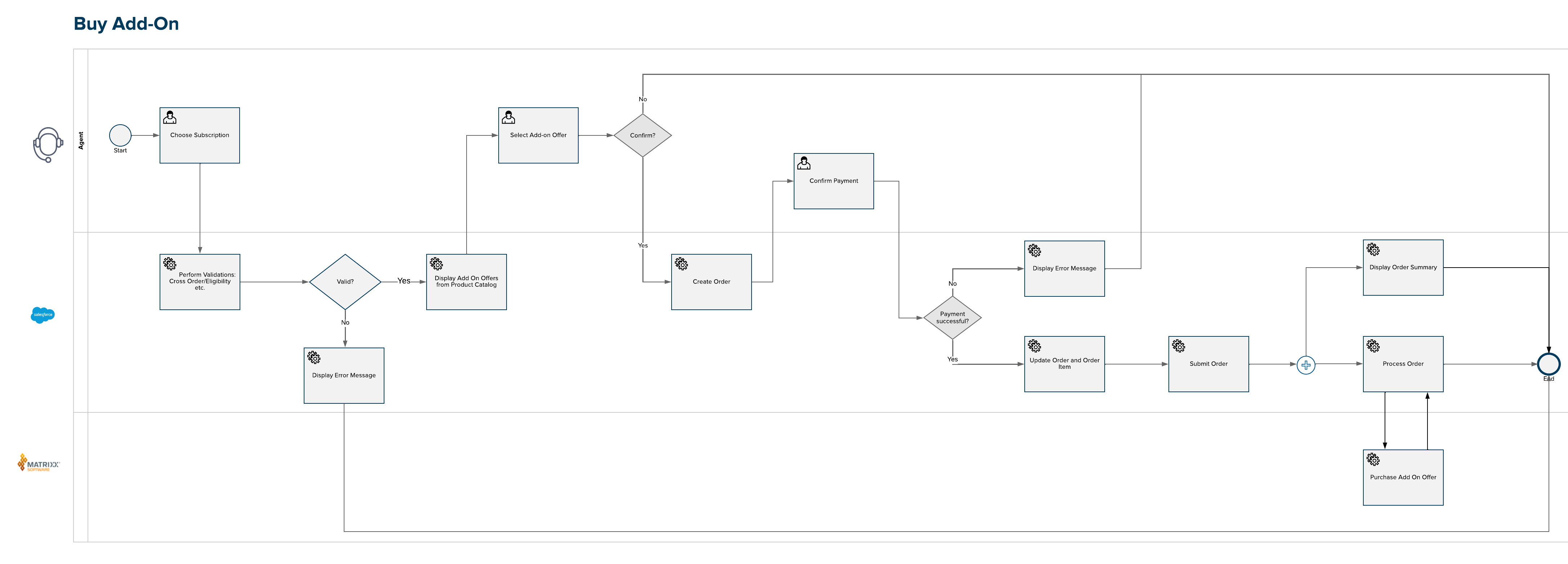
The agent (on behalf of the customer) initiates the process with an action link for a specific mobile subscription. This add-on process is valid if the customer has no other open order. A list of add-on products defined in the product catalog are shown to choose from. The relevant add-on offers are displayed based on whether the subscription is prepaid or postpaid. The user selects an add-on on behalf of the customer and confirms payment.
- Use Interaction Launcher to verify a subscriber and start a customer interaction.
- On the subscription card, click Buy add-ons.
- Select the add-on requested by the subscriber.
- Confirm the selection.
- This workflow assumes that payment is made over IVR. If payment is successful, click Yes and then click Next.
- The order is placed and the order details are displayed. Click Done to exit the workflow.