
You can use qualification context rules to control displaying price lists in Industries Cart's Price List picklist. You can ensure that customers order from the correct price list according to your business rules. The Price List picklist in Industries Cart displays all price lists that a customer is eligible to use based upon rule conditions. Any price lists that a customer is not eligible to use does not appear in the list. For example, you may want to ensure that consumer accounts cannot order from a B2B price list, and business accounts cannot order from a B2C price list.
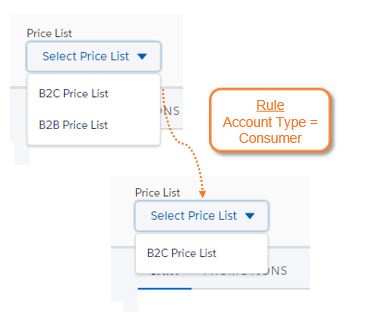
You create qualification rules in Vlocity Product Console using reusable context rule components. For more information, see Creating Qualification Rule Sets.
After creating a qualification rule, you can assign it to a price list. For more information, see Qualification Rules - Assigning and Qualification Rules - Deleting.