
To speed your deployment, Salesforce provides pre-configured calculation procedures and matrices for attribute-based pricing.
Starting in the Summer '18 release, you use pricing plans and calculation matrices to price products using attributes. The standard calculation matrices store the combinations of product configurations and their corresponding prices. The pricing plan service overrides the product's base price with the price specified for each permutation defined in the standard calculation matrix. If any permutations aren’t defined, the pricing plan service defaults to the base price listed in the shared catalog.
An easy way to ensure that all permutations are captured in the calculation matrix is to set the product's base price to $100,000,000. That way, users quickly let you know if a permutation slips through the matrix!
If you’ve installed the Attribute/Volume Based Pricing DataPack, you should have the following records in your org.
|
Calculation Procedure |
Calculation Matrix |
DataPack |
|---|---|---|
|
AttributePricing |
AttributePricingMatrix |
AttributePricingDataPack.json |
|
SourceTargetAttributePricingProcedure |
SourceTargetAttributePricingMatrix |
SourceTargetAttributePricingDataPack.json |
|
RangeAttributePricingProcedure |
RangeAttributePricingMatrix |
RangeAttributePricingDataPack.json |
Each DataPack corresponds to a type of attribute-based pricing and has a standard calculation matrix that has been configured to support it. You can deploy one, two, or all of these matrices depending on the type of attribute-based pricing that you need. After importing the DataPacks into your org, go to Vlocity Calculation Matrices to add data to the matrices.

Vlocity Communications supports only standard calculation matrices. It doesn’t currently support grouped calculation matrices, row-versioned calculation matrices, or wildcards in calculation matrices. For a description of each, see Calculation Matrices.
Attribute-Based Pricing Calculation Matrices
The pre-configured calculation matrices contain the following columns.
Don’t change the header names of the columns in the calculation matrix. The PricingPlanHelper.cls expects these column names and fails if they aren’t found. The only header change you can make is to change the field names in the range attribute-based pricing matrix.
|
Header Name |
Header Type |
Data Type |
Description |
|---|---|---|---|
|
Source Product Name |
Input |
Text |
Product name |
|
Source Product Code |
Input |
Text |
Product code is the key for the matching algorithm used in the |
|
Characteristic Name |
Input |
Text |
Attribute name associated with the product. Specify multiple attributes using a semi-colon-delimited list. |
|
Characteristic Value |
Input |
Text |
Attribute value associated with the product attribute. Specify multiple attributes using a semi-colon-delimited list in the same order as the corresponding attributes. By default, PricingPlanHelper.cls evaluates attribute display labels when looking for a match, but you can change this behavior using the UseDisplayTextForValues parameter. To learn more, see Set Up a Custom Pricing Step for Attribute-Based Pricing. |
|
MRC |
Output |
Text |
Recurring monthly charge. Doesn’t need to match an existing pricing element value in the price list that is used for the order, quote, or opportunity order. |
|
NRC |
Output |
Text |
Non-recurring charge or one-time charge. Doesn’t need to match an existing pricing element value on the price list that is used for the order, quote, or opportunity order. |
|
Target Product Name |
Output |
Text |
Used only for source/target or range pricing. Specifies the target product name to which the pricing override is applied. If no path is specified in the pricing plan step, pricing override is applied to all target products that match the target product name. If a path is specified, however, pricing override is applied specifically to the path + Target Product Name that is defined. |
Range attribute-based pricing calculation matrices also can include any field or attribute of data type Number on order line item, quote product, or opportunity product sObjects. Create column headers in your matrix for those fields using the API field name, such as Quantity or vlocity_cmt__EffectiveQuantity__c.
Set up the Calculation Matrices
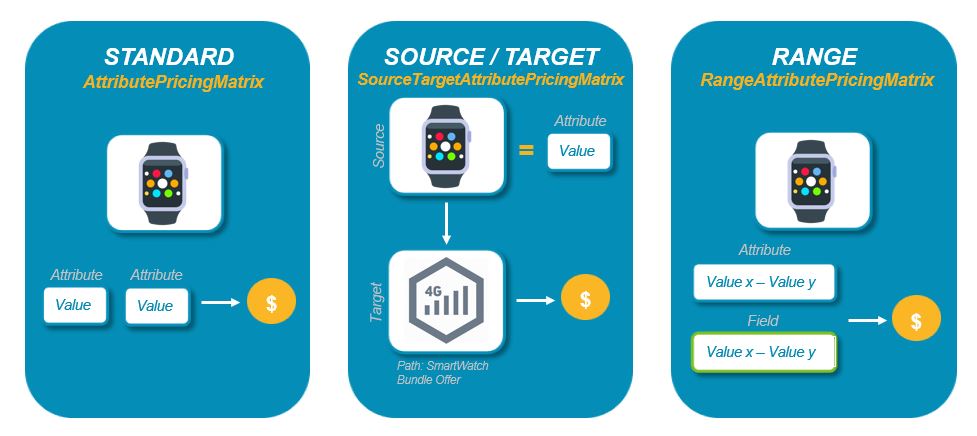
Each calculation matrix corresponds to a type of attribute-based pricing and includes all of the columns needed for each type. Before you deploy any of these matrices, you must populate them with data.
If additional performance is required, see Caching Calculation Matrices for Performance.
- Set Up AttributePricingMatrix
The AttributePricingMatrix enables you to implement standard attribute-based pricing. This calculation matrix is pre-configured with the column headers that define the source products, the product attributes, the MRC, the NRC, and the usage prices. - Setting Up SourceTargetAttributePricingMatrix
SourceTargetAttributePricingMatrix enables you to implement attribute-based pricing based on source and target products. Using this approach, you can adjust pricing for one product based upon the attributes of another product. You can also use a parameter on the pricing plan step to specify the path to specific products in a bundle. - Setting Up RangeAttributePricingMatrix
The RangeAttributePricingMatrix enables you to implement attribute-based pricing that evaluates a range of numeric values in an attribute or a field. Using this approach, you can override pricing for a product when, for example, the Quantity field on the line item exceeds a certain threshold or the numeric value of an attribute falls within a certain range. You can also use this matrix to allow volume-based pricing simply based on quantity alone (no attributes necessary). - Set Up Cache for Calculation Matrices for Performance
To optimize performance for large calculation matrices or pricing plans that have many attribute-based pricing steps, you can cache your calculation matrices in the platform cache.