
Customers can define loyalty credits as a form of payment for products. Loyalty credits enable customers to use points or other customer loyalty awards to purchase products.
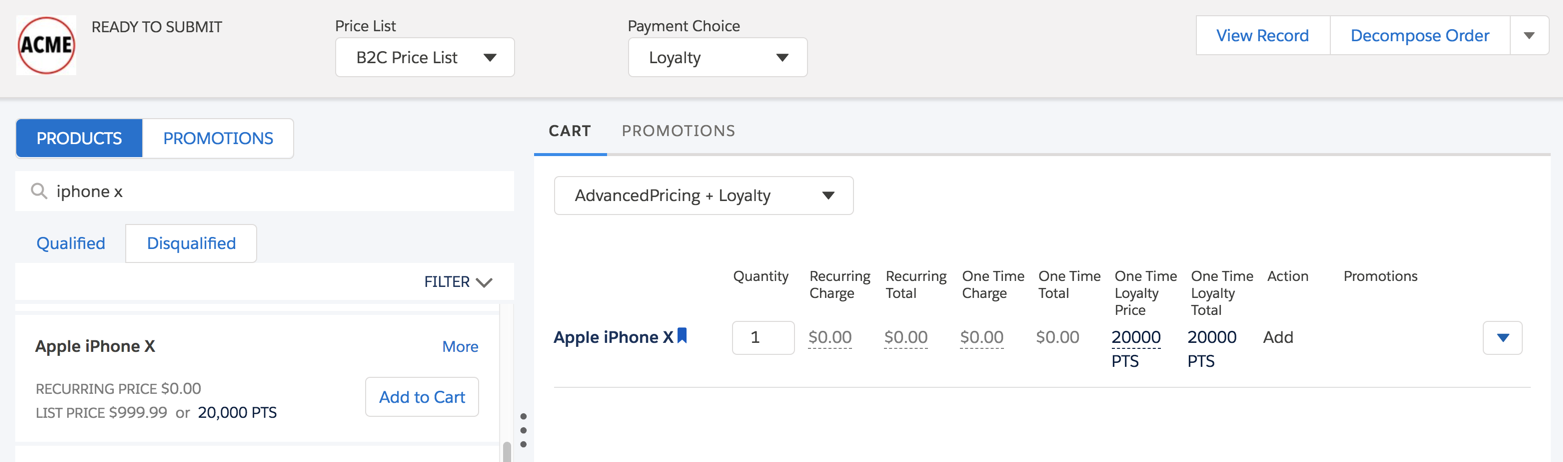
These features are available after you enable loyalty pricing:
-
The One Time Loyalty pricing variable to set the one-time price type
-
Pricing variables with pricing variable bindings to ensure the correct calculation of each line item in the cart
-
Additional columns for Industries Cart to display the one-time loyalty price and one-time loyalty total for each line item
-
The loyalty points total on the cart's total bar
Before you can create a price list entry for a product using loyalty points, you must create pricing elements that use the One Time Loyalty pricing variable and the specific amounts you need in loyalty points. See Create Pricing Elements for Loyalty Point Charges.
You can manage loyalty points in the Industries CPQ Cart. For example, if a product is priced with a currency charge and a loyalty points charge, you can determine which payment type to use in the cart. See Manage Loyalty Pricing in the Cart.
- Enable Loyalty Pricing
Customers can define loyalty credits as a form of payment for products. Loyalty credits enable customers to use points or other customer loyalty awards to purchase products. - Manage Loyalty Pricing in the Cart
When a product with a one-time charge has a price assigned in both currency and loyalty points, both pricing types appear in the products list of the cart. You can select the payment choice and change a line item's payment type. - Create Pricing Elements for Loyalty Point Charges
When you create price list entries for products that have charges in loyalty points, you must have existing pricing elements that contain those charges.