
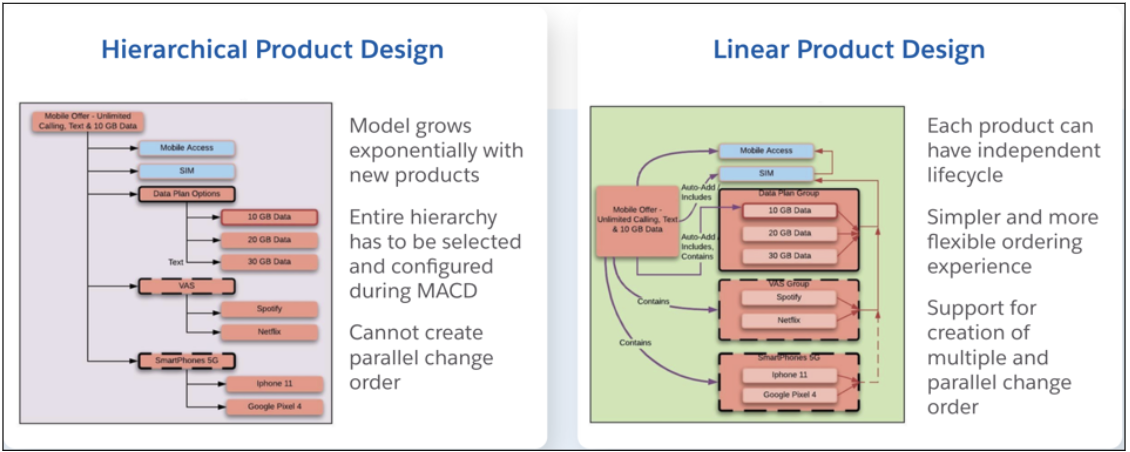
A Linear Relationship is a product modeling pattern designed for complex Enterprise Products. It provides an alternative to traditional hierarchical modeling, streamlining the process and reducing the complexities often found in hierarchical structures.
With linear relationships, each product can have an independent lifecycle. They offer a simpler and more flexible ordering experience and support the creation of multiple and parallel change orders. With hierarchical relationships, the entire hierarchy has to be selected and configured during Move, Add, Change, Delete (MACD), and it's impossible to create parallel change orders.
Linear relationships enable a simplified experience when associating relationships across the entire enterprise quote or enterprise order. You can bulk associate relationships for multiple lines or members and automate association based on cardinality and available selections.
When a product's functionality depends on another product, the product admin creates a linear relationship between the two products. After adding the related products to the Cart, they can be linked or de-linked. For example, the admin can create a linear relationship where the Unlimited Data Add-on product relies on the Business Postpaid Pro Plan product. A sales agent can then add both the Unlimited Data Add-on and the Business Postpaid Pro Plan to the cart and link them. To implement the Linear Relationship functionality in the CPQ Cart, see Relies On Product Relationships in Industries CPQ
- Create a Linear Relationship
Linear relationships provide a simpler and more flexible ordering experience. For example, product admins can set the relationship type to Relies On to create connections between devices and/or add-ons and a plan, allowing sales agents to easily link them. - Attribute Propagation for Pricing in Linear Relationships
Attribute Propagation allows attribute values from the target product instance to be propagated to the source product instance, enabling their use in pricing calculations. The user can define how propagation occurs at runtime by using a specific syntax when creating the product relationship. - Reverse Cardinality
Reverse Cardinality enables product designers to specify the number of Source Product instances that can rely on a Target product instance within a Relies On relationship. In reverse cardinality, users can define how many source product instances rely on a target product instance.