
Evaluation context rules are used exclusively with promotions and evaluate the customer's eligibility for a promotion after the promotion has been added to the cart. By contrast, qualification context rules determine eligibility before it is added to the cart.

Evaluation rules are only available using an API. Custom configuration is required to implement them in Industries Cart. For more information, contact Salesforce Customer Support.
For example, after adding a promotion to the cart, an agent can change the customer's membership from Silver to Gold to understand how it affects the promotional price of the product or service. Evaluation rules can access account information stored in Salesforce, as well as temporary values passed at runtime. Evaluation rules enable you to create what-if scenarios to determine a customer's qualification for a promotion by manipulating information at runtime, without committing it to the database and permanently changing it on the account.
Creating Evaluation Rules
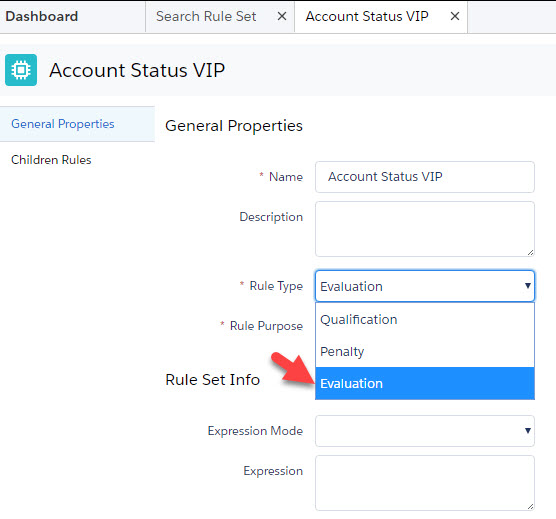
Like qualification and penalty context rules, you create and manage evaluation context rules using Vlocity Product Console. To create an evaluation rule, create a rule set, and then, from the Rule Type picklist, select Evaluation.
If you do not see the value Evaluation in the
Rule Types picklist, activate or add
Evaluation to the Rule Type
(vlocity_cmt__RuleType__c) picklist values on the Vlocity
Rule object (vlocity_cmt__Rule__c).
Invoking Evaluation Rules
Evaluation context rules are not implemented in Industries Cart by default. However, you can invoke them using Industries CPQ Web APIs v2 in your custom web application. The parameter ruleEvalutionInput passes the temporary values that enable the API to handle what-if scenarios.
Format the API request as shown in the following example:
https://{instance}.salesforce.com/services/apexrest/vlocity_cmt/v2/cpq/GET/carts/{cartid}/promotions?subaction=getPromotionsAppliedToCart&include=qualifications&ruleType=Evaluation&category={value}&ruleEvaluationInput={value}The subaction parameter should be getPromotionsAppliedToCart and the ruleType parameter should be Evaluation.
Possible category parameter values are:
-
disqualified: Returns all promotions for which the customer is disqualified. -
qualified: Returns all promotions for which the customer is eligible.
The ruleEvaluationInput parameter accepts sObject and field values written in JSON notation. For example, the following API request returns all disqualified promotions using the temporary run time value specified in the ruleEvaluationInput parameter. In this example, the ruleEvaluationInput parameter is what if an order's Originating Channel field is set to Web.
/services/apexrest/vlocity_cmt/v2/cpq/carts/8011I000000TNSZ/promotions?subaction=getPromotionsAppliedToCart&include=qualifications&ruleType=Evaluation&category=disqualified&ruleEvaluationInput={"Order":{"OriginatingChannel__c":"Web"}}