Editing Object Mappings

You can use the Object Mapper edit object mappings.

To edit object mappings:

  1. Go to App Launcher → Object Mapper.
  2. Select the Source Parent Object element to edit.
  3. Select the Destination Parent Object element to edit.

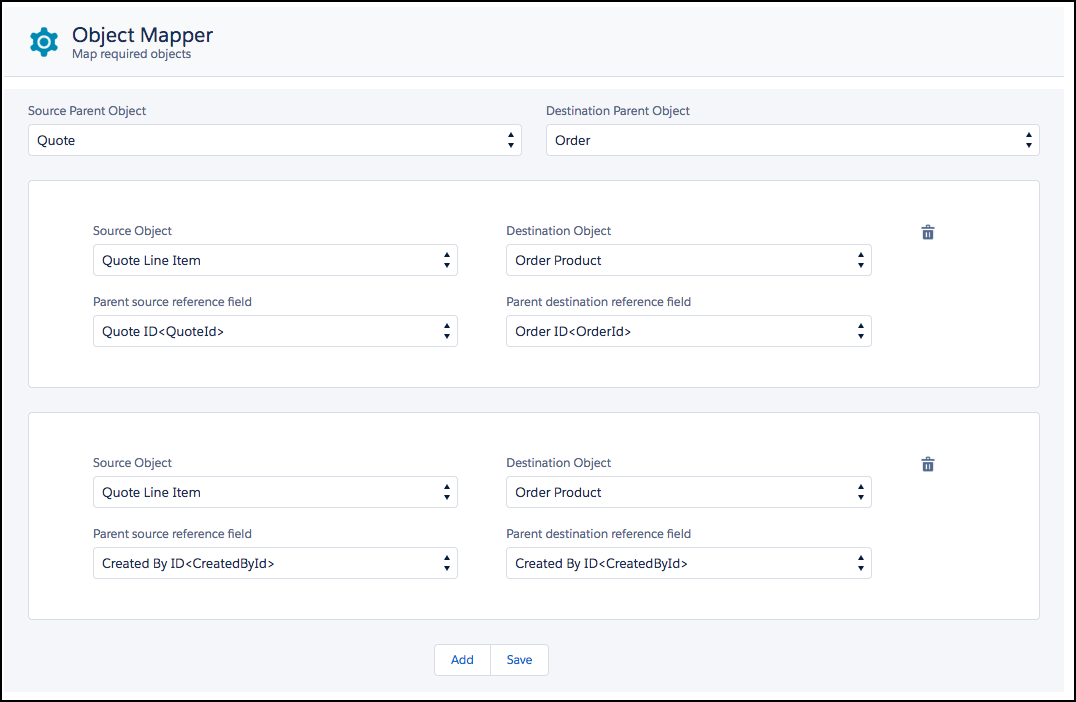
    The mappings for those objects appear.

    Source Parent Object is set to Quote. Destination Parent Object is set to Order. First mapping: Source Object is set to Quote Line Item. Destination Object is set to Order Product. Parent source reference field is set to Quote ID<QuoteId>. Parent destination reference field is set to Order ID<OrderId>. Second mapping: Source Object is set to Quote Line Item. Destination Object is set to Order Product. Parent source and destination reference fields are set to Created By ID<CreatedById>.
  4. To add more mappings, click Add.
  5. To change mappings, select the appropriate Source Object, Destination Object, Parent Source Reference Field, and Parent Destination Reference Field.
  6. Click Save.