
Context mappings allow the rules engine to compare context dimensions to data stored in an sObject, calculated using a function, or entered during design time within a specified context scope. Create context mappings in Vlocity Product Console.
You must define context scopes and context dimensions before configuring context mappings.
Context scopes and context dimensions link to context mappings. You can access the context mappings facet when editing a context scope or a context dimension.
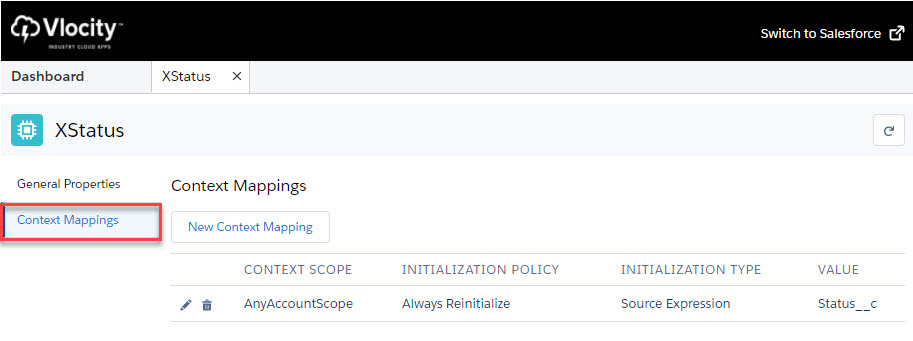
- In Vlocity Product Console, in the Rules list, next to Context Dimension or Context Scope, click Search.
- Find the context dimension or the context scope for which to make a context mapping.
- Click Edit to open the context mapping for editing.
- In the sidebar, click Context Mappings.
- In the Context Mappings facet, click New Context Mapping.
-
In the New Context Mapping dialog box, enter the following information:
Property
Value
Description
Context Dimension
Select a context dimension using the Context Dimension Lookup dialog box.
Specifies the context dimension linked to this context mapping.
This property only appears when creating a context mapping from a context scope.
Context Scope
Select a context scope using the Context Scope Lookup dialog box.
Specifies the context scope linked to this context mapping.
This property only appears when creating a context mapping from a context dimension.
Initialization Policy
-
Do Not Reinitialize
-
Always Reinitialize
Specifies how frequently context mapping values are refreshed in the session cache. Salesforce recommends Always Reinitialize. For entity scopes, the rules engine always reinitializes by default, essentially ignoring this selection. However, for session context scopes, the initialization policy is honored.
Initialization Type
-
Scope SObject
-
Source Expression
-
Function
-
Type In
Specifies where to retrieve the data to use to compare to the rule condition. Supported initialization types are:
-
Scope SObject is reserved for future functionality.
-
Function enables you to select a function to perform complex logic. For more information about functions, see Functions for Rules.
-
Type In enables you to enter free-form string values.
Source Expression
String value
Specifies the sObject API name from the context scope. When referring to a field on a custom object using a custom lookup, use __r instead of __c as the suffix syntax, for example, ContractId__r.ContractTerm using the Asset context scope. Appears when the Initialization Type is set to Source Expression.
Vlocity Function
Select a function using the Function Lookup dialog box.
Appears when the Initialization Type is set to Function.
Type In Value
String value
Appears when the Initialization Type is set to Type In.
Sequence
Numeric value
Specifies the context mapping sequence. Use a sequence of 10, 20, 30, and so on. to allow for easier sequence changes in the future.
Active
Click to select
The rules engine evaluates only active context mappings.
Effective From Date
Select a date
The start date of the period during which rules can use the context mapping.
Effective Until Date
Select a date
The end date of the period during which rules can use the context mapping.
-
-
Click Save.
After creating a context mapping, the next step is to create a context rule. For more information about creating context rules, Creating Context Rules.
Using Source Expressions
You can create context mappings to specific data stored in sObjects using the source expression property. Using source expressions, you can trace the object hierarchy to access data in objects related by Salesforce lookups.
-
Use API names of related sObjects and fields when writing source expressions.
-
When referring to a field on a custom object using a custom lookup, use __r instead of __c as the suffix syntax, e.g., ContractId__r.ContractTerm using the Asset context scope.
Tracing the Object Hierarchy using Source Expressions
.png)

For Initialization Type set as Source Expression, the source expression fields refer to the Context Scope, meaning:
- If the root scope is OrderScope, the API invocation only supports:
Order.Account.RecordType.Name. It does not support Quote or Opportunity contexts. - If the root scope is AnyScope, the evaluated expression depends on the
invoking API’s runtime context:
Order Context: Order.Account.RecordType.Name
Quote Context: Quote.Account.RecordType.Name
Opportunity Context: Opportunity.Account.RecordType.Name
The final expression depends on the runtime context and the field relationship to the scope object in the source expression
Using Source Expressions to Map to Virtual Objects
You can also create context mappings to data in virtual objects. Similar to context mappings for regular sObjects, you write source expressions to describe where the rules engine looks for the data. However, when creating mappings to virtual objects, note the following differences.
-
Create context mappings to attributes on the virtual object.
-
Use the attribute names when writing source expressions.
-
Account, Order, Quote and Opportunity are the only sObjects currently supported.
-
The ANY attribute is similar to the ANY context scope. For more information, see Any Context Scope.
-
For the ANY, Account, Order, Quote and Opportunity attributes, you can refer to fields on those sObjects using the format of [attribute name].[API field name].
-
You can't trace the object hierarchy to access data in related objects.
Using Source Expressions for Virtual Objects
A Virtual Context Scope includes attributes that either map directly to context mappings or map to fields that then link to context mappings. Use the format:
[attribute name].[API field name]
For example:
-
Account.RecordType.Name
-
Order.Account.Name
-
Quote.Account.RecordType.Name
