
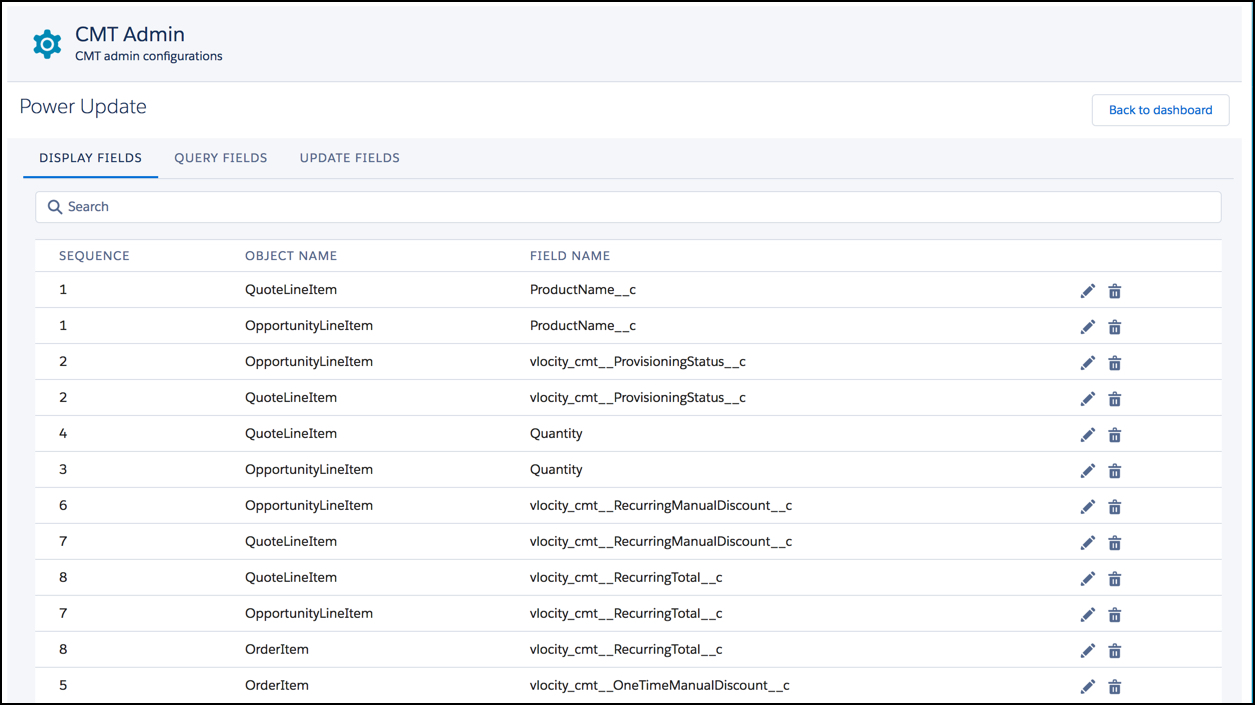
Display fields are the column names in the Power Update Records panel. In the images below, each of the column names in the Records panel corresponds to the fields in the Power Update Display Fields tab.

-
Product Name corresponds to the OpportunityLineItem, QuoteLineItem, and OrderItem ProductName__c fields.
-
Provisioning Status corresponds to the OpportunityLineItem, QuoteLineItem, and OrderItem vlocity_cmt__ProvisioningStatus__c fields.
-
Quantity corresponds to the OpportunityLineItem, QuoteLineItem, and OrderItem Quantity fields.
-
One Time Manual Discount corresponds to the OpportunityLineItem, QuoteLineItem, and OrderItem vlocity_cmt__OneTimeManualDiscount__c fields.
-
One Time Total corresponds to the OpportunityLineItem, QuoteLineItem, and OrderItem vlocity_cmt__OneTimeTotal__c fields.
-
Recurring Manual Discount corresponds to the OpportunityLineItem, QuoteLineItem, and OrderItem vlocity_cmt__RecurringManualDiscount__c fields.
-
Recurring Total corresponds to the OpportunityLineItem, QuoteLineItem, and OrderItem vlocity_cmt__RecurringTotal__c fields.
To create display fields:
- On the Vlocity CMT Administration Power Update tab, click Display Fields.
- At the bottom of the page, click Add.
- In the first red box, enter the sequence in which the column heading should appear.
- From the picklist, select the object in which the field appears.
-
Click the Action icon
 .
.
The Field Selection dialog box opens.
- Select the field that contains the information to display.
- Click Save.

