To use a pricing matrix, you must create a pricing rules workflow, or flow.
- From Setup, in the Quick Find box, enter Flow.
- Click Flows.
- Click New Flow.
-
Add a custom action.
- Scroll down to Apex.
- Drag vlocity_cmt__CustomAction onto the flow.
-
Enter the following information:
-
Name is the flow name, in this example, Pricing Initialization.
-
On the Inputs tab, from the Target picklist, select className.
-
In the Source box, enter PricingInitialization.
-
- Click OK.
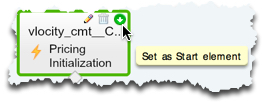
- Click Set As Start Element.
-
Add a rule action.
- From the Apex section, drag vlocity_cmt__RuleAction onto the flow.
-
Enter the following information:
-
Name is the rule action name, in this example, Quantity Order Pricing.
-
From the Target picklist, select ruleName.
-
In the Source box, enter the rule name, in this example Quantity Order Pricing.
-
Click Add Row.
-
From the Target picklist, select ruleType.
-
In the Source box, enter Pricing.
-
Click Add Row.
-
From the Target picklist, select doCommit.
-
In the Source box, enter {!$GlobalConstant.True}.
-
- Click OK.
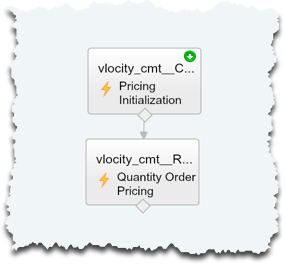
- Connect the custom action and the rule action.
- Click Save.
- In the Flow Properties dialog box, enter the Name, in this example, Pricing Rules Flow.
- Click OK.