
You can implement attribute-based pricing using pricing plans, calculation procedures, and standard calculation matrices. Attribute-based pricing enables you to create a single product entity and attributes, and use a matrix to price each combination of attributes. This approach reduces the number of products in your catalog and gives you an easy way to review and administer your pricing model.

Vlocity Communications supports only standard calculation matrices. It doesn’t currently support grouped calculation matrices, row-versioned calculation matrices, or wildcards in calculation matrices. For a description of each, see Calculation Matrices.
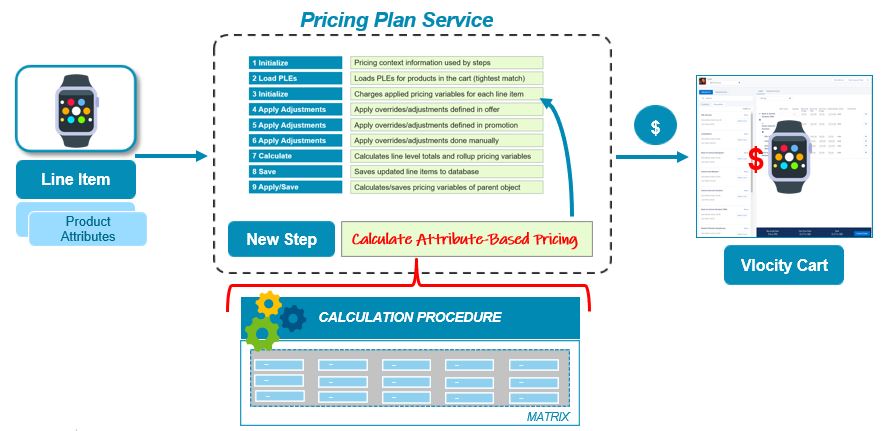
You create a step in the default pricing plan. Then, use that step to call a calculation procedure and a standard calculation matrix that stores the product attributes and pricing information. At runtime, the PricingPlanService implementation passes the cart line items, including product information and their attributes and fields, to the calculation service and retrieves the correct price. The price returned overrides the base price in the shared catalog. Additional adjustments and calculations can be applied before the price is displayed in Industries Cart.
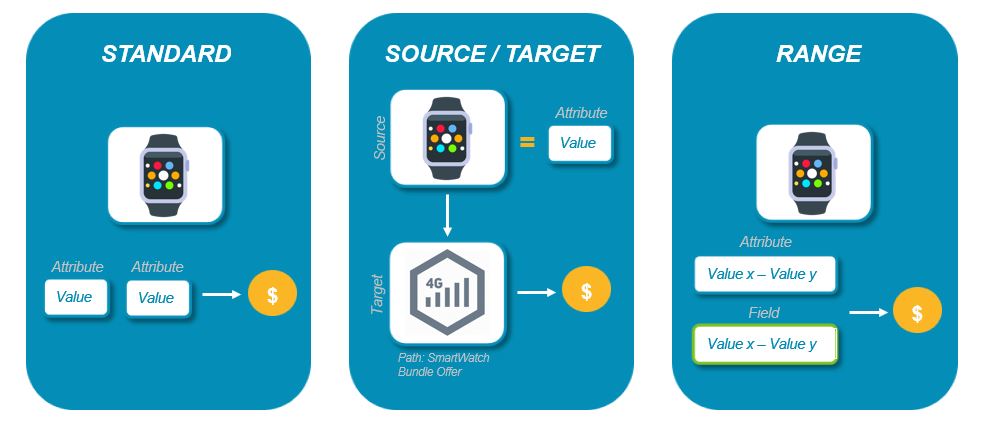
These types of attribute-based pricing are supported:
-
Standard
Standard attribute-based pricing provides the ability to price a product using attributes.
-
Source/Target
Source/Target attribute-based pricing enables you to price a product based on the attributes of another product. You can also provide a path to a child product in a bundle to change the price of a product based on its specific context.
NoteBecause a calculation matrix requires input data to be unique across all the rows in the matrix, you can't use source-target attribute-based pricing to change more than one child product in a bundle.
-
Range
Range attribute-based pricing enables you to define ranges for each attribute and field in the matrix, and to determine a price for the product when values fall within those ranges.
- Download the Attribute/Volume Based Pricing DataPack
The Fall '18 release includes an attribute schema change. Customers who implemented attribute-based pricing in an earlier release must install the latest version to obtain the latest Apex classes that support the new attribute schema. The updated classes are backward-compatible, so they can be used in deployments that have not migrated yet to the new schema as well as in deployments that have completed the migration. - Confirm the Post-Install Setup for Attribute-Based Pricing
Learn how to set up attribute-based pricing in the Summer '18 and Fall '18 releases of Salesforce Industries Communications, Media, and Energy. - Create Apex Classes for Attribute-Based Pricing
The Fall '18 release includes an attribute schema change. Customers who implemented attribute-based pricing in an earlier release must install the latest version of the Attribute/Volume Based Pricing DataPack in order to obtain the latest Apex classes that support the new attribute schema. The updated classes are backward-compatible, so they can be used in deployments that have not migrated yet to the new schema as well as in deployments that have completed the migration. - Pricing Matrices for Attribute-Based Pricing
To speed your deployment, Salesforce provides pre-configured calculation procedures and matrices for attribute-based pricing. - Calculation Procedures for Attribute-Based Pricing
To speed your deployment, Salesforce Industries Communications, Media, and Energy provides preconfigured calculation procedures and matrices for attribute-based pricing. - Set Up a Custom Pricing Step for Attribute-Based Pricing
After you implement the Apex classes, calculation procedures, and matrices included in the Attribute/Volume Based Pricing DataPack, create a new step in the Default Pricing Plan. - Attribute-Based Pricing with Usage Pricing and Cost and Margin
A calculation matrix for attribute-based pricing can be expanded to handle usage pricing, cost and margin, or both. You must also update the PricingPlanHelper Apex class and the Pricing Plan. - Set Up Attribute-Based Pricing with Time Plan and Time Policy
Time Plan Attribute-Based Pricing supports output columns for Time Plan and Time Policy. In accordance with Time Plan and Time Policy, you can create adjustment records with Source = 'ABP'. - Test for Attribute-Based Pricing at Runtime
To test attribute-based pricing, create an order and add a product to the cart that is listed in your calculation matrix. Set the attributes (or fields, if you have implemented range attribute-based pricing) as needed to trigger the attribute-based pricing. - Configure Fallback Pricing for Attribute-Based Pricing
Use Business Rules Engine (BRE) to set the pricing matrix for Attribute-Based Pricing and it applies a fallback price if no matching value is found.